
GroupBy标题行在角光滑网格中丢失了吗?
在我的例子中,我在一个布局中有多个光滑的网格。
在该布局中,根据某些条件显示并隐藏光滑的网格。
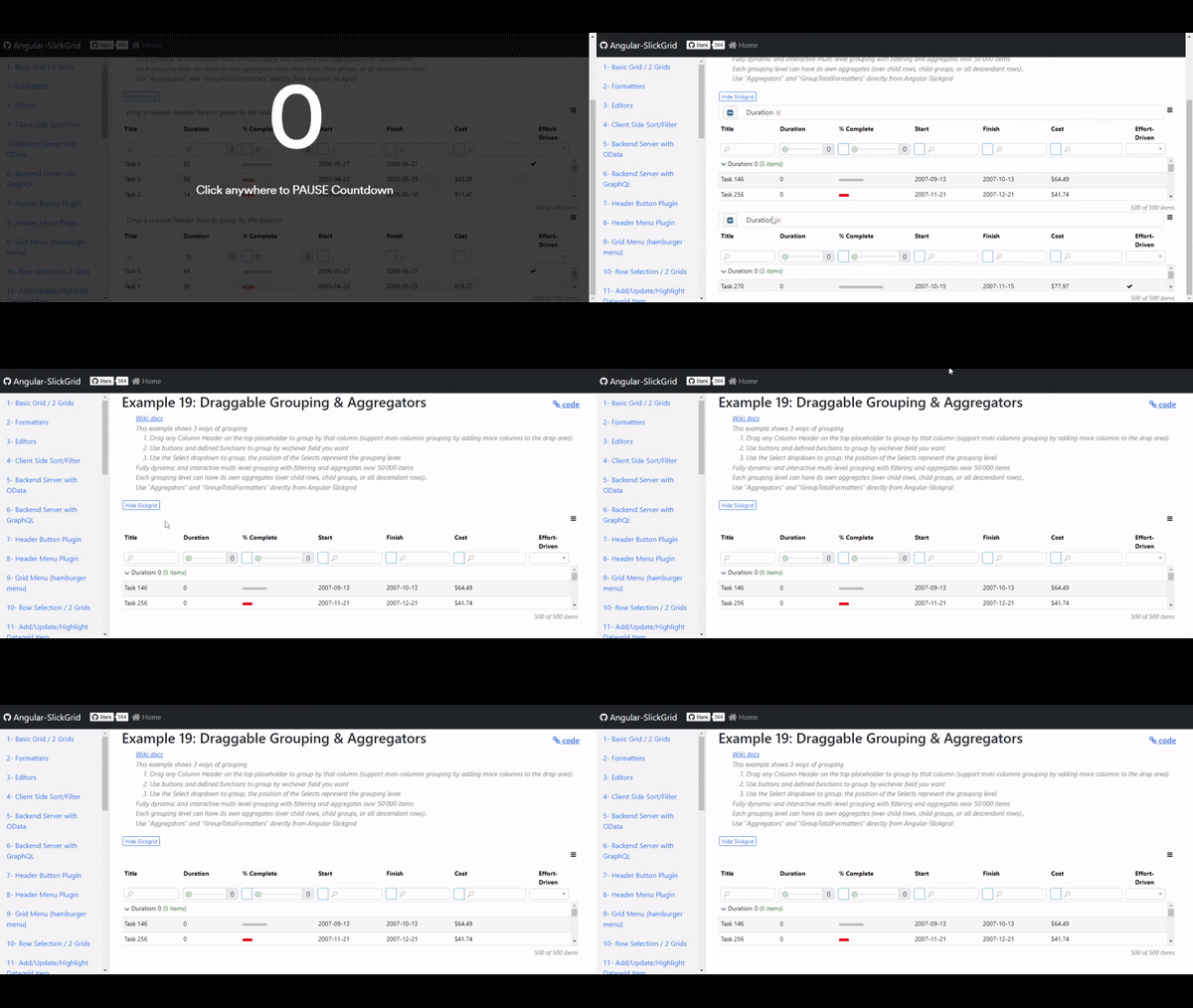
对于灵活的网格隐藏时间,其他光滑网格显示的groupBy标题行将丢失。
图片:
HTML代码:
<div id="demo-container" class="container-fluid">
<h2>
{{title}}
<span class="float-end">
<a style="font-size: 18px"
target="_blank"
href="https://github.com/ghiscoding/Angular-Slickgrid/blob/master/src/app/examples/grid-draggrouping.component.ts">
<span class="fa fa-link"></span> code
</a>
</span>
</h2>
<div class="subtitle" [innerHTML]="subTitle"></div>
<form class="form-inline">
<div class="row">
<div class="col-sm-12">
<button class="btn btn-outline-primary btn-xs" data-test="add-500-rows-btn" (click)="enableFlag()">
Hide Slickgrid
</button>
<!-- <button class="btn btn-outline-secondary btn-xs" data-test="add-500-rows-btn" (click)="loadData(500)">
500 rows
</button>
<button class="btn btn-outline-secondary btn-xs" data-test="add-50k-rows-btn" (click)="loadData(50000)">
50k rows
</button>
<button class="btn btn-outline-secondary btn-xs" data-test="clear-grouping-btn"
(click)="clearGroupsAndSelects()">
<i class="fa fa-times"></i> Clear grouping
</button>
<button class="btn btn-outline-secondary btn-xs" data-test="collapse-all-btn" (click)="collapseAllGroups()">
<i class="fa fa-compress"></i> Collapse all groups
</button>
<button class="btn btn-outline-secondary btn-xs" data-test="expand-all-btn" (click)="expandAllGroups()">
<i class="fa fa-expand"></i> Expand all groups
</button>
<button class="btn btn-outline-secondary btn-xs" (click)="toggleDraggableGroupingRow()">
Toggle Draggable Grouping Row
</button>
<button class="btn btn-outline-secondary btn-xs" (click)="exportToExcel()">
<i class="fa fa-file-excel-o text-success"></i> Export to Excel
</button> -->
</div>
</div>
<!-- <div class="row">
<div class="col-sm-12">
<button class="btn btn-outline-secondary btn-xs" data-test="group-duration-sort-value-btn"
(click)="groupByDurationOrderByCount(false)">
Group by duration & sort groups by value
</button>
<button class="btn btn-outline-secondary btn-xs" data-test="group-duration-sort-count-btn"
(click)="groupByDurationOrderByCount(true)">
Group by duration & sort groups by count
</button>
<button class="btn btn-outline-secondary btn-xs" data-test="group-duration-effort-btn"
(click)="groupByDurationEffortDriven()">
Group by Duration & then Effort-Driven
</button>
<button class="btn btn-outline-secondary btn-xs" data-test="set-dynamic-filter"
(click)="setFiltersDynamically()">
Set Filters Dynamically
</button>
<button class="btn btn-outline-secondary btn-xs" data-test="set-dynamic-sorting"
(click)="setSortingDynamically()">
Set Sorting Dynamically
</button>
</div>
</div> -->
<!-- <div class="row mt-2">
<div class="col-sm-12">
<div class="form-row">
<div class="row form-group">
<label for="field1" class="col-sm-3 mb-2">Group by field(s)</label>
<div class="form-group col-md-3"
*ngFor="let groupField of selectedGroupingFields; let i = index; trackBy: selectTrackByFn">
<select class="form-select" name="groupField{{i}}" [(ngModel)]="selectedGroupingFields[i]"
(ngModelChange)="groupByFieldName($event, i)">
<option value=""></option>
<option [ngValue]="field.id" *ngFor="let field of columnDefinitions">{{field.name}}</option>
</select>
</div>
</div>
</div>
</div>
</div> -->
</form>
<div class="row mt-1 mb-1">
<hr />
</div>
<angular-slickgrid gridId="grid19"
[dataset]="dataset"
[columnDefinitions]="columnDefinitions"
[gridOptions]="gridOptions"
(onAngularGridCreated)="angularGridReady($event.detail)">
</angular-slickgrid>
<angular-slickgrid *ngIf="hideSlickgrid" gridId="grid18"
[dataset]="dataset0"
[columnDefinitions]="columnDefinitions0"
[gridOptions]="gridOptions0"
(onAngularGridCreated)="angularGridReady($event.detail)">
</angular-slickgrid>
</div>TS代码:
import { Component, OnInit } from '@angular/core';
import { ExcelExportService } from '@slickgrid-universal/excel-export';
import { TextExportService } from '@slickgrid-universal/text-export';

import {
  AngularGridInstance,
  Aggregators,
  Column,
  DelimiterType,
  FieldType,
  FileType,
  Filters,
  Formatters,
  GridOption,
  Grouping,
  GroupingGetterFunction,
  GroupTotalFormatters,
  SortDirectionNumber,
  SortComparers,
} from './../modules/angular-slickgrid';

@Component({
  templateUrl: './grid-draggrouping.component.html'
})
export class GridDraggableGroupingComponent implements OnInit {
  title = 'Example 19: Draggable Grouping & Aggregators';
  subTitle = `
      <ul>
        <li><a href="https://github.com/ghiscoding/Angular-Slickgrid/wiki/Grouping-&-Aggregators" target="_blank">Wiki docs</a></li>
        <li>This example shows 3 ways of grouping</li>
        <ol>
          <li>Drag any Column Header on the top placeholder to group by that column (support moti-columns grouping by adding more columns to the drop area).</li>
          <li>Use buttons and defined functions to group by wichever field you want</li>
          <li>Use the Select dropdown to group, the position of the Selects represent the grouping level</li>
        </ol>
        <li>Fully dynamic and interactive multi-level grouping with filtering and aggregates ovor 50'000 items</li>
        <li>Each grouping level can have its own aggregates (over child rows, child groups, or all descendant rows)..</li>
        <li>Use "Aggregators" and "GroupTotalFormatters" directly from Angular-Slickgrid</li>
      </ul>
    `;

  angularGrid!: AngularGridInstance;
  columnDefinitions!: Column[];
  dataset!: any[];
  dataviewObj: any;
  draggableGroupingPlugin: any;
  durationOrderByCount = false;
  gridObj: any;
  gridOptions!: GridOption;
  processing = false;
  selectedGroupingFields: Array<string | GroupingGetterFunction> = ['', '', ''];
  excelExportService = new ExcelExportService();
  textExportService = new TextExportService();
  columnDefinitions0!: Column[];
  dataset0!: any[];
  gridOptions0!: GridOption;
  public hideSlickgrid:boolean=true;

  constructor() {
    // define the grid options & columns and then create the grid itself
    this.loadData(500);
    this.defineGrid();
  }

  ngOnInit(): void {
    // populate the dataset once the grid is ready
    this.defineGrid();
  }

  angularGridReady(angularGrid: AngularGridInstance) {
    this.angularGrid = angularGrid;
    this.gridObj = angularGrid.slickGrid; // grid object
    this.dataviewObj = angularGrid.dataView;
  }

  /* Define grid Options and Columns */
  defineGrid() {
    this.columnDefinitions = [
      {
        id: 'title', name: 'Title', field: 'title',
        width: 70, minWidth: 50,
        cssClass: 'cell-title',
        filterable: true,
        sortable: true,
        grouping: {
          getter: 'title',
          formatter: (g) => `Title: ${g.value}  <span style="color:green">(${g.count} items)</span>`,
          aggregators: [
            new Aggregators.Sum('cost')
          ],
          aggregateCollapsed: false,
          collapsed: false
        }
      },
      {
        id: 'duration', name: 'Duration', field: 'duration',
        width: 70,
        sortable: true,
        filterable: true,
        filter: { model: Filters.slider, operator: '>=' },
        type: FieldType.number,
        groupTotalsFormatter: GroupTotalFormatters.sumTotals,
        grouping: {
          getter: 'duration',
          formatter: (g) => `Duration: ${g.value}  <span style="color:green">(${g.count} items)</span>`,
          comparer: (a, b) => {
            return this.durationOrderByCount ? (a.count - b.count) : SortComparers.numeric(a.value, b.value, SortDirectionNumber.asc);
          },
          aggregators: [
            new Aggregators.Sum('cost')
          ],
          aggregateCollapsed: false,
          collapsed: false
        }
      },
      {
        id: 'percentComplete', name: '% Complete', field: 'percentComplete',
        minWidth: 70, width: 90,
        formatter: Formatters.percentCompleteBar,
        type: FieldType.number,
        filterable: true,
        filter: { model: Filters.compoundSlider },
        sortable: true,
        groupTotalsFormatter: GroupTotalFormatters.avgTotalsPercentage,
        grouping: {
          getter: 'percentComplete',
          formatter: (g) => `% Complete: ${g.value}  <span style="color:green">(${g.count} items)</span>`,
          aggregators: [
            new Aggregators.Sum('cost')
          ],
          aggregateCollapsed: false,
          collapsed: false
        },
        params: { groupFormatterPrefix: '<i>Avg</i>: ' }
      },
      {
        id: 'start', name: 'Start', field: 'start', minWidth: 60,
        sortable: true,
        filterable: true,
        filter: { model: Filters.compoundDate },
        formatter: Formatters.dateIso,
        type: FieldType.dateUtc,
        outputType: FieldType.dateIso,
        exportWithFormatter: true,
        grouping: {
          getter: 'start',
          formatter: (g) => `Start: ${g.value}  <span style="color:green">(${g.count} items)</span>`,
          aggregators: [
            new Aggregators.Sum('cost')
          ],
          aggregateCollapsed: false,
          collapsed: false
        }
      },
      {
        id: 'finish', name: 'Finish', field: 'finish',
        minWidth: 60,
        sortable: true,
        filterable: true,
        filter: { model: Filters.compoundDate },
        formatter: Formatters.dateIso,
        type: FieldType.dateUtc,
        outputType: FieldType.dateIso,
        exportWithFormatter: true,
        grouping: {
          getter: 'finish',
          formatter: (g) => `Finish: ${g.value} <span style="color:green">(${g.count} items)</span>`,
          aggregators: [
            new Aggregators.Sum('cost')
          ],
          aggregateCollapsed: false,
          collapsed: false
        }
      },
      {
        id: 'cost', name: 'Cost', field: 'cost',
        width: 90,
        sortable: true,
        filterable: true,
        filter: { model: Filters.compoundInput },
        formatter: Formatters.dollar,
        groupTotalsFormatter: GroupTotalFormatters.sumTotalsDollar,
        type: FieldType.number,
        grouping: {
          getter: 'cost',
          formatter: (g) => `Cost: ${g.value} <span style="color:green">(${g.count} items)</span>`,
          aggregators: [
            new Aggregators.Sum('cost')
          ],
          aggregateCollapsed: true,
          collapsed: true
        }
      },
      {
        id: 'effortDriven', name: 'Effort-Driven', field: 'effortDriven',
        width: 80, minWidth: 20, maxWidth: 100,
        cssClass: 'cell-effort-driven',
        sortable: true,
        filterable: true,
        filter: {
          collection: [{ value: '', label: '' }, { value: true, label: 'True' }, { value: false, label: 'False' }],
          model: Filters.singleSelect
        },
        formatter: Formatters.checkmark,
        grouping: {
          getter: 'effortDriven',
          formatter: (g) => `Effort-Driven: ${g.value ? 'True' : 'False'} <span style="color:green">(${g.count} items)</span>`,
          aggregators: [
            new Aggregators.Sum('cost')
          ],
          collapsed: false
        }
      }
    ];

    this.gridOptions = {
      autoResize: {
        container: '#demo-container',
        rightPadding: 10
      },
      enableDraggableGrouping: true,
      createPreHeaderPanel: true,
      showPreHeaderPanel: true,
      preHeaderPanelHeight: 40,
      showCustomFooter: true,
      enableFiltering: true,
      // you could debounce/throttle the input text filter if you have lots of data
      // filterTypingDebounce: 250,
      enableSorting: true,
      exportOptions: {
        sanitizeDataExport: true
      },
      gridMenu: {
        onCommand: (e, args) => {
          if (args.command === 'toggle-preheader') {
            // in addition to the grid menu pre-header toggling (internally), we will also clear grouping
            this.clearGrouping();
          }
        },
      },
      draggableGrouping: {
        dropPlaceHolderText: 'Drop a column header here to group by the column',
        // groupIconCssClass: 'fa fa-outdent',
        deleteIconCssClass: 'fa fa-times',
        onGroupChanged: (e, args) => this.onGroupChanged(args),
        onExtensionRegistered: (extension) => this.draggableGroupingPlugin = extension,
      },
      enableTextExport: true,
      enableExcelExport: true,
      excelExportOptions: { sanitizeDataExport: true },
      textExportOptions: { sanitizeDataExport: true },
      registerExternalResources: [this.excelExportService, this.textExportService],
    };

    this.columnDefinitions0 = [
      {
        id: 'title0', name: 'Task Title', field: 'title',
        width: 70, minWidth: 50,
        cssClass: 'cell-title',
        filterable: true,
        sortable: true,
        grouping: {
          getter: 'title',
          formatter: (g) => `Title: ${g.value}  <span style="color:green">(${g.count} items)</span>`,
          aggregators: [
            new Aggregators.Sum('cost')
          ],
          aggregateCollapsed: false,
          collapsed: false
        }
      },
      {
        id: 'duration0', name: 'Task Duration', field: 'duration',
        width: 70,
        sortable: true,
        filterable: true,
        filter: { model: Filters.slider, operator: '>=' },
        type: FieldType.number,
        groupTotalsFormatter: GroupTotalFormatters.sumTotals,
        grouping: {
          getter: 'duration',
          formatter: (g) => `Duration: ${g.value}  <span style="color:green">(${g.count} items)</span>`,
          comparer: (a, b) => {
            return this.durationOrderByCount ? (a.count - b.count) : SortComparers.numeric(a.value, b.value, SortDirectionNumber.asc);
          },
          aggregators: [
            new Aggregators.Sum('cost')
          ],
          aggregateCollapsed: false,
          collapsed: false
        }
      },
      {
        id: 'percentComplete0', name: 'Task % Complete', field: 'percentComplete',
        minWidth: 70, width: 90,
        formatter: Formatters.percentCompleteBar,
        type: FieldType.number,
        filterable: true,
        filter: { model: Filters.compoundSlider },
        sortable: true,
        groupTotalsFormatter: GroupTotalFormatters.avgTotalsPercentage,
        grouping: {
          getter: 'percentComplete',
          formatter: (g) => `% Complete: ${g.value}  <span style="color:green">(${g.count} items)</span>`,
          aggregators: [
            new Aggregators.Sum('cost')
          ],
          aggregateCollapsed: false,
          collapsed: false
        },
        params: { groupFormatterPrefix: '<i>Avg</i>: ' }
      },
      {
        id: 'start0', name: 'Task Start', field: 'start', minWidth: 60,
        sortable: true,
        filterable: true,
        filter: { model: Filters.compoundDate },
        formatter: Formatters.dateIso,
        type: FieldType.dateUtc,
        outputType: FieldType.dateIso,
        exportWithFormatter: true,
        grouping: {
          getter: 'start',
          formatter: (g) => `Start: ${g.value}  <span style="color:green">(${g.count} items)</span>`,
          aggregators: [
            new Aggregators.Sum('cost')
          ],
          aggregateCollapsed: false,
          collapsed: false
        }
      },
      {
        id: 'finish0', name: 'Task Finish', field: 'finish',
        minWidth: 60,
        sortable: true,
        filterable: true,
        filter: { model: Filters.compoundDate },
        formatter: Formatters.dateIso,
        type: FieldType.dateUtc,
        outputType: FieldType.dateIso,
        exportWithFormatter: true,
        grouping: {
          getter: 'finish',
          formatter: (g) => `Finish: ${g.value} <span style="color:green">(${g.count} items)</span>`,
          aggregators: [
            new Aggregators.Sum('cost')
          ],
          aggregateCollapsed: false,
          collapsed: false
        }
      },
      {
        id: 'cost0', name: 'Task Cost', field: 'cost',
        width: 90,
        sortable: true,
        filterable: true,
        filter: { model: Filters.compoundInput },
        formatter: Formatters.dollar,
        groupTotalsFormatter: GroupTotalFormatters.sumTotalsDollar,
        type: FieldType.number,
        grouping: {
          getter: 'cost',
          formatter: (g) => `Cost: ${g.value} <span style="color:green">(${g.count} items)</span>`,
          aggregators: [
            new Aggregators.Sum('cost')
          ],
          aggregateCollapsed: true,
          collapsed: true
        }
      },
      {
        id: 'effortDriven0', name: 'Task Effort-Driven', field: 'effortDriven',
        width: 80, minWidth: 20, maxWidth: 100,
        cssClass: 'cell-effort-driven',
        sortable: true,
        filterable: true,
        filter: {
          collection: [{ value: '', label: '' }, { value: true, label: 'True' }, { value: false, label: 'False' }],
          model: Filters.singleSelect
        },
        formatter: Formatters.checkmark,
        grouping: {
          getter: 'effortDriven',
          formatter: (g) => `Effort-Driven: ${g.value ? 'True' : 'False'} <span style="color:green">(${g.count} items)</span>`,
          aggregators: [
            new Aggregators.Sum('cost')
          ],
          collapsed: false
        }
      }
    ];

    this.gridOptions0 = {
      autoResize: {
        container: '#demo-container',
        rightPadding: 10
      },
      enableDraggableGrouping: true,
      createPreHeaderPanel: true,
      showPreHeaderPanel: true,
      preHeaderPanelHeight: 40,
      showCustomFooter: true,
      enableFiltering: true,
      // you could debounce/throttle the input text filter if you have lots of data
      // filterTypingDebounce: 250,
      enableSorting: true,
      exportOptions: {
        sanitizeDataExport: true
      },
      gridMenu: {
        onCommand: (e, args) => {
          if (args.command === 'toggle-preheader') {
            // in addition to the grid menu pre-header toggling (internally), we will also clear grouping
            this.clearGrouping();
          }
        },
      },
      draggableGrouping: {
        dropPlaceHolderText: 'Drop a column header here to group by the column',
        // groupIconCssClass: 'fa fa-outdent',
        deleteIconCssClass: 'fa fa-times',
        onGroupChanged: (e, args) => this.onGroupChanged(args),
        onExtensionRegistered: (extension) => this.draggableGroupingPlugin = extension,
      },
      enableTextExport: true,
      enableExcelExport: true,
      excelExportOptions: { sanitizeDataExport: true },
      textExportOptions: { sanitizeDataExport: true },
      registerExternalResources: [this.excelExportService, this.textExportService],
    };

    this.loadData(500);
  }

  loadData(rowCount: number) {
    // mock a dataset
    this.dataset = [];
    this.dataset0 = [];
    for (let i = 0; i < rowCount; i++) {
      const randomYear = 2000 + Math.floor(Math.random() * 10);
      const randomMonth = Math.floor(Math.random() * 11);
      const randomDay = Math.floor((Math.random() * 29));
      const randomPercent = Math.round(Math.random() * 100);

      this.dataset[i] = {
        id: 'id_' + i,
        num: i,
        title: 'Task ' + i,
        duration: Math.round(Math.random() * 100) + '',
        percentComplete: randomPercent,
        percentCompleteNumber: randomPercent,
        start: new Date(randomYear, randomMonth, randomDay),
        finish: new Date(randomYear, (randomMonth + 1), randomDay),
        cost: (i % 33 === 0) ? null : Math.round(Math.random() * 10000) / 100,
        effortDriven: (i % 5 === 0)
      };
      this.dataset0[i] = {
        id: 'id_' + i,
        num: i,
        title: 'Task ' + i,
        duration: Math.round(Math.random() * 100) + '',
        percentComplete: randomPercent,
        percentCompleteNumber: randomPercent,
        start: new Date(randomYear, randomMonth, randomDay),
        finish: new Date(randomYear, (randomMonth + 1), randomDay),
        cost: (i % 33 === 0) ? null : Math.round(Math.random() * 10000) / 100,
        effortDriven: (i % 5 === 0)
      };
    }
  }

  clearGroupsAndSelects() {
    this.clearGroupingSelects();
    this.clearGrouping();
  }

  clearGrouping() {
    if (this.draggableGroupingPlugin && this.draggableGroupingPlugin.setDroppedGroups) {
      this.draggableGroupingPlugin.clearDroppedGroups();
    }
    this.gridObj.invalidate(); // invalidate all rows and re-render
  }

  clearGroupingSelects() {
    this.selectedGroupingFields.forEach((g, i) => this.selectedGroupingFields[i] = '');
  }

  collapseAllGroups() {
    this.dataviewObj.collapseAllGroups();
  }

  expandAllGroups() {
    this.dataviewObj.expandAllGroups();
  }

  exportToExcel() {
    this.excelExportService.exportToExcel({
      filename: 'Export',
      format: FileType.xlsx
    });
  }

  exportToCsv(type = 'csv') {
    this.textExportService.exportToFile({
      delimiter: (type === 'csv') ? DelimiterType.comma : DelimiterType.tab,
      filename: 'myExport',
      format: (type === 'csv') ? FileType.csv : FileType.txt
    });
  }

  groupByDuration() {
    this.clearGrouping();
    if (this.draggableGroupingPlugin && this.draggableGroupingPlugin.setDroppedGroups) {
      this.showPreHeader();
      this.draggableGroupingPlugin.setDroppedGroups('duration');
      this.gridObj.invalidate(); // invalidate all rows and re-render
    }
  }

  groupByDurationOrderByCount(sortedByCount = false) {
    this.durationOrderByCount = sortedByCount;
    this.clearGrouping();
    this.groupByDuration();

    // you need to manually add the sort icon(s) in UI
    const sortColumns = sortedByCount ? [] : [{ columnId: 'duration', sortAsc: true }];
    this.angularGrid.filterService.setSortColumnIcons(sortColumns);
  }

  groupByDurationEffortDriven() {
    this.clearGrouping();
    if (this.draggableGroupingPlugin && this.draggableGroupingPlugin.setDroppedGroups) {
      this.showPreHeader();
      this.draggableGroupingPlugin.setDroppedGroups(['duration', 'effortDriven']);
      this.gridObj.invalidate(); // invalidate all rows and re-render
    }
  }

  groupByFieldName(fieldName: string, index: number) {
    this.clearGrouping();
    if (this.draggableGroupingPlugin && this.draggableGroupingPlugin.setDroppedGroups) {
      // get the field names from Group By select(s) dropdown, but filter out any empty fields
      const groupedFields = this.selectedGroupingFields.filter((g) => g !== '');

      this.showPreHeader();
      this.draggableGroupingPlugin.setDroppedGroups(groupedFields);
      this.gridObj.invalidate(); // invalidate all rows and re-render
    }
  }

  onGroupChanged(change: { caller?: string; groupColumns: Grouping[] }) {
    // the "caller" property might not be in the SlickGrid core lib yet, reference PR https://github.com/6pac/SlickGrid/pull/303
    const caller = change && change.caller || [];
    const groups = change && change.groupColumns || [];

    if (Array.isArray(this.selectedGroupingFields) && Array.isArray(groups) && groups.length > 0) {
      // update all Group By select dropdown
      this.selectedGroupingFields.forEach((g, i) => this.selectedGroupingFields[i] = groups[i] && groups[i].getter || '');
    } else if (groups.length === 0 && caller === 'remove-group') {
      this.clearGroupingSelects();
    }
  }

  showPreHeader() {
    this.gridObj.setPreHeaderPanelVisibility(true);
  }

  selectTrackByFn(index: number, item: any) {
    return index;
  }

  setFiltersDynamically() {
    // we can Set Filters Dynamically (or different filters) afterward through the FilterService
    this.angularGrid.filterService.updateFilters([
      { columnId: 'percentComplete', operator: '>=', searchTerms: ['55'] },
      { columnId: 'cost', operator: '<', searchTerms: ['80'] },
    ]);
  }

  setSortingDynamically() {
    this.angularGrid.sortService.updateSorting([
      // orders matter, whichever is first in array will be the first sorted column
      { columnId: 'percentComplete', direction: 'ASC' },
    ]);
  }

  toggleDraggableGroupingRow() {
    this.clearGrouping();
    this.gridObj.setPreHeaderPanelVisibility(!this.gridObj.getOptions().showPreHeaderPanel);
  }

  enableFlag(){
    this.hideSlickgrid = !this.hideSlickgrid;
  }
}
软件版本:
- 角: 13.3.9
- 角-Slickgrid: 4.3.1
- 光滑网格-通用: 1.4.0
- TypeScript: 4.6.4
- 操作系统: Windows 11
- 节点: 14.18.3
- 国家预防机制: 6.14.8
回答 1
Stack Overflow用户
发布于 2022-11-28 16:51:58
请注意,我是“角-斯利克格栅”的作者
我从来没有使用这个插件与两个网格在同一页,并没有意识到这个问题。但是,通过查看SlickDraggableGrouping实现,它似乎是我最近在这个提交中修复的一个bug,并进行了以下更改
之前的代码(在4.x中使用)是删除所有网格预标头(哎呀,对不起)。
dispose() {
   // ...
   emptyElement(document.querySelector('.slick-preheader-panel'));
}
最近进行了更改,并修复了您正在处理的问题,只针对正在销毁/处理的网格。
dispose() {
   // ...
   emptyElement(document.querySelector(`.${this.gridUid} .slick-preheader-panel`));
}
因此,最初的代码是删除整个DOM树中的预标头,而不管网格是什么,这是您正在使用的bug。
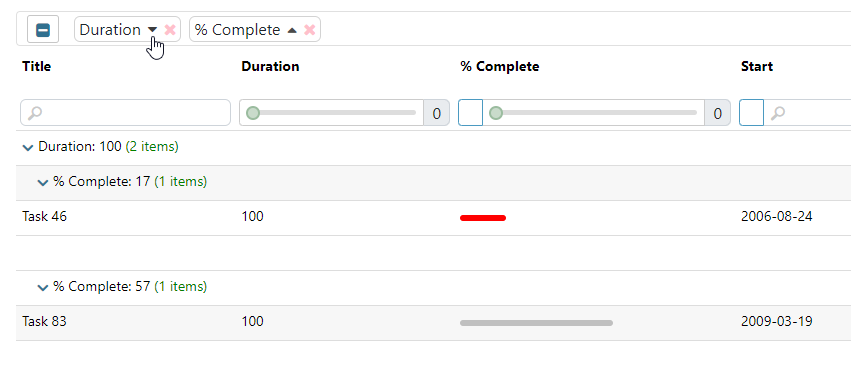
只有一个真正的解决方案,您将需要升级到最新的角-Slickgrid5.x版本,其中有修复。不幸的是,我没有为库的旧版本提供支持,这对于一个人(我)来说是太多的工作了,因为这个库是一个免费的开源项目,而且我没有从这项工作中获得任何钱(除了非常罕见的ko贡献)。您将从升级中获得的另一个好处是最近的一个小特性,可以按元素对每个组进行排序(请参见下面)
或者实际上是一个可能的补丁,但不太理想,那就是隐藏第二个网格(使用*ngShow而不是*ngIf),而不是销毁它,但如果您能够接受这一点,则会产生副作用,使这两个网格html代码保持在原地。
https://stackoverflow.com/questions/74601905
复制相似问题
腾讯云开发者

Copyright © 2013 - 2026 Tencent Cloud. All Rights Reserved. 腾讯云 版权所有
深圳市腾讯计算机系统有限公司 ICP备案/许可证号:粤B2-20090059  粤公网安备44030502008569号
腾讯云计算(北京)有限责任公司 京ICP证150476号 | 京ICP备11018762号