
axios/ fetch失败,但postman使用php
axios/ fetch失败,但postman使用php
提问于 2022-11-27 04:40:53
在我的React应用程序中使用form-data类型调用php时,我被困住了。当我用邮递员进行测试时,它工作正常,但反应失败。
如果我做错了请告诉我。在邮递员中,可以这样调用api:
URl_API: xxxx/yyyy.php.
Config in Body tab in key/value: form-data
k: "some string"
id: "some string"
对于axios,我犯了一个错误:
我的代码:
const formData = new FormData()
  formData.append('k', 'some string')
  formData.append('id', 'some string')

  const response = await axios.post('xxxx/yyyy.php', formData, {
    headers: {
      'Access-Control-Allow-Origin': '*',
    },
})xxxx/yyyy.php net::ERR_HTTP2_PROTOCOL_ERROR我已经尝试过使用fetch,但是状态200没有幸运调用api成功,但是response.text()是空的。使用fetch api:
const result = await fetch('xxxx/yyyy.php', {
    method: 'POST',
    mode: 'no-cors',
    body: formData,
    cache: 'no-cache',
  })
    .then(async (res) => {
      return res.text()
    })
.then((text) => console.log('It is empty here', text))回答 1
Stack Overflow用户
发布于 2022-11-27 04:51:48
它看起来也像一个CORS,但你可以解决它。
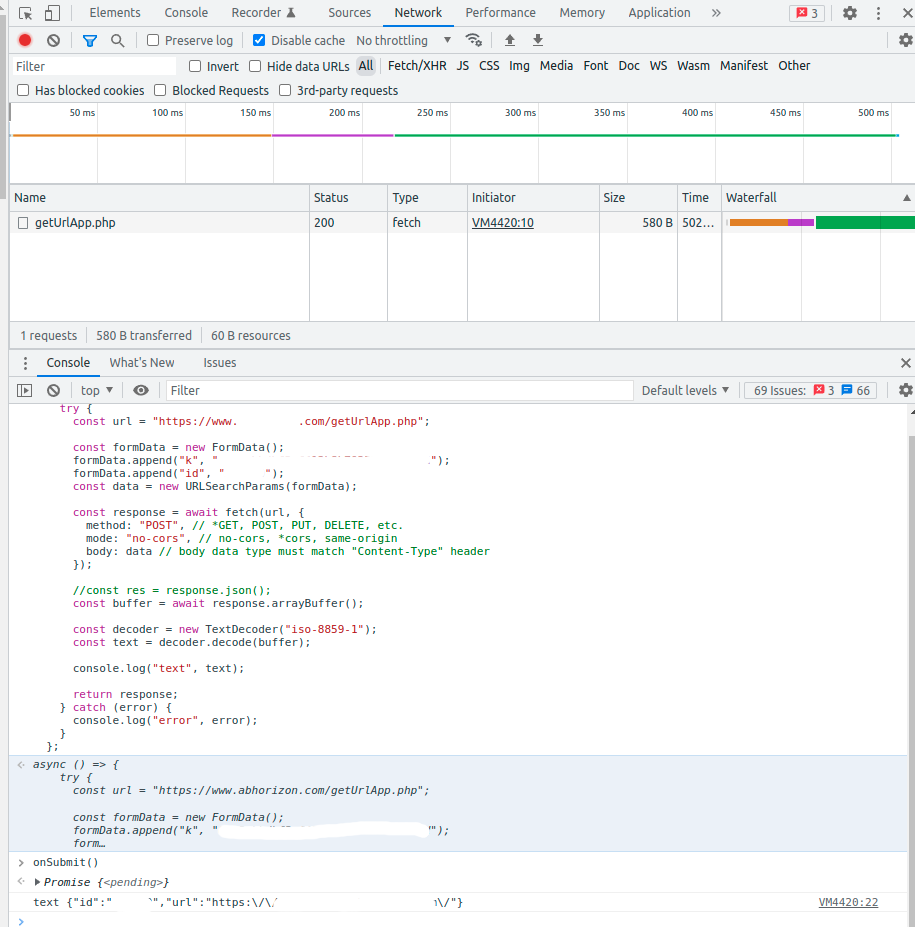
开发中的一个简单解决方案是使用本地api服务器,最后,当应用程序部署到与api位于同一域中的服务器时,您应该得到响应,如下所示,使用dev工具进行调用。
简而言之:如果api调用与postman一起工作,而不是通过浏览器(主要是由于cors的限制),那么它可能是响应类型。
通过开发工具进行调用来验证cors问题
 let onSubmit = async () => {
    try {
      const url = "https://www.your-domain***.com/getUrlApp.php";

      const formData = new FormData();
      formData.append("k", "kk");
      formData.append("id", "dd");
      const data = new URLSearchParams(formData);

      const response = await fetch(url, {
        method: "POST", // *GET, POST, PUT, DELETE, etc.
        mode: "no-cors", // no-cors, *cors, same-origin
        body: data // body data type must match "Content-Type" header
      });

      //const res = response.json();
      const buffer = await response.arrayBuffer();

      const decoder = new TextDecoder("iso-8859-1");
      const text = decoder.decode(buffer);

      console.log("text", text);

      return response;
    } catch (error) {
      console.log("error", error);
    }
  };
验证响应
https://www.your-domain***.com
- go
- open => console
- 通过了上面的函数并通过在控制台
中键入onSubmit()来运行它
你会看到他们的反应
希望它能在某种程度上帮助你
页面原文内容由Stack Overflow提供。腾讯云小微IT领域专用引擎提供翻译支持
原文链接:
https://stackoverflow.com/questions/74587549
复制相关文章
相似问题
腾讯云开发者

Copyright © 2013 - 2026 Tencent Cloud. All Rights Reserved. 腾讯云 版权所有
深圳市腾讯计算机系统有限公司 ICP备案/许可证号:粤B2-20090059  粤公网安备44030502008569号
腾讯云计算(北京)有限责任公司 京ICP证150476号 | 京ICP备11018762号