
如何使用PyGithub与Streamlit一起构建webapp应用程序
如何使用PyGithub与Streamlit一起构建webapp应用程序
提问于 2022-11-26 21:51:35
我想要创建一个脚本,在python中部署Streamlit,它列出了特定存储库的内容。有可能吗?因为我在尝试,它总是这样说:
ImportError: cannot import name 'Github' from 'github' (/Library/Frameworks/Python.framework/Versions/3.9/lib/python3.9/site-packages/github/__init__.py)
Traceback:
File "/Library/Frameworks/Python.framework/Versions/3.9/lib/python3.9/site-packages/streamlit/runtime/scriptrunner/script_runner.py", line 564, in _run_script
    exec(code, module.__dict__)
File "/Users/blanc/Desktop/My-notes/webpage.py", line 1, in <module>
    from github import Github
我确实有这样一个导入,它可以在控制台中使用输出:
from github import Github我已经检查了18次了,我的请求(和正确版本的PyGithub),我不知道我还能做什么。希望你能帮我:)
这是我使用的代码:
from github import Github

def list_content_repo():
    g = Github()
    # github username
    username = g.get_user("gitblanc")
    # Obtain the repository
    repo = username.get_repo("Obsidian-Notes")
print(repo.get_contents(""))回答 1
Stack Overflow用户
回答已采纳
发布于 2022-11-28 14:33:35
代码
main.py
from github import Github
import streamlit as st


def list_content_repo():
    g = Github()
    username = g.get_user("gitblanc")
    repo = username.get_repo("Obsidian-Notes")
    contents = repo.get_contents("")

    st.write('#### Contents')
    st.write(contents)


if __name__ == '__main__':
    list_content_repo()
输出
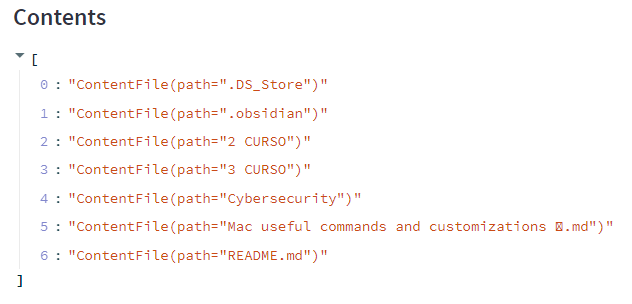
设置
尝试以这种方式设置您的开发环境。让我们看看你是否还有问题。我使用的是windows 10和虚拟环境。打开powershell。
PS C:\Users\ferdi> f:我用驱动器f。
PS F:\> mkdir temp_streamlit

PS F:\> cd temp_streamlit
PS F:\temp_streamlit> python --version
Python 3.10.6

PS F:\temp_streamlit> python -m venv myvenv

PS F:\temp_streamlit> ./myvenv/scripts/activate

(myvenv) PS F:\temp_streamlit> python -m pip install pip -U

(myvenv) PS F:\temp_streamlit> pip install streamlit

(myvenv) PS F:\temp_streamlit> pip install pygithub
使用上面的代码创建main.py并运行streamlit。
(myvenv) PS F:\temp_streamlit> streamlit run main.py您应该看到上面相同的输出。
页面原文内容由Stack Overflow提供。腾讯云小微IT领域专用引擎提供翻译支持
原文链接:
https://stackoverflow.com/questions/74585843
复制相关文章
相似问题
腾讯云开发者

Copyright © 2013 - 2026 Tencent Cloud. All Rights Reserved. 腾讯云 版权所有
深圳市腾讯计算机系统有限公司 ICP备案/许可证号:粤B2-20090059  粤公网安备44030502008569号
腾讯云计算(北京)有限责任公司 京ICP证150476号 | 京ICP备11018762号