
为什么Visual代码在调试Next.js全堆栈时总是在启动时中断?
为什么Visual代码在调试Next.js全堆栈时总是在启动时中断?
提问于 2022-11-25 07:02:11
我正在使用以下Next.js文件调试一个.vscode/launch.json 13应用程序:
{
    "version": "0.2.0",
    "compounds": [
      {
        "name": "Compound",
        "configurations": [],
        "stopAll": false
      }
    ],
    "configurations": [
      {
        "name": "Next.js: debug server-side",
        "type": "node-terminal",
        "request": "launch",
        "command": "npm run dev",
        "stopOnEntry": false
      },
      {
        "name": "Next.js: debug client-side",
        "type": "chrome",
        "request": "launch",
        "url": "http://localhost:3000",
        "stopOnEntry": false
      },
      {
        "name": "Next.js: debug full stack",
        "type": "node-terminal",
        "request": "launch",
        "command": "npm run dev",
        "serverReadyAction": {
          "pattern": "started server on .+, url: (https?://.+)",
          "uriFormat": "%s",
          "action": "debugWithChrome"
        },
        "stopOnEntry": false
      }
    ]
  }
但是,每次我在"Next.js: debug完整堆栈“选项上调试时,它都会在第一个文件(..next/server/app.)上停止。每次刷新之后。
虽然文档说stopOnEntry是被接受的,但是vscode说它不接受。
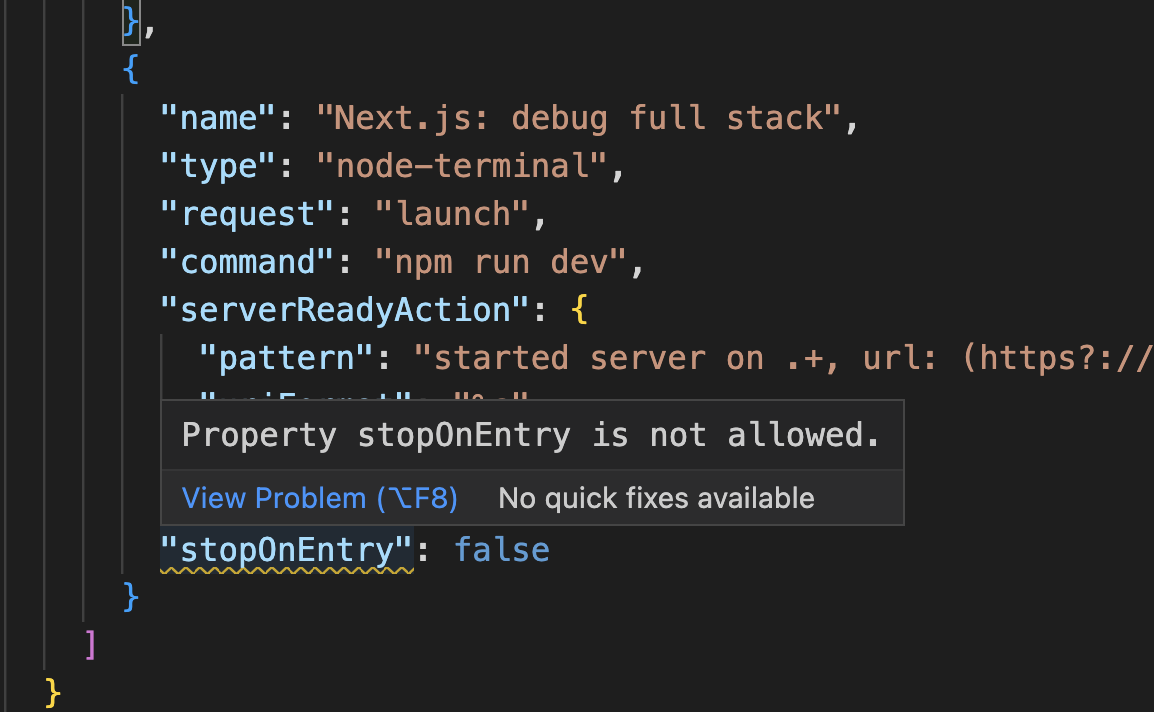
也许我用错地方了。如何使Visual代码在输入时不停止?
回答 1
Stack Overflow用户
发布于 2022-11-30 07:10:44
尝试使用:
{
  "version": "0.2.0",
  "configurations": [
    {
      "name": "Next.js: debug server-side",
      "request": "launch",
      "runtimeArgs": ["run-script", "dev"],
      "runtimeExecutable": "npm",
      "skipFiles": ["<node_internals>/**"],
      "type": "node",
      "stopOnEntry": false,
      "console": "integratedTerminal",
      "trace": true
    },
    {
      "name": "Next.js: debug client-side",
      "type": "chrome",
      "request": "launch",
      "url": "http://localhost:3000",
      "webRoot": "${workspaceFolder}",
      "trace": true
    },
    {
      "name": "Next.js: debug full stack",
      "request": "launch",
      "runtimeArgs": ["run-script", "dev"],
      "runtimeExecutable": "npm",
      "skipFiles": ["<node_internals>/**"],
      "type": "node",
      "serverReadyAction": {
        "pattern": "started server on .+, url: (https?://.+)",
        "uriFormat": "%s",
        "action": "debugWithChrome"
      },
      "stopOnEntry": false,
      "console": "integratedTerminal",
      "trace": true
    }
  ]
}
如果你愿意的话,可以根据你的要求改变它。
页面原文内容由Stack Overflow提供。腾讯云小微IT领域专用引擎提供翻译支持
原文链接:
https://stackoverflow.com/questions/74569254
复制相关文章
相似问题
腾讯云开发者

Copyright © 2013 - 2026 Tencent Cloud. All Rights Reserved. 腾讯云 版权所有
深圳市腾讯计算机系统有限公司 ICP备案/许可证号:粤B2-20090059  粤公网安备44030502008569号
腾讯云计算(北京)有限责任公司 京ICP证150476号 | 京ICP备11018762号