
如何使用python请求下载这个zip文件?
如何使用python请求下载这个zip文件?
提问于 2022-11-24 21:54:57
我正在下载一个存储在这里的zip文件:
http://e4ftl01.cr.usgs.gov/MEASURES/SRTMGL1.003/2000.02.11/N45W074.SRTMGL1.hgt.zip如果您将其粘贴到浏览器并点击enter,它将下载.zip文件夹。
如果在发生这种情况时检查浏览器,您将看到内部重定向正在进行:
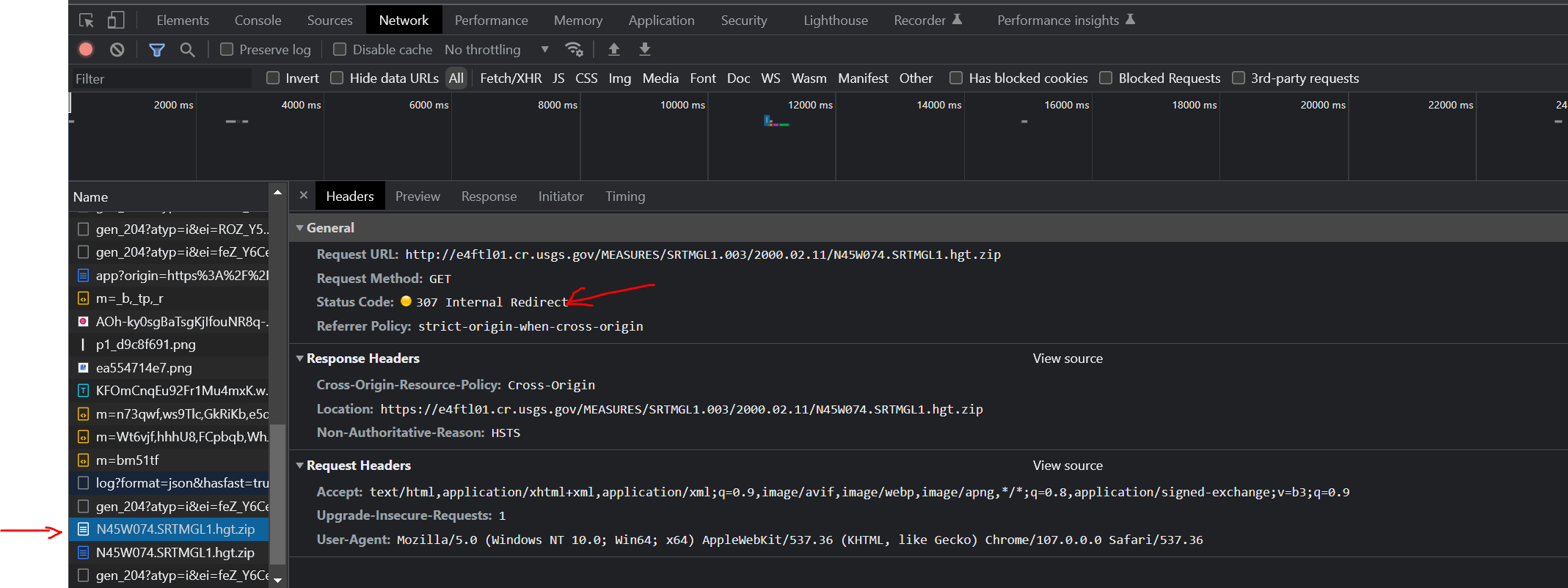
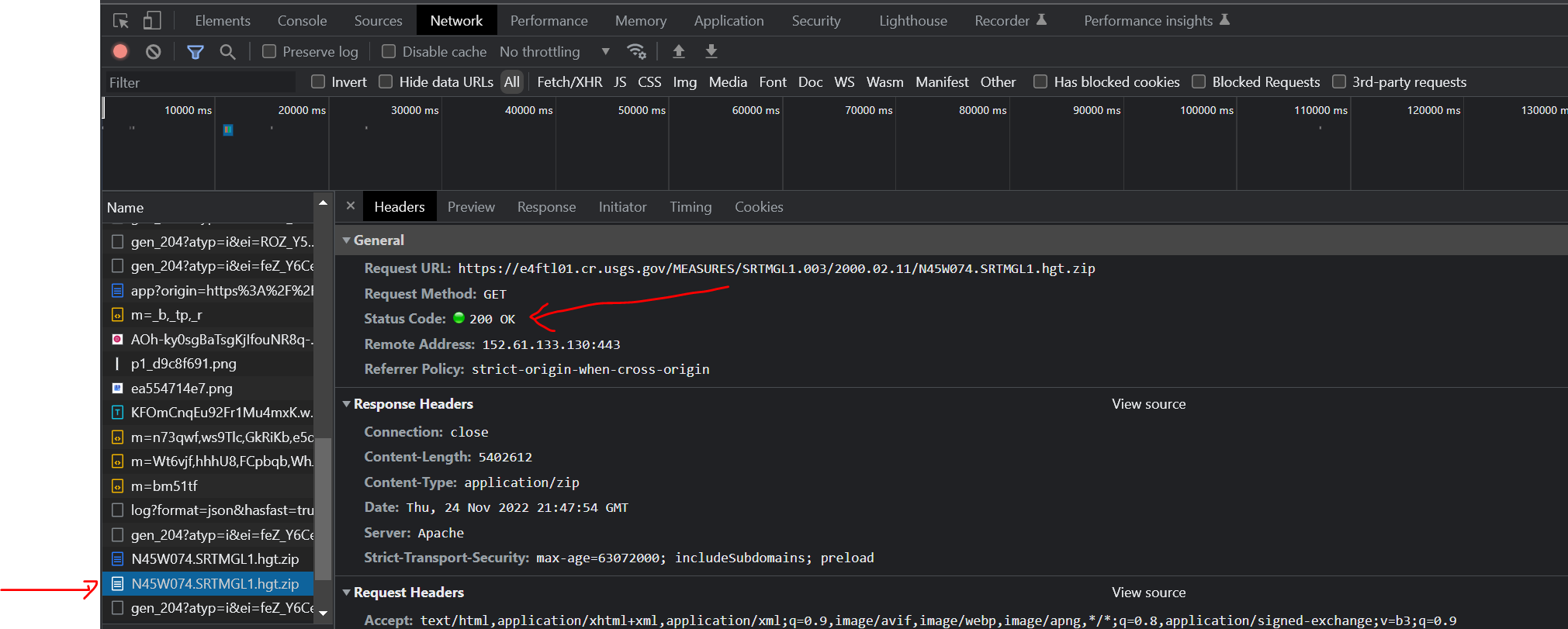
最后邮编就被下载了。
通过执行以下操作,我试图使用python请求库自动完成此下载:
import requests
requests.get(url,
             allow_redirects=True,
headers={'User-Agent':'Chrome/107.0.0.0'})我尝试了大量组合,使用HTML检查中的完整头字符串,强制verify=True、有重定向和不重定向,添加一个HTTPBasicAuth用户/pass,该用户/pass是必需的,尽管该文件似乎可以在没有凭据的情况下正常下载。
老实说,不知道我错过了什么,这不是我的专长。我一直在犯这个错误:
>>> requests.get(url,
...              allow_redirects=True,
...              headers={'User-Agent':'Chrome/107.0.0.0'})
Traceback (most recent call last):
  File "C:\Users\dere\Miniconda3\envs\blender\lib\site-packages\urllib3\connection.py", line 174, in _new_conn
    conn = connection.create_connection(
  File "C:\Users\dere\Miniconda3\envs\blender\lib\site-packages\urllib3\util\connection.py", line 95, in create_connection
    raise err
  File "C:\Users\dere\Miniconda3\envs\blender\lib\site-packages\urllib3\util\connection.py", line 85, in create_connection
    sock.connect(sa)
ConnectionRefusedError: [WinError 10061] No connection could be made because the target machine
actively refused it

During handling of the above exception, another exception occurred:

Traceback (most recent call last):
  File "C:\Users\dere\Miniconda3\envs\blender\lib\site-packages\urllib3\connectionpool.py", line 703, in urlopen
    httplib_response = self._make_request(
  File "C:\Users\dere\Miniconda3\envs\blender\lib\site-packages\urllib3\connectionpool.py", line 398, in _make_request
    conn.request(method, url, **httplib_request_kw)
  File "C:\Users\dere\Miniconda3\envs\blender\lib\site-packages\urllib3\connection.py", line 239, in request
    super(HTTPConnection, self).request(method, url, body=body, headers=headers)
  File "C:\Users\dere\Miniconda3\envs\blender\lib\http\client.py", line 1282, in request
    self._send_request(method, url, body, headers, encode_chunked)
  File "C:\Users\dere\Miniconda3\envs\blender\lib\http\client.py", line 1328, in _send_request
    self.endheaders(body, encode_chunked=encode_chunked)
  File "C:\Users\dere\Miniconda3\envs\blender\lib\http\client.py", line 1277, in endheaders
    self._send_output(message_body, encode_chunked=encode_chunked)
  File "C:\Users\dere\Miniconda3\envs\blender\lib\http\client.py", line 1037, in _send_output
    self.send(msg)
  File "C:\Users\dere\Miniconda3\envs\blender\lib\http\client.py", line 975, in send
    self.connect()
  File "C:\Users\dere\Miniconda3\envs\blender\lib\site-packages\urllib3\connection.py", line 205, in connect
    conn = self._new_conn()
  File "C:\Users\dere\Miniconda3\envs\blender\lib\site-packages\urllib3\connection.py", line 186, in _new_conn
    raise NewConnectionError(
urllib3.exceptions.NewConnectionError: <urllib3.connection.HTTPConnection object at 0x0000016B76A6FE50>: Failed to establish a new connection: [WinError 10061] No connection could be made because the target machine actively refused it

During handling of the above exception, another exception occurred:

Traceback (most recent call last):
  File "C:\Users\dere\Miniconda3\envs\blender\lib\site-packages\requests\adapters.py", line 489, in send
    resp = conn.urlopen(
  File "C:\Users\dere\Miniconda3\envs\blender\lib\site-packages\urllib3\connectionpool.py", line 787, in urlopen
    retries = retries.increment(
  File "C:\Users\dere\Miniconda3\envs\blender\lib\site-packages\urllib3\util\retry.py", line 592, in increment
    raise MaxRetryError(_pool, url, error or ResponseError(cause))
urllib3.exceptions.MaxRetryError: HTTPConnectionPool(host='e4ftl01.cr.usgs.gov', port=80): Max retries exceeded with url: /MEASURES/SRTMGL1.003/2000.02.11/N45W074.SRTMGL1.hgt.zip (Caused by NewConnectionError('<urllib3.connection.HTTPConnection object at 0x0000016B76A6FE50>: Failed to establish a new connection: [WinError 10061] No connection could be made because the target machine actively refused it'))

During handling of the above exception, another exception occurred:

Traceback (most recent call last):
  File "<stdin>", line 1, in <module>
  File "C:\Users\dere\Miniconda3\envs\blender\lib\site-packages\requests\api.py", line 73, in get
    return request("get", url, params=params, **kwargs)
  File "C:\Users\dere\Miniconda3\envs\blender\lib\site-packages\requests\api.py", line 59, in request
    return session.request(method=method, url=url, **kwargs)
  File "C:\Users\dere\Miniconda3\envs\blender\lib\site-packages\requests\sessions.py", line 587, in request
    resp = self.send(prep, **send_kwargs)
  File "C:\Users\dere\Miniconda3\envs\blender\lib\site-packages\requests\sessions.py", line 701, in send
    r = adapter.send(request, **kwargs)
  File "C:\Users\dere\Miniconda3\envs\blender\lib\site-packages\requests\adapters.py", line 565, in send
    raise ConnectionError(e, request=request)
requests.exceptions.ConnectionError: HTTPConnectionPool(host='e4ftl01.cr.usgs.gov', port=80): Max retries exceeded with url: /MEASURES/SRTMGL1.003/2000.02.11/N45W074.SRTMGL1.hgt.zip (Caused by NewConnectionError('<urllib3.connection.HTTPConnection object at 0x0000016B76A6FE50>: Failed to establish a new connection: [WinError 10061] No connection could be made because the target machine actively refused it'))
有人能帮我找到导致请求成功的代码吗?后来我知道怎么把请求写进拉链里。
回答 2
Stack Overflow用户
发布于 2022-11-24 22:11:46
将http更改为Https:这应该有效
import requests

# download zip file from url
url = "https://e4ftl01.cr.usgs.gov/MEASURES/SRTMGL1.003/2000.02.11/N45W074.SRTMGL1.hgt.zip"
r = requests.get(url)
with open("N45W074.SRTMGL1.hgt.zip", "wb") as f:
f.write(r.content)Stack Overflow用户
发布于 2022-11-24 23:15:46
谢谢@cnemri给我小费。
它是将http更改为https并在请求头中包含这个特定的cookie头的组合:
headers = {'Cookie': '_gid=GA1.2.48775707.1669266346; _hjSessionUser_606685=eyJpZCI6IjQ1MzEzM2QzLTI3MWEtNWM0YS04M2YzLWRmMmMzNDk4NjY1ZSIsImNyZWF0ZWQiOjE2NjkyNjYzNDU2MjUsImV4aXN0aW5nIjp0cnVlfQ==; ERS_production_2=b7dfade669180a6d6d250b030ffc3cf2UZZa8%2F471MfcV%2FaNuFtu6Pli%2BpP8jKOIwR4JvQjm%2B6DLPjl679vVf5SCDk7C5TLQsj7qckIev6lmtGb6Mes5RKDHUs%2BBp3EAjKW2%2BMCUpV%2Fnx0z1pdaCQQ%3D%3D; EROS_SSO_production_secure=eyJjcmVhdGVkIjoxNjY5MjY5MjEzLCJ1cGRhdGVkIjoiMjAyMi0xMS0yMyAyMzo1MzoyOCIsImF1dGhUeXBlIjoiRVJTIiwiYXV0aFNlcnZpY2UiOiJFUk9TIiwidmVyc2lvbiI6MS4xLCJzdGF0ZSI6ImVjMDY3YmMzYmRhMzBiZTUyNTkxYTNiZTYwMTMwZWNmNjAwMWU1Y2JlMGMxZmNkYTU4Y2Y4OTY0YjRlNTJkOTEiLCJpZCI6InY5U1Q4YVl3M1hRKCsyIiwic2VjcmV0IjoiPl8lMCZPYiY9MUVkclRLZTt4fHVZLVcyU1VvTiA1SE17KiQqaG12OSxvPl5%2BdyJ9; _ga_0YWDZEJ295=GS1.1.1669269458.1.0.1669269460.0.0.0; _ga=GA1.2.1055277358.1669266346; _ga_71JPYV1CCS=GS1.1.1669306300.2.1.1669306402.0.0.0; DATA=Y3_gg9uD6LmunsfDHneR9wAAARQ'}然后,这起作用:
requests.get(url, headers=headers)我不确定这是“解决方案”,还是我发现的解决办法。还是很感激你的意见。我想可能只是凭据被储存了?
页面原文内容由Stack Overflow提供。腾讯云小微IT领域专用引擎提供翻译支持
原文链接:
https://stackoverflow.com/questions/74566535
复制相关文章
相似问题
腾讯云开发者

Copyright © 2013 - 2026 Tencent Cloud. All Rights Reserved. 腾讯云 版权所有
深圳市腾讯计算机系统有限公司 ICP备案/许可证号:粤B2-20090059  粤公网安备44030502008569号
腾讯云计算(北京)有限责任公司 京ICP证150476号 | 京ICP备11018762号