
如何停止柏树第一次故障测试的中断
我有一项任务要转到多个页面,并为每一页生成灯塔报告。因此,我实现了生成灯塔报告部分,并创建了一个excel文件,并添加了所有网页的URL。这意味着我现在实现了读取excel文件,一个接一个地获取URL,然后进入该页面并进行灯塔测试。
    //calculationStoryService
    export function getLighthouseAuditForCalculationStory() {
        getAllCalculationStoriesFromExcel().then(stories => {
            stories.forEach(story => {
                cy.visit(story.url);
                cy.wait(Cypress.env("storyTableViewResultColumnCheckLoadingTimeout"));
                lighthouseAudit(story.name); // generating lighthouse report
            });
        });
}我正在使用一个名为"cypress-audit“的包生成灯塔报告,我们需要给出单个页面的基值。
function lighthouseAudit(name) {
    let baseValueData = getBaseValueData();
    let desktopConfig= getDesktopConfig();

    const lighthouseMetrics = {
            performance: baseValueData.performance,
            accessibility: baseValueData.accessibility,
            seo: baseValueData.seo,
            pwa: baseValueData.pwa
     };


     cy.lighthouse(lighthouseMetrics, desktopConfig);
}当我调用"lighthouseAudit“方法时,我传递"story.name”作为参数。它是每一页的唯一标识。因此,"lighthouseAudit“方法知道如何使用唯一的id获取"baseValueData”。
当"lighthouseAudit“方法运行时,它执行灯塔测试,并将值与基值(如果某些值小于基值)进行比较--它将失败--测试就是它是如何工作的,它工作得很好。
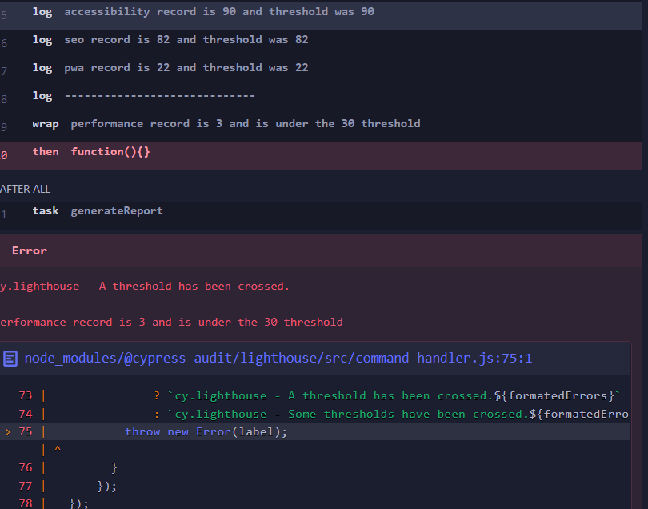
这是我的测试文件,我在这里调用了"getLighthouseAuditForCalculationStory“方法
import { Given, Then } from "cypress-cucumber-preprocessor/steps";
import { signIn } from "../../../support/services/commonServices";
import { getLighthouseAuditForCalculationStory } from "../../../support/services/calculationStoryService";

Given('Logged in', () => {
    signIn (Cypress.env('username'), Cypress.env('password'));
});

Then('navigate to page and generate lighthouse audit', () => {
    getLighthouseAuditForCalculationStory();
});正如我所解释的,"getLighthouseAuditForCalculationStory“获取所有网页URL,遍历列表并访问页面。在它运行灯塔测试之后。举个例子,如果第一页灯塔测试失败了,那么循环就停止了。我想继续循环,访问所有的页面,做灯塔测试,即使其中一个失败。如果一个测试失败,它会中断整个循环。
如何继续循环,即使灯塔测试失败了一个网页
包装清单
 "@cypress-audit/lighthouse": "^1.3.1",
 "cypress": "^10.9.0",
 "cypress-audit": "^1.1.0",
"cypress-cucumber-preprocessor": "^4.3.1"回答 1
Stack Overflow用户
发布于 2022-11-24 07:30:28
有几件事要尝试:
使用事件处理程序抑制失败。
export function getLighthouseAuditForCalculationStory() {
  Cypress.on('fail', (error, runnable) => {
    if (error.message.includes('A threshold has been crossed') {
      return false
    }
  })
  getAllCalculationStoriesFromExcel().then(stories => {
    ...
这可能不是您想要的行为,另一种选择是尝试在每个层创建一个测试。
Spec
Cypress.env('stories').forEach(story => {

  it(`Testing story: "${story.url}"`, () => {
    cy.visit(story.url);
    cy.wait(Cypress.env("storyTableViewResultColumnCheckLoadingTimeout"));
    lighthouseAudit(story.name); // generating lighthouse report
  })

})stories环境变量必须在cypress.config.js中使用在Spec API之前创建
const { defineConfig } = require('cypress')

module.exports = defineConfig({
  e2e: {
    setupNodeEvents(on, config) {
      on('before:spec', (spec) => {
        getAllCalculationStoriesFromExcel().then(stories => {
          config.env['stories'] = stories
        })
      })
    }
  }
})具体细节取决于getAllCalculationStoriesFromExcel(),我希望代码已经在cypress.config.js中运行,但在一个任务中运行。
https://stackoverflow.com/questions/74556610
复制相似问题
腾讯云开发者

Copyright © 2013 - 2026 Tencent Cloud. All Rights Reserved. 腾讯云 版权所有
深圳市腾讯计算机系统有限公司 ICP备案/许可证号:粤B2-20090059  粤公网安备44030502008569号
腾讯云计算(北京)有限责任公司 京ICP证150476号 | 京ICP备11018762号