
如果在Textarea中有空行,则为2个新行字符
如果在Textarea中有空行,则为2个新行字符
提问于 2022-11-23 19:27:46
我试图获取文本区域为行计数器(对于文本编辑器)所拥有的行数,但如果文本区域中有emtpy行,则添加两行。这是输出:
["// Hello World!","","","The line above was empty","","","Same here!","The line on the bottom of this one is empty!","",""]
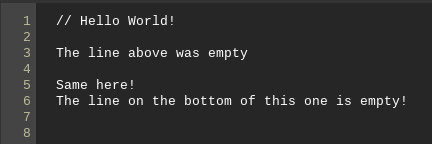
我的代码:
function getLines() {
  var textValue = document.querySelector('#editor').value;
  var lines = textValue.split("\n");
  console.log(lines);
}
应某人的请求,以下是HTML:
    <div id="visible" contenteditable="true"
    onkeyup="updateLineCount()">// Hello World!</div>
    <textarea id="code-editor">
基本上,我计划添加语法高亮显示,因此div是内容可编辑的,JS将div中的内容发送到textarea,只为了计算代码行。以下是执行此操作的JS:
textarea.value = document.querySelector("#code-editor").innerText;回答 1
Stack Overflow用户
回答已采纳
发布于 2022-11-24 22:32:42
您所遇到的问题与提取可内容div的innerText值并将其放入<textarea>有关。这就是额外的换行符\n的来源。
除非需要使用<textarea>,否则我将直接从可内容的div获取行计数。这里唯一奇怪的地方是在innerText的末尾添加了一个额外的换行符\n,但是这可以使用.split(0, -1)删除。
const updateLineCount = () => {
  document.querySelector(".lines").innerHTML = [...Array(document.querySelector("#code-editor").innerText.slice(0, -1).split("\n").length).keys()].map(v => v+1).join("<br>")
}
document.querySelector("#code-editor").addEventListener("keyup", updateLineCount).code {
padding: .2em .4em;
border: 1px solid #CCC;
box-sizing: border-box;
display: inline-block;
}
.lines {
color: #555;
font-family: monospace;
width: 2em;
vertical-align: top;
border-right: 1px solid #CCC;
display: inline-block;
}
#code-editor {
font-family: monospace;
width: 40em;
vertical-align: top;
display: inline-block;
}
#code-editor:focus { outline: none; }<div class="code">
<div class="lines">1</div>
<div id="code-editor" contenteditable="true">// Hello World!</div>
</div>
页面原文内容由Stack Overflow提供。腾讯云小微IT领域专用引擎提供翻译支持
原文链接:
https://stackoverflow.com/questions/74552066
复制相关文章
相似问题
腾讯云开发者

Copyright © 2013 - 2026 Tencent Cloud. All Rights Reserved. 腾讯云 版权所有
深圳市腾讯计算机系统有限公司 ICP备案/许可证号:粤B2-20090059  粤公网安备44030502008569号
腾讯云计算(北京)有限责任公司 京ICP证150476号 | 京ICP备11018762号