
如何确保卡保持相同的高度/宽度
如何确保卡保持相同的高度/宽度
提问于 2022-11-23 04:32:34
我有这段代码,在这里我有3个CSS卡与引导程序连在一起。
        <div class="container mt-4">
            <div class="row">
                <div class="col-auto mb-3">
                    <div class="card" style="width: 18rem;">
                        <div class="card-body">
                            <div class="reward12"><h1 class="rewardtext12">#50</h1></div>
                            <h5 class="card-title">Hiya how is your day been this is extra long text ?</h5>
                            <h6 class="card-subtitle mb-2 text-muted">Card subtitle</h6>
                            <p class="card-text">Some quick example text to build on the card title and make up the bulk of the card's content.</p>
                           <center><button type="button" class="btn btn-info" disabled="disabled">Status - Claimed</button></center>
                            Tag: <span class="tag tag-teal">CSS/HTML</span>
                            <div class="user">
                                <img src="https://yt3.ggpht.com/a/AGF-l7-0J1G0Ue0mcZMw-99kMeVuBmRxiPjyvIYONg=s900-c-k-c0xffffffff-no-rj-mo" alt="user" />
                                <div class="user-info">
                                  <h5>Joey Jenkins</h5>
                                  <small><strong>30s ago</strong></small>
                                </div>
                              </div>

                        </div>
                    </div>
                </div>
                <div class="col-auto mb-3">
                    <div class="card" style="width: 18rem;">
                        <div class="card-body">
                            <div class="reward12"><h1 class="rewardtext12">#50</h1></div>

                            <h5 class="card-title">Card title</h5>
                            <h6 class="card-subtitle mb-2 text-muted">Card subtitle</h6>
                            <p class="card-text">Some quick example text to build on the card title and make up the bulk of the card's content.</p>
                            <center><button type="button" class="btn btn-danger" disabled="disabled">Status - Completed</button></center>
                            Tag: <span class="tag tag-teal">CSS/HTML</span>
                            <div class="user">
                                <img src="https://yt3.ggpht.com/a/AGF-l7-0J1G0Ue0mcZMw-99kMeVuBmRxiPjyvIYONg=s900-c-k-c0xffffffff-no-rj-mo" alt="user" />
                                <div class="user-info">
                                  <h5>Joey Jenkins</h5>
                                  <small><strong>30s ago</strong></small>
                                </div>
                              </div>

                        </div>
                    </div>
                </div>
                <div class="col-auto mb-3">
                    <div class="card" style="width: 18rem;">
                        <div class="card-body">
                            <div class="reward12"><h1 class="rewardtext12">#50</h1></div>

                            <h5 class="card-title">Card title</h5>
                            <h6 class="card-subtitle mb-2 text-muted">Card subtitle</h6>
                            <p class="card-text">Some quick example text to build on the card title and make up the bulk of the card's content.</p>
                            <center><button type="button" class="btn btn-success">Claim</button></center>
                            Tag: <span class="tag tag-teal">CSS/HTML</span>
                            <div class="user">
                                <img src="https://yt3.ggpht.com/a/AGF-l7-0J1G0Ue0mcZMw-99kMeVuBmRxiPjyvIYONg=s900-c-k-c0xffffffff-no-rj-mo" alt="user" />
                                <div class="user-info">
                                  <h5>Joey Jenkins</h5>
                                  <small><strong>30s ago</strong></small>
                                </div>
                              </div>


                        </div>
                    </div>
                </div>
                        </div>
            <h3>Hi</h3>
<br>
        </div>

<style>
    .user {
  display: flex;
  margin-top: auto;
}

.user img {
  border-radius: 50%;
  width: 40px;
  height: 40px;
  margin-right: 10px;
}
.user-info h5 {
  margin: 0;
}
.user-info small {
  color: #545d7a;
}

    .reward12 {
        background: green;
        font-weight: bold;
text-align: center;
font-size: large;
height: 30px;
  border-radius: 30px;
  font-size: 12px;
  margin: 0;
  color: #fff;
  padding: 2px 10px;
  text-transform: uppercase;
  cursor: context-menu;

    }
    .rewardtext12 {
        font-size: 20px;
        font-family: 'PT Sans', serif;
        font-weight: bold;

    }
    .tag {
  background: #cccccc;
  border-radius: 50px;
  font-size: 12px;
  margin: 0;
  color: #fff;
  padding: 2px 10px;
  text-transform: uppercase;
  cursor: pointer;
}
.tag-teal {
  background-color: #47bcd4;
}
.tag-purple {
  background-color: #5e76bf;
}
.tag-pink {
  background-color: #cd5b9f;
}
</style>
这就是结果
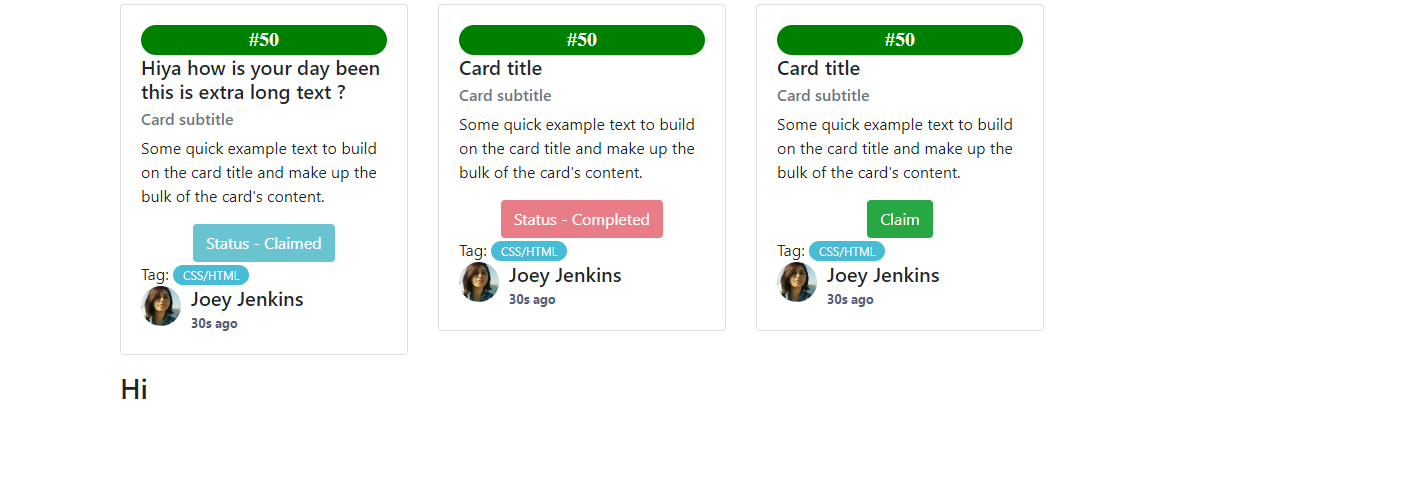
正如您所看到的,第一张卡的高度更多是因为文本长度较长。是否有办法确保卡的高度保持不变,即使不同大小的文本?(比如把一些文字转换成.如果太多的话?)
回答 1
Stack Overflow用户
回答已采纳
发布于 2022-11-23 04:36:05
你只需要给出100%的高度和宽度
width:100%;
height:100%;
或者如果您使用的是flex,那么
你可以给
flex-grow:1;
height:100%;页面原文内容由Stack Overflow提供。腾讯云小微IT领域专用引擎提供翻译支持
原文链接:
https://stackoverflow.com/questions/74541821
复制相关文章
相似问题
腾讯云开发者

Copyright © 2013 - 2026 Tencent Cloud. All Rights Reserved. 腾讯云 版权所有
深圳市腾讯计算机系统有限公司 ICP备案/许可证号:粤B2-20090059  粤公网安备44030502008569号
腾讯云计算(北京)有限责任公司 京ICP证150476号 | 京ICP备11018762号