
SwiftUI选择器不尊重设备上的帧大小
SwiftUI选择器不尊重设备上的帧大小
提问于 2022-11-21 06:03:29
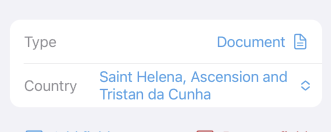
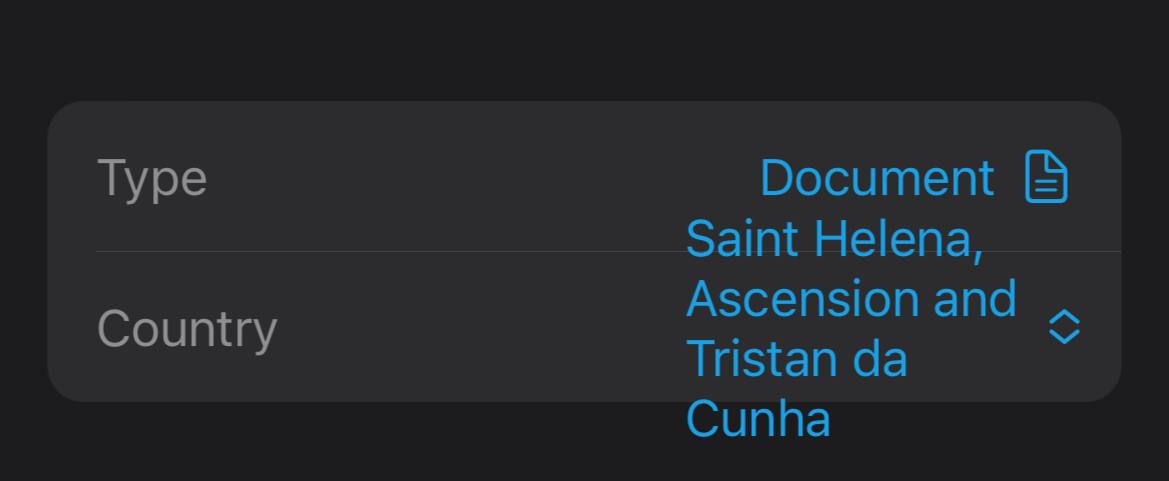
我的选择视图超出了仅在设备上的帧大小,而在模拟器中工作得很好。此视图不是表单或列表的一部分,仅在VStack中。
var body: some View {
    HStack {
        Text(title)
            .foregroundColor(.gray)
        Spacer()

        if isEditing {
            Picker(selection: $value) {
                Section {
                    Text("None").tag("None")
                }
                Section {
                    ForEach(Countries.all, id: \.self) { i in
                        Text(i).tag(i)
                    }
                }
            } label: {}
            .frame(height: DocumentPage.rowHeight) // <-- This is ignored
        } else {
            // View when not editing
        }

    }
    .frame(height: DocumentPage.rowHeight) // <-- And this is ignored
}
仿真器对设备的研究
回答 1
Stack Overflow用户
发布于 2022-11-21 20:57:56
在Picker()上使用.layoutPriority(1),在Text()上使用.fixedSize()帮助。
页面原文内容由Stack Overflow提供。腾讯云小微IT领域专用引擎提供翻译支持
原文链接:
https://stackoverflow.com/questions/74514832
复制相关文章
相似问题
腾讯云开发者

Copyright © 2013 - 2026 Tencent Cloud. All Rights Reserved. 腾讯云 版权所有
深圳市腾讯计算机系统有限公司 ICP备案/许可证号:粤B2-20090059  粤公网安备44030502008569号
腾讯云计算(北京)有限责任公司 京ICP证150476号 | 京ICP备11018762号