
如何在用SlateJS包装节点时忽略空行?
如何在用SlateJS包装节点时忽略空行?
提问于 2022-11-19 15:59:25
我正在使用Slate.js构建一个富文本编辑器。我设置了一个内联格式,可以使用以下函数切换:
toggleInline: function (editor, format) {
  const isActive = this.isFormatActive(editor, format, TYPES.FORMATS.INLINE);

  if (isActive) {
    Transforms.unwrapNodes(editor, {
      match: node => !this.isEditor(node) && Element.isElement(node) && node.type === format
    });

  } else {
    const inline = { type: format, children: noChildren };
    Transforms.wrapNodes(editor, inline, { split: true });
  }
}它工作得很好,但是如果我选择多行,我想忽略空行,这样就不会插入空块。例如,在这里,我只想包装A和B,而不想包装空行:
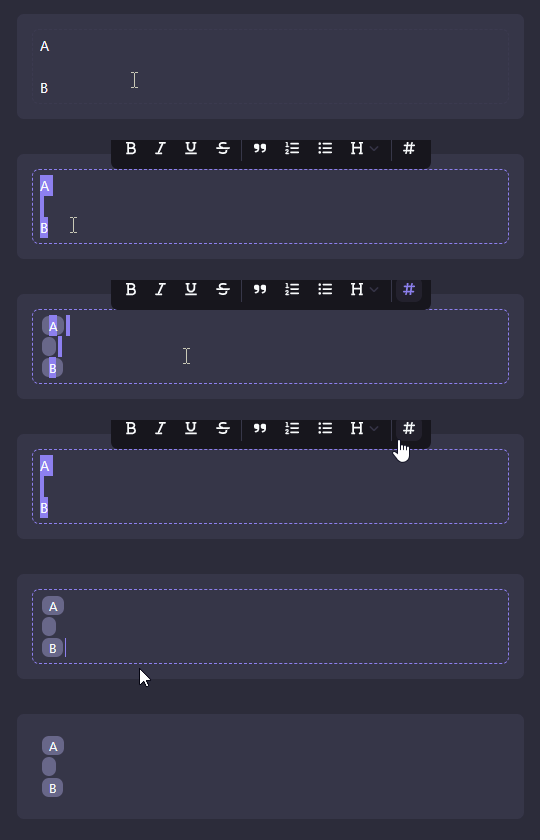
相应的孩子们看起来如下:
[
  { type: "p", children: [{ text: "A" }]},
  { type: "p", children: [{ text: "" }]},
  { type: "p", children: [{ text: "B" }]}
]我试图在match上添加一个wrapNodes选项,但是它删除了空行而不是跳过它们:
Transforms.wrapNodes(editor, inline, {
  match: node => node.text !== emptyString
  split: true
});
我该怎么做?
回答 1
Stack Overflow用户
回答已采纳
发布于 2022-11-28 12:37:17
事实证明,match选项是可行的,我只需要使用一个适当的函数来检查一个元素是否为空:
Transforms.wrapNodes(editor, inline, {
  match: (node) => !Element.isEmpty(node),
  split: true
});我的自定义isEmpty函数:
isEmpty: function (element) {
  if ("text" in element) return element.text === emptyString;
  if (element.children.length > 1) return false;

  return this.isEmpty(head(element.children));
}页面原文内容由Stack Overflow提供。腾讯云小微IT领域专用引擎提供翻译支持
原文链接:
https://stackoverflow.com/questions/74501521
复制相关文章
相似问题
腾讯云开发者

Copyright © 2013 - 2026 Tencent Cloud. All Rights Reserved. 腾讯云 版权所有
深圳市腾讯计算机系统有限公司 ICP备案/许可证号:粤B2-20090059  粤公网安备44030502008569号
腾讯云计算(北京)有限责任公司 京ICP证150476号 | 京ICP备11018762号