
如何在QtWidgets应用程序中集成游标
如何在QtWidgets应用程序中集成游标
提问于 2022-11-18 13:28:44
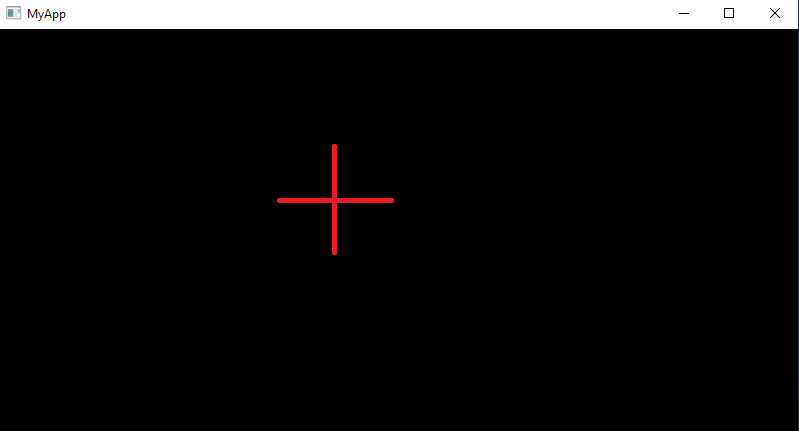
我是QtWidgets新手,我正试图用QtWidgets和Python3.x构建一个应用程序。该应用程序的最终目标是显示图像和一个叠加的光标(确切地说,是一个2cm的“加号”),可以沿着图像移动,以响应鼠标事件。我现在首先关注这个光标。到目前为止,我阅读了关于如何在matplotlib上实现它的示例。但是,我很难理解如何在代码中集成matplotlib。而且,matplotlib是在这段代码上实现它的最简单的方法。或者有更好的方法。任何提示都会有帮助,谢谢。
这是我想要的输出和我的应用程序的代码
import sys
from PySide2 import QtWidgets
from vispy import scene
from PySide2.QtCore import QMetaObject
from PySide2.QtWidgets import *

class SimpleItem(QtWidgets.QGraphicsItem):
    def __init__(self):
       QtWidgets.QGraphicsItem.__init__(self)
       self.setFlag(QtWidgets.QGraphicsItem.ItemIsMovable, True)

       def boundingRect(self):
          penWidth = 1.0
          return QRectF(-10 - penWidth / 2, -10 - penWidth / 2,
                         20 + penWidth, 20 + penWidth)

       def paint(self, painter, option, widget):
          rect = self.boundingRect()
          painter.drawRect(rect)

class Ui_MainWindow(object):
    def setupUi(self, MainWindow):
        if not MainWindow.objectName():
            MainWindow.setObjectName("MainWindow")
        MainWindow.resize(800, 600)

        self.centralwidget = QWidget(MainWindow)
        self.centralwidget.setObjectName("centralwidget")
        self.gridLayout = QGridLayout(self.centralwidget)
        self.gridLayout.setObjectName("gridLayout")

        self.groupBox = QGroupBox(self.centralwidget)
        self.groupBox.setObjectName("groupBox")

        self.gridLayout.addWidget(self.groupBox, 0, 0, 1, 1)

        MainWindow.setCentralWidget(self.centralwidget)

        QMetaObject.connectSlotsByName(MainWindow)


class MainWindow(QtWidgets.QMainWindow):

    def __init__(self):
        super(MainWindow, self).__init__()
        self.ui = Ui_MainWindow()
        self.ui.setupUi(self)

        # OpenGL drawing surface
        self.canvas = scene.SceneCanvas(keys='interactive')
        self.canvas.create_native()
        self.canvas.native.setParent(self)

        self.view = self.canvas.central_widget.add_view()

        self.view.bgcolor = '#ffffff'   # set the canva to a white background

        scene2 = QGraphicsScene()
        item = SimpleItem()
        scene2.addItem(item)
        self.setWindowTitle('MyApp')


def main():
    import ctypes
    ctypes.windll.shell32.SetCurrentProcessExplicitAppUserModelID('my_gui')

    app = QtWidgets.QApplication([])

    main_window = MainWindow()
    main_window.show()
    sys.exit(app.exec_())

if __name__ == '__main__':
    main()
编辑:我添加了一个类(这里是一个矩形,作为一个例子)来说明我的问题。我很难将代码片段(与SimpleItem)集成到OpenGL画布上
回答 1
Stack Overflow用户
回答已采纳
发布于 2022-11-24 10:44:06
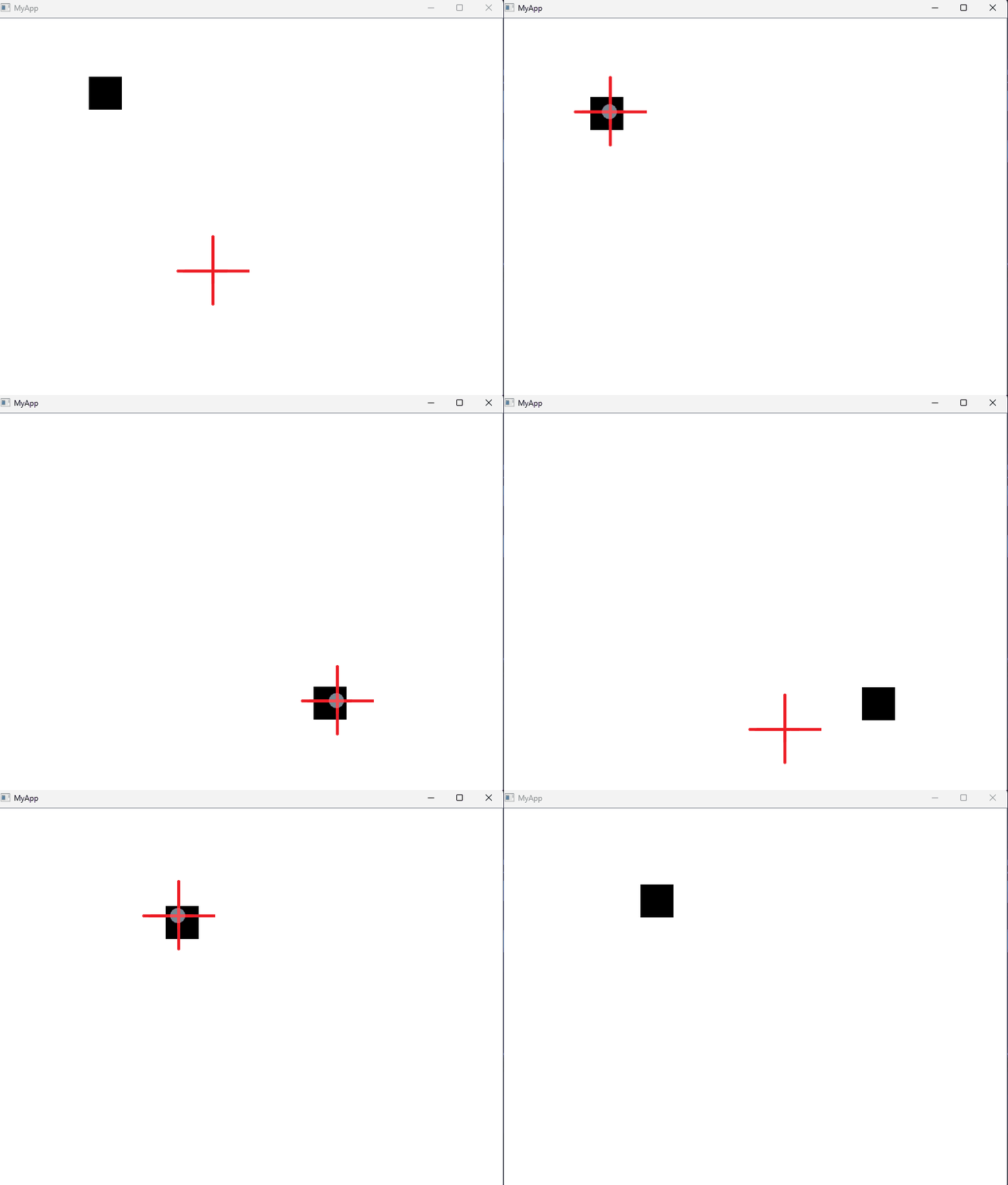
当.png图像文件出现在Qt程序中时,您可以使用该方法将其指定为游标。
下面是一个主要基于您问题中的代码的示例。下面是一个说明这个例子的gif。最后一个图像是我在代码中作为cursor.png使用的图像
希望这能有所帮助
import sys
from PySide2.QtCore import *
from PySide2.QtWidgets import *
from PySide2.QtGui import *

class SimpleItem(QtWidgets.QGraphicsItem):
    def __init__(self):
       QtWidgets.QGraphicsItem.__init__(self)
       self.setFlag(QtWidgets.QGraphicsItem.ItemIsMovable, True)
       self._brush = QBrush(Qt.black)

    def boundingRect(self):
        penWidth = 1.0
        return QRectF(-50 - penWidth / 2, -50 - penWidth / 2,
                     50 + penWidth, 50 + penWidth)

    def paint(self, painter, option, widget):
        rect = self.boundingRect()
        painter.drawRect(rect)
        painter.fillRect(rect, self._brush)


class MainWindow(QtWidgets.QMainWindow):

    def __init__(self):
        super(MainWindow, self).__init__()
        self.resize(800, 600)
        self.scene = QGraphicsScene()
        self.canvas = scene.SceneCanvas(keys='interactive')
        self.view = QGraphicsView(self.scene)
        item = SimpleItem()
        self.scene.addItem(item)
        self.setCentralWidget(self.view)
        self.setWindowTitle('MyApp')


def main():
    import ctypes
    ctypes.windll.shell32.SetCurrentProcessExplicitAppUserModelID('my_gui')
    app = QtWidgets.QApplication([])
    app.setOverrideCursor(QCursor(QPixmap('cursor.png')))
    main_window = MainWindow()
    main_window.show()
    sys.exit(app.exec_())

if __name__ == '__main__':
    main()

页面原文内容由Stack Overflow提供。腾讯云小微IT领域专用引擎提供翻译支持
原文链接:
https://stackoverflow.com/questions/74490415
复制相关文章
相似问题
腾讯云开发者

Copyright © 2013 - 2026 Tencent Cloud. All Rights Reserved. 腾讯云 版权所有
深圳市腾讯计算机系统有限公司 ICP备案/许可证号:粤B2-20090059  粤公网安备44030502008569号
腾讯云计算(北京)有限责任公司 京ICP证150476号 | 京ICP备11018762号