
用于容器注册表的Azure terraform模块-动态块在清空白色列出的IP列表以完成零时不会删除IP地址
我已经为Azure Container (ACR)编写了一个terraform模块。我希望可以选择将ACR公开或仅供选定的网络使用,并在这两者之间进行切换。选择的网络,我指的是特定的子网或I被白名单。如果没有提供子网或IP列表,ACR将是公开的。否则,它将可通过选定的网络。我是这样在variables.tf文件中定义IP列表和子网列表的:
variable "allowed_subnet_ids" {
  type        = list(string)
  description = "List of subnet IDs to be allowed to access the ACR"
}

variable "allowed_ips" {
  type        = list(string)
  description = "White list IP addresses"
}

variable "public_network_access_enabled"{
  type = bool
  description = "(Optional) Whether public network access is allowed for the container registry. Defaults to true."
}
通过在network_rule_set中使用动态块,我使main.tf属性成为可选的,如下所示:
resource "azurerm_container_registry" "this" {
  name                = local.acr_name
  resource_group_name = var.resource_group_name
  location            = var.location
  sku                 = var.sku
  admin_enabled       = var.admin_enabled

  public_network_access_enabled = var.public_network_access_enabled
  dynamic "network_rule_set" {
    for_each = (length(var.allowed_ips) != 0 || length(var.allowed_subnet_ids) != 0) ? [1] : []
    content {
        default_action  = "Deny"
        dynamic "virtual_network" {
            for_each = var.allowed_subnet_ids
            content {
                action = "Allow"
                subnet_id = virtual_network.value
            }
        }
        dynamic "ip_rule" {
            for_each =  var.allowed_ips
            content {
                action = "Allow"
                ip_range = ip_rule.value
            }
        }
    }
}
Network_rule_set允许在ACR中公开it和子网,并通过使用上面所示的动态块,使其具有可选的公共或私有特性。为了提供变量值,我使用了terraform.tfvars,如下所示:
env                  = "sdbx"
application_id       = "appid"
resource_group_name  = "rg-sbx"
role = "public"
location = "westeurope"
allowed_ips = [ "84.x.x.x", "51.x.x.x"]
# allowed_ips = []
allowed_subnet_ids = []
public_network_access_enabled = true这里有一个问题:尽管有一个严重的问题。如果我们有一个名单的it要白名单,它将工作。如果我们稍后决定从这个列表中删除IP或更改它们,但列表仍然不是空的,它将按预期工作。但是,如果您使用一个it列表(非空列表)启动ACR,然后决定像一样清空它。
allowed_ips = [] ,它将跳过块,不会删除那些IP!有人有什么解决办法吗?我希望这个块能够在公共和选定的网络之间切换,如Azure门户中所示。换句话说,当我将allowed_ips替换为空列表时,我希望动态块能够将IP列表缩小到零,这样可以使我的ACR公开.。
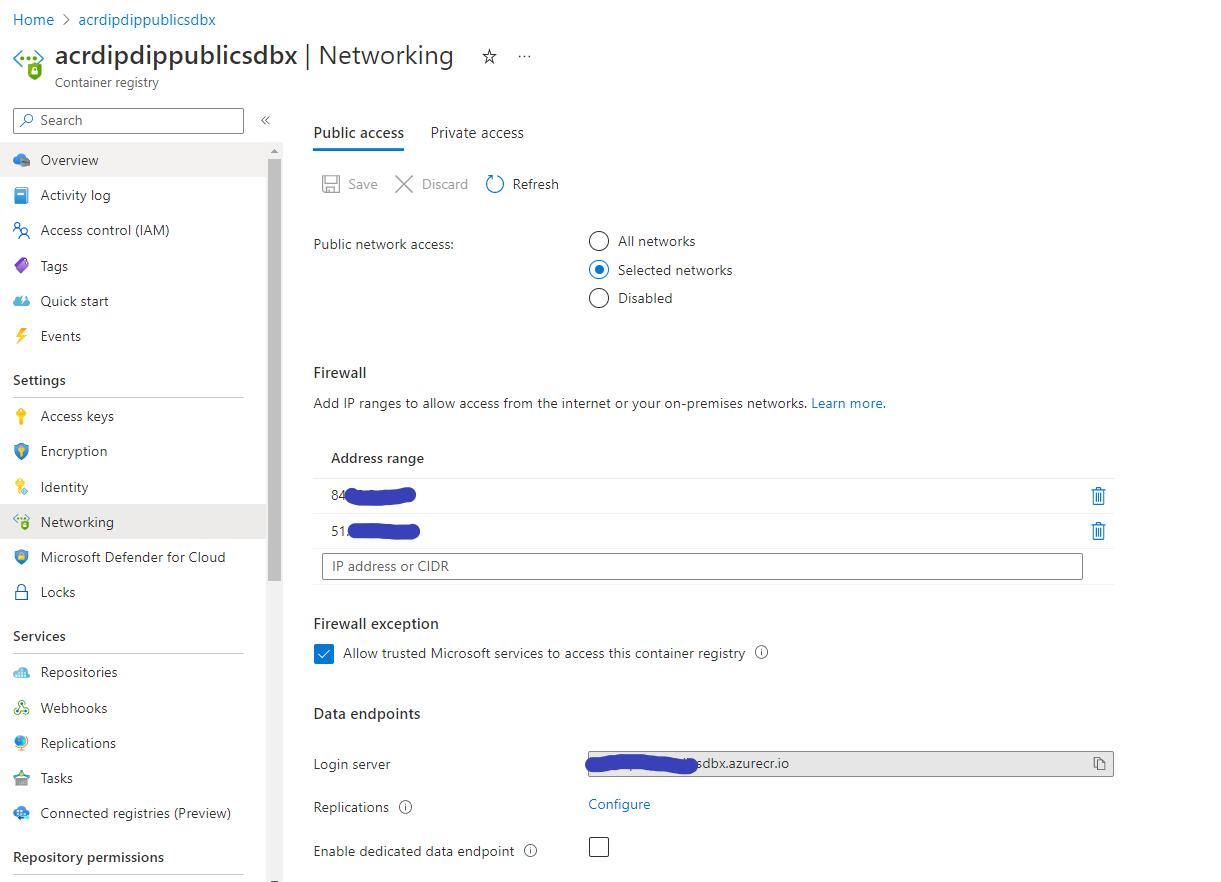
在下面的图片中,您可以看到网络应该如何在两种状态之间切换,这是我的最终目标:
可供选定网络和白色名单的综合方案使用的ACR:
当未提供allopwed_ips或allowed_subnet_ids时,可公开使用ACR,应使其成为公共ACR:
为了完整起见,这里是我的terraform提供者和规范:
terraform {
  required_version = ">= 1.0.0"
  required_providers {
    azurerm = {
      source  = "hashicorp/azurerm"
      version = ">=3.0.0"
    }
  }
}

provider "azurerm" {
  features {}
}回答 1
Stack Overflow用户
发布于 2022-11-16 10:46:54
为了在ACR公开可用或仅对选定的网络可用时在网络之间切换,我们需要保留network_rule_set详细代码的条件如下。
通过允许所有网络创建ACR
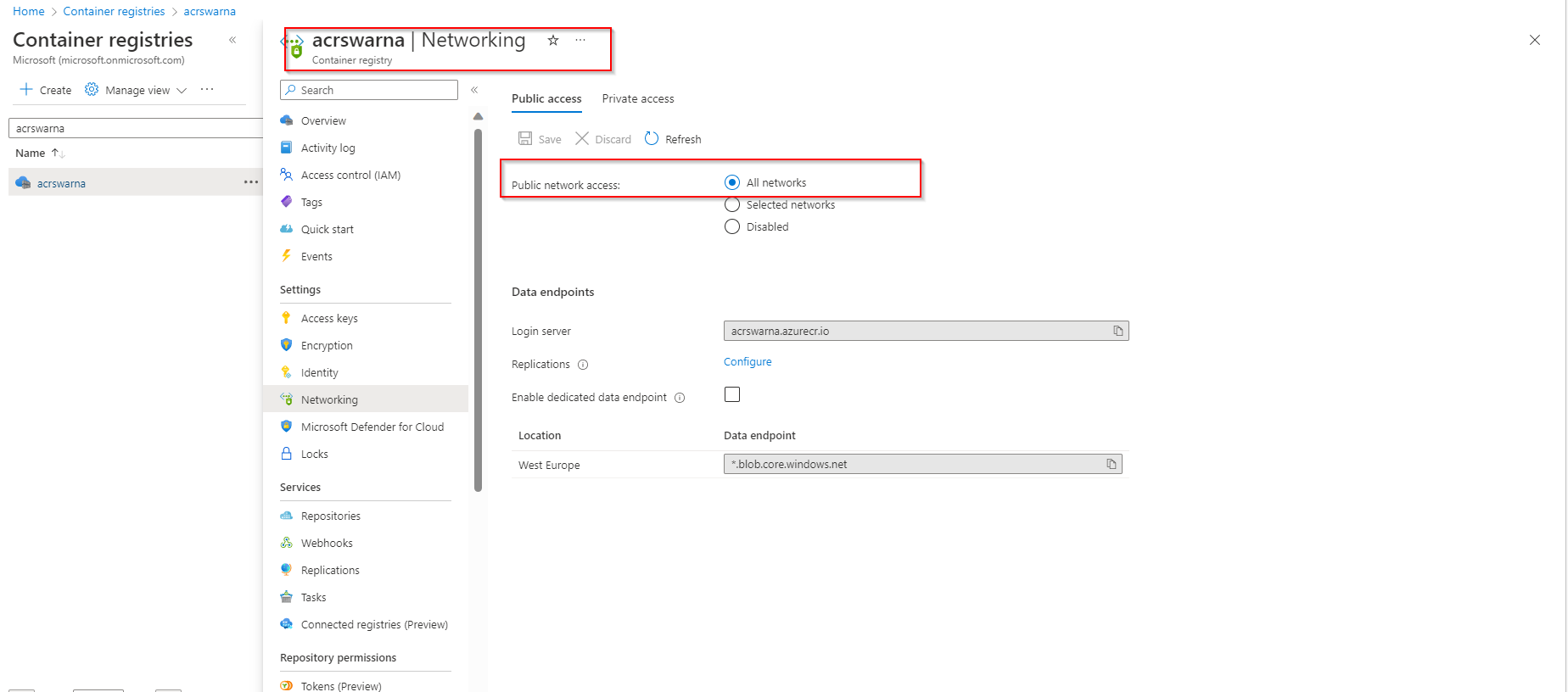
Step1:以下是我添加了 **main.tf文件的最新代码:**
provider  "azurerm" {
    features {}
    }
    resource  "azurerm_container_registry"  "acr_name" {
    name  =  "acrswarna"
    resource_group_name  =  var.resource_group_name
    location  =  var.location
    sku  =  var.sku
    admin_enabled  =  var.admin_enabled
    // Disable this code block for allowed ip network - Begin
    network_rule_set {
    default_action  =  "Allow"
    }
    // Disable this code block for allowed ip network - End
    dynamic  "network_rule_set" {
    for_each =  (length(var.allowed_ips) != 0 || length(var.allowed_subnet_ids) != 0) ? [1] : []
    content {
    default_action =  "Deny"
    dynamic  "virtual_network" {
    for_each = var.allowed_subnet_ids
    content {
    action =  "Allow"
    subnet_id =  virtual_network.value
    }
    }
    dynamic  "ip_rule" {
    for_each = var.allowed_ips
    content {
    action =  "Allow"
    ip_range =  ip_rule.value
    }}}}}
变量tf文件作为
variable "allowed_subnet_ids" {
  type        = list(string)
  description = "List of subnet IDs to be allowed to access the ACR"
}

variable "allowed_ips" {
  type        = list(string)
  description = "White list IP addresses"
}

variable "public_network_access_enabled"{
  type = bool
  description = "(Optional) Whether public network access is allowed for the container registry. Defaults to true."
}
variable "admin_enabled"{
  type = bool
  description = "(Optional) Whether public network access is allowed for the container registry. Defaults to true."
}
variable "sku" {
  type        = string
  description = "SKU"
}
variable "resource_group_name" {
  type        = string
  description = "resource_group_name"
}
variable "location" {
  type        = string
  description = "location"
}
Terraform.tfvar文件代码
    env                  = "sdbx"
    application_id       = "appid"
    resource_group_name  = "rg-swarna"
    role = "public"
    location = "westeurope"
    //Disable/ Enable the allowed ips when ever need if it was empty All Network will allow and if any ips its allowed only required range
    //allowed_ips = ["84.1.2.3", "51.3.4.2"]
    allowed_ips = []
    allowed_subnet_ids = []
    admin_enabled = true
    sku="Premium"
public_network_access_enabled = trueStep2:在命令下面运行
   terraform plan -var-file .\terraform.tfvars
   terraform apply -var-file .\terraform.tfvars -auto-approve
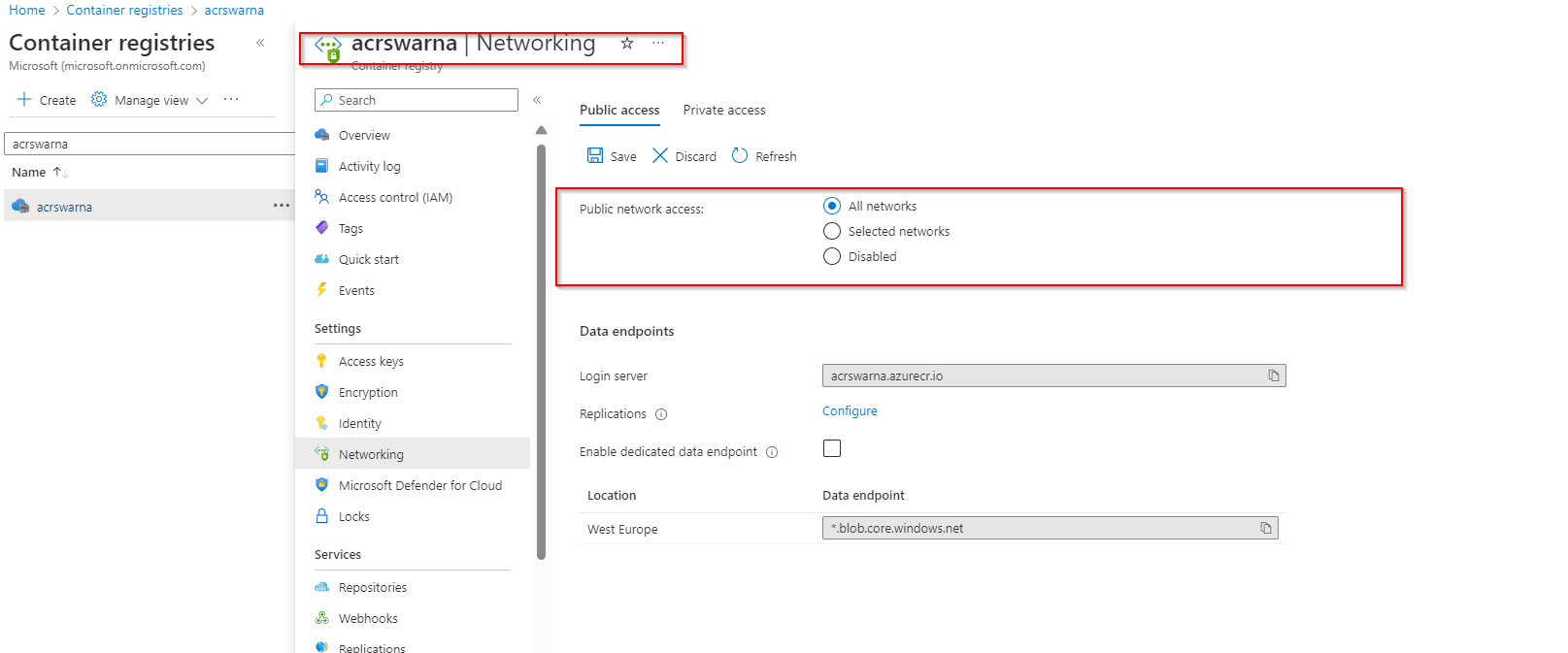
Step3:在Terraform应用于蔚蓝门户之后,我们可以看到ACR,
Step4:使用选定的IP范围更新代码,并重新运行要在上执行的terraform代码更改,在terraform.tfvars中替换下面的代码
//Disable/ Enable the allowed ips when ever need if it was empty All Network will allow and if any ips its allowed only required range
allowed_ips = ["84.1.2.3", "51.3.4.2"]
//allowed_ips  =  []
主tf文件-替换下面的代码
# // Disable this code block  for allowed ip network - Begin
#  network_rule_set {
#   default_action = "Allow"
#  }
#  // Disable this code block  for allowed ip network - End
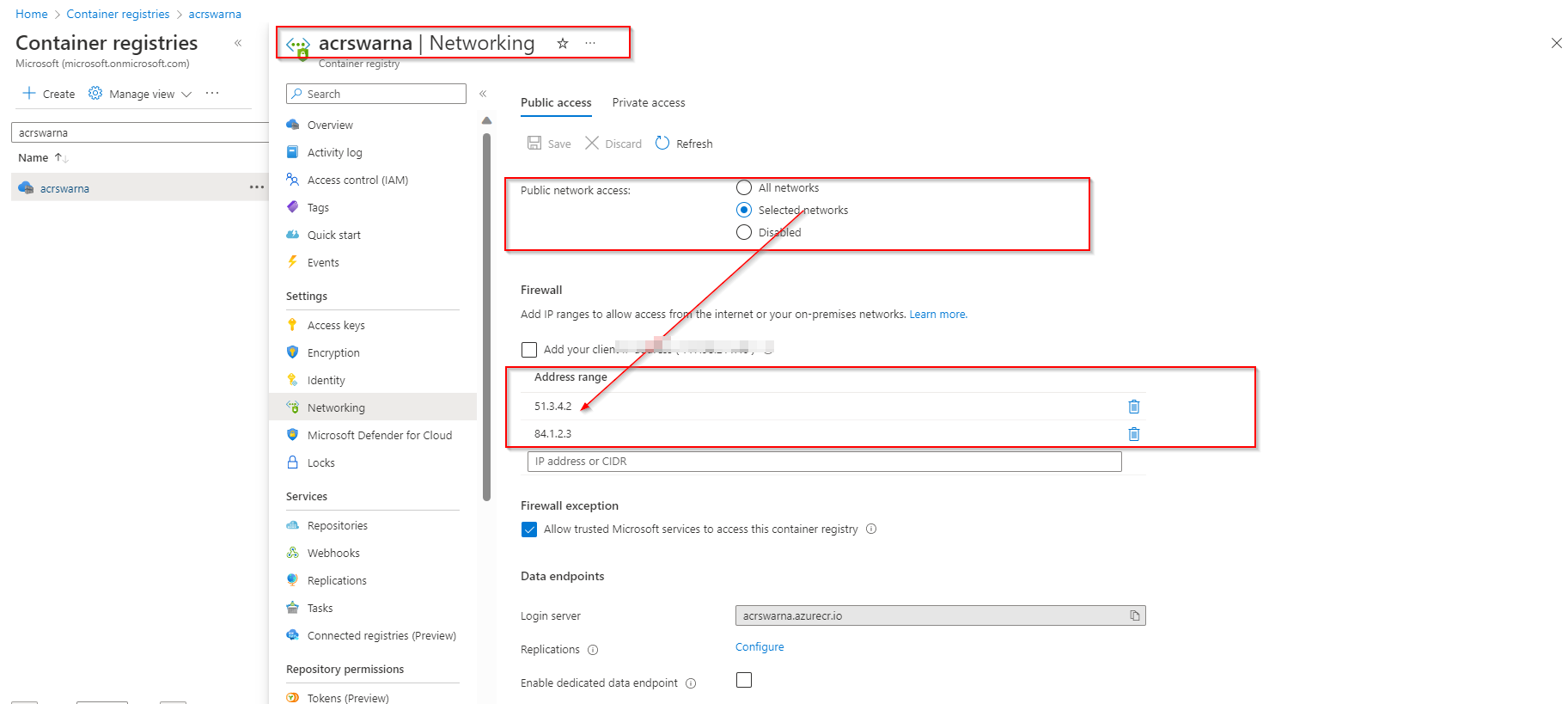
Repeat Step2这里是实现后门户的输出。具有选定的IP范围
回滚过程,使所有网络保持默认状态,并在门户.上移除IP上的范围
要在上进行的更改替换terraform.tfvars中的下面代码
//Disable/ Enable the allowed ips when ever need if it was empty All Network will allow and if any ips its allowed only required range
//allowed_ips = ["84.1.2.3", "51.3.4.2"]
allowed_ips  =  []
main.tf文件-替换下面的代码
// Disable this code block  for allowed ip network - Begin
 network_rule_set {
  default_action = "Allow"
 }
// Disable this code block  for allowed ip network - End
重复序列Step2
输出
在terraform应用之后,您可以看到到所有网络的流量路由,并在门户上删除相应的IP地址。
https://stackoverflow.com/questions/74450592
复制相似问题
腾讯云开发者

Copyright © 2013 - 2026 Tencent Cloud. All Rights Reserved. 腾讯云 版权所有
深圳市腾讯计算机系统有限公司 ICP备案/许可证号:粤B2-20090059  粤公网安备44030502008569号
腾讯云计算(北京)有限责任公司 京ICP证150476号 | 京ICP备11018762号