
Kubernetes ConfigMap不能覆盖Nginx default.conf文件
Kubernetes ConfigMap不能覆盖Nginx default.conf文件
提问于 2022-11-14 14:01:45
我试图使用default.conf对象将现有的Nginx文件替换为自己的文件,但此操作会导致“回退重新启动失败容器”错误。如果我将覆盖目录从config .d更改为新的nginx.d,那么传递我的配置将是成功的。看起来nginx不允许重写它现有的文件和目录。是否有任何解决办法,或者我在部署文件中犯了错误?
这是我的yaml文件。部署文件
apiVersion: apps/v1
kind: Deployment
metadata:
  name: skadate-deployment
  labels:
    tier: backend
spec:
  replicas: 1
  selector:
    matchLabels:
      app: skadate
      tier: backend
  template:
    metadata:
      labels:
        app: skadate
        tier: backend
    spec:
      volumes:
        - name: skadate-software
          emptyDir: {}
        - name: nginx-config
          configMap:
            name: skadate-test-nginx-config
            items:
              - key: default.conf
                path: default.conf
      containers:
        - name: php
          image: psiloscop/php-hello-world:latest
          ports:
            - containerPort: 81
              name: http
              protocol: TCP
          volumeMounts:
            - name: skadate-software
              mountPath: /var/www/html
          lifecycle:
            postStart:
              exec:
                command: [ "/bin/sh", "-c", "cp -r /app/. /var/www/html" ]
        - name: nginx
          image: nginx:stable
          ports:
            - containerPort: 80
          volumeMounts:
            - name: skadate-software
              mountPath: /var/www/html
            - name: nginx-config
              mountPath: /etc/nginx/conf.d/default.conf
              subPath: default.conf
ConfigMap文件
apiVersion: v1
kind: ConfigMap
metadata:
  name: skadate-test-nginx-config
  labels:
    tier: backend
data:
  default.conf : |
    server {
      listen 80;

      location / {
        root /var/www/html
        index index.html index.htm;
        try_files $uri $uri/ /index.html;
      }
    }
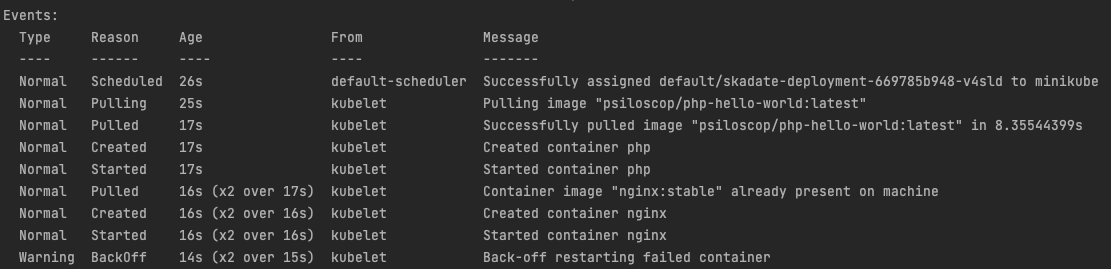
下面是部署荚日志:
回答 1
Stack Overflow用户
回答已采纳
发布于 2022-11-14 16:23:14
我最近也遇到了类似的情况。为了管理这一点,我们可以破解CMD (命令)来执行所需的操作。
首先,为nginx容器的nginx进程创建启动脚本。&这肯定是一个configmap。
#!/bin/sh
rm -rf /etc/nginx/conf.d/default.conf
cp /tmp/default.conf /etc/nginx/conf.d/default.conf
nginx -g daemon off;
然后将此脚本用于部署文件中的nginx容器。有时如下所示:
apiVersion: apps/v1
kind: Deployment
metadata:
  name: skadate-deployment
  labels:
    tier: backend
spec:
  replicas: 1
  selector:
    matchLabels:
      app: skadate
      tier: backend
  template:
    metadata:
      labels:
        app: skadate
        tier: backend
    spec:
      volumes:
        - name: skadate-software
          emptyDir: {}
        - name: nginx-config
          configMap:
            name: skadate-test-nginx-config
            items:
              - key: default.conf
                path: default.conf
      containers:
        - name: php
          image: psiloscop/php-hello-world:latest
          ports:
            - containerPort: 81
              name: http
              protocol: TCP
          volumeMounts:
            - name: skadate-software
              mountPath: /var/www/html
          lifecycle:
            postStart:
              exec:
                command: [ "/bin/sh", "-c", "cp -r /app/. /var/www/html" ]
        - name: nginx
          image: nginx:stable
          command: ['sh','/script/nginx-start']
          ports:
            - containerPort: 80
          volumeMounts:
            - name: skadate-software
              mountPath: /var/www/html
            - name: nginx-config
              mountPath: /tmp
              subPath: default.conf
            - name: nginx-start-script
              mountpath: /script
              subPath: nginx-start
在这里,两个重要的变化是:
- 我们放置在/tmp路径中的新default.conf文件&将由自定义启动脚本负责复制到/etc/ nginx /con.d/ default.conf路径中。
自定义启动脚本的额外configmap
apiVersion: v1
kind: ConfigMap
metadata:
  name: nginx-start-script
  labels:
    app: nginx
data:
  nginx-start : |
    #!/bin/sh
    rm -rf /etc/nginx/conf.d/default.conf
    cp /tmp/default.conf /etc/nginx/conf.d/default.conf
    nginx -g daemon off;
希望这能解决你的问题。请分享结果。
页面原文内容由Stack Overflow提供。腾讯云小微IT领域专用引擎提供翻译支持
原文链接:
https://stackoverflow.com/questions/74432855
复制相关文章
相似问题
腾讯云开发者

Copyright © 2013 - 2026 Tencent Cloud. All Rights Reserved. 腾讯云 版权所有
深圳市腾讯计算机系统有限公司 ICP备案/许可证号:粤B2-20090059  粤公网安备44030502008569号
腾讯云计算(北京)有限责任公司 京ICP证150476号 | 京ICP备11018762号