
阿童木:埃斯林特被配置为
阿童木:埃斯林特被配置为
提问于 2022-11-12 10:09:23
我试图用react、typescript和astro来设置我的eslint配置,但似乎我无法摆脱这个错误:
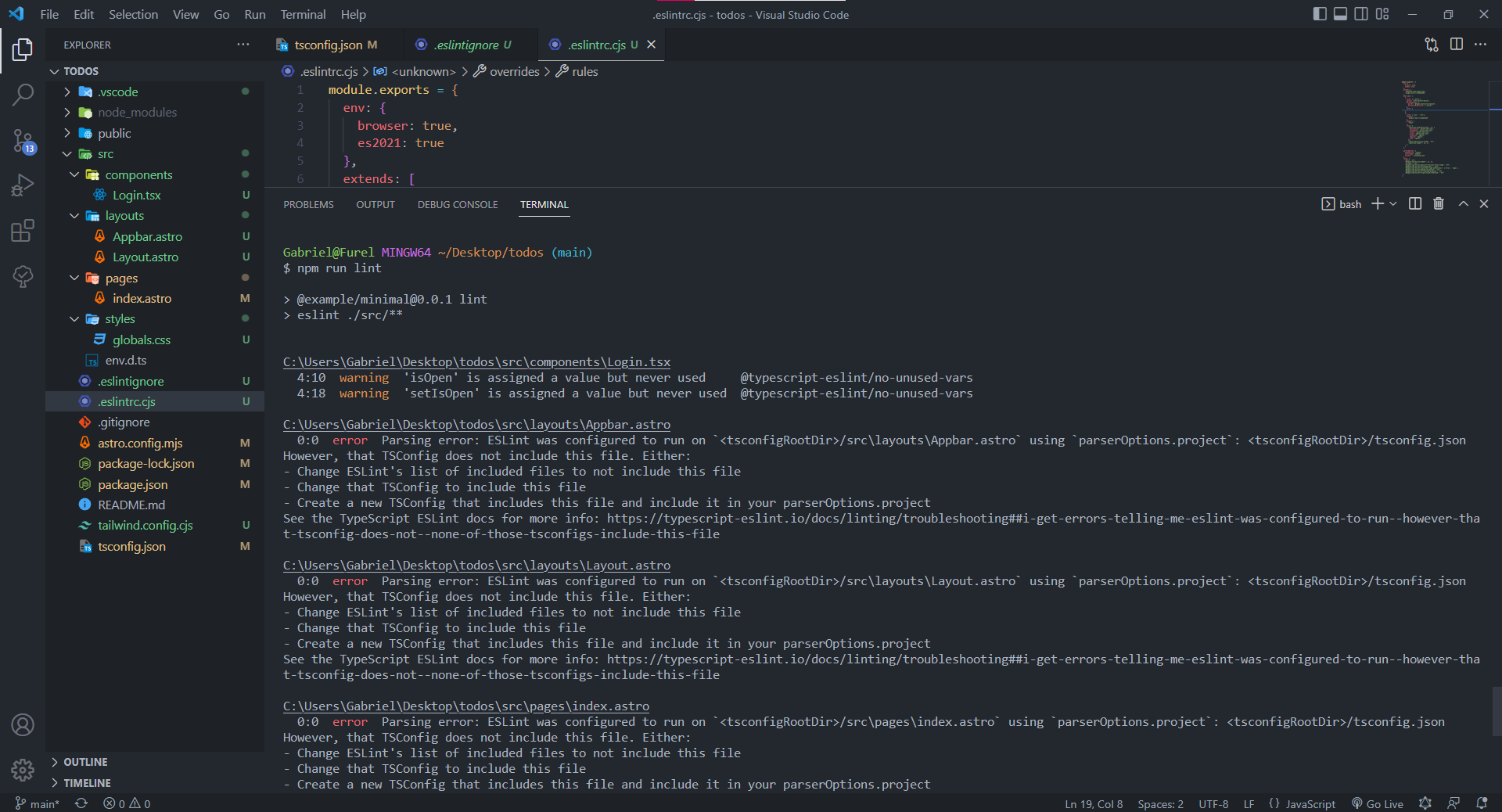
这是我的.eslintrc.cjs,它看起来像:
module.exports = {
  env: {
    browser: true,
    es2021: true
  },
  extends: [
    'standard-with-typescript',
    'plugin:astro/recommended'
  ],
  overrides: [
    {
      files: ['*.astro'],
      parser: 'astro-eslint-parser',
      parserOptions: {
        parser: '@typescript-eslint/parser',
        extraFileExtensions: ['.astro']
      },
      rules: {
      }
    },
    {
      files: ['.jsx', '.tsx'],
      extends: [
        'plugin:react/recommended'
      ],
      plugins: [
        'react'
      ],
      rules: {
        'react/jsx-wrap-multilines': [2, {
          declaration: 'parens-new-line',
          assignment: 'parens-new-line',
          return: 'parens-new-line',
          arrow: 'parens-new-line',
          condition: 'ignore',
          logical: 'ignore',
          prop: 'ignore'
        }],
        'react/react-in-jsx-scope': 'off',
        'react/jsx-indent': [1, 2]
      }
    }
  ],

  parserOptions: {
    ecmaVersion: 'latest',
    sourceType: 'module',
    project: './tsconfig.json'
  },
  rules: {
    indent: 'off',
    '@typescript-eslint/indent': [1, 2],
    'no-tabs': 'off',
    '@typescript-eslint/explicit-function-return-type': 'off',
    '@typescript-eslint/no-unused-vars': 'warn',
    '@typescript-eslint/consistent-type-definitions': ['error', 'type'],
    '@typescript-eslint/naming-convention': 'off',
    '@typescript-eslint/no-floating-promises': 'off',
    '@typescript-eslint/triple-slash-reference': 'off'
  }
}这是我的tsconfig.json
{
  "extends": "astro/tsconfigs/strictest",
  "compilerOptions": {
    "target": "ESNext",
    "useDefineForClassFields": true,
    "lib": ["DOM", "DOM.Iterable", "ESNext"],
    "allowJs": false,
    "skipLibCheck": true,
    "esModuleInterop": false,
    "baseUrl": "./src/",
    "allowSyntheticDefaultImports": true,
    "strict": true,
    "forceConsistentCasingInFileNames": true,
    "module": "ESNext",
    "moduleResolution": "Node",
    "resolveJsonModule": true,
    "isolatedModules": true,
    "noEmit": true,
    "jsx": "react-jsx"
  },
  "include": ["src"]
}
任何帮助都是非常感谢的。
我试着遵循这个https://github.com/ota-meshi/eslint-plugin-astro的星体设置指南,但是仍然会出现这些错误。
回答 2
Stack Overflow用户
发布于 2022-11-20 00:16:31
您还需要在您的"include": ["**/*.ts", "**/*.tsx", "**/*.astro"]中添加/更新tsconfig.json
Stack Overflow用户
发布于 2022-12-04 09:25:56
您需要在extraFileExtensions: ['.astro'],的顶部范围内将parserOptions添加到.eslintrc.cjs!
这是因为standard-with-typescript覆盖了parserOptions。
页面原文内容由Stack Overflow提供。腾讯云小微IT领域专用引擎提供翻译支持
原文链接:
https://stackoverflow.com/questions/74411996
复制相关文章
相似问题
腾讯云开发者

Copyright © 2013 - 2026 Tencent Cloud. All Rights Reserved. 腾讯云 版权所有
深圳市腾讯计算机系统有限公司 ICP备案/许可证号:粤B2-20090059  粤公网安备44030502008569号
腾讯云计算(北京)有限责任公司 京ICP证150476号 | 京ICP备11018762号