
Azure.Data.Tables C# SDK查询时间戳返回零结果
Azure.Data.Tables C# SDK查询时间戳返回零结果
提问于 2022-11-11 22:35:15
我有一个Azure CosmosDB表,当我使用带有时间戳过滤器的Azure.Data.Tables C# SDK查询它时,它返回零列。当我删除筛选器时,它成功地应用了其余的查询。
例如,使用下面的过滤器:
Timestamp ge datetime'2022-11-04T22:24:14.851Z'当我在Azure Portal上应用相同的筛选器时,查询将按预期的方式运行,并根据时间戳属性筛选行。
我希望返回行,因为有满足此筛选器的行(它们是在此日期之后添加的)。
回答 1
Stack Overflow用户
发布于 2022-11-15 12:22:55
使用下面的查询,您可以根据时间戳筛选结果。
"SELECT * FROM c WHERE (c[\"ShipDate\"] >= \"2014-09-30T23:14:25.7251173Z\")"我根据时间戳从cosmos db获取数据的步骤如下:
- 在Azure中创建了cosmos db。
- 创建了一个C#控制台应用程序并在下面添加了代码,
using Microsoft.Azure.Cosmos;
using Microsoft.Azure.Cosmos.Linq;
// </using_directives>

// <endpoint_key>
// New instance of CosmosClient class using an endpoint and key string
var Endpoint = "<cosmos db url>";
var Key = "<yourkey>";
CosmosClient cosmosClient = new CosmosClient(Endpoint, Key);// </endpoint_key>

// <create_database>
// New instance of Database class referencing the server-side database
Database database = await cosmosClient.CreateDatabaseIfNotExistsAsync(
    id: "adventureworks"
);
// </create_database>

// <create_container>
// New instance of Container class referencing the server-side container
Container container = await database.CreateContainerIfNotExistsAsync(
    id: "products",
    partitionKeyPath: "/category",
    throughput: 400
);
// </create_container>

// <create_items>
// Create new items and add to container
Product firstNewItem = new(
    id: "68719518388",
    category: "gear-surf-surfboards",
    name: "Sunnox Surfboard",
    quantity: 8,
    sale: true,
    ShipDate: DateTime.UtcNow.AddDays(-14)
);

Product secondNewitem = new(
    id: "68719518398",
    category: "gear-surf-surfboards",
    name: "Noosa Surfboard",
    quantity: 15,
    sale: false,
    ShipDate: DateTime.UtcNow.AddDays(-10)
);

await container.CreateItemAsync<Product>(
    item: firstNewItem,
    partitionKey: new PartitionKey("gear-surf-surfboards")
);

await container.CreateItemAsync<Product>(
    item: secondNewitem,
    partitionKey: new PartitionKey("gear-surf-surfboards")
);
// </create_items>

// <query_items_sql>
// Query multiple items from container
using FeedIterator<Product> feed = container.GetItemQueryIterator<Product>(
    queryText: "SELECT * FROM c WHERE (c[\"ShipDate\"] >= \"2014-09-30T23:14:25.7251173Z\")"
);

// Iterate query result pages
while (feed.HasMoreResults)
{
    FeedResponse<Product> response = await feed.ReadNextAsync();

    // Iterate query results
    foreach (Product item in response)
    {
        Console.WriteLine($"Found item:\t{item.name}");
    }
}- 又添加了一个名为Product.cs的类,并添加了下面的代码
 class Product
{
    public string id;
    public string category;
    public string name;
    public int quantity;
    public bool sale;
    public DateTime ShipDate;

    public Product(string id, string category, string name, int quantity, bool sale,DateTime ShipDate)
    {
        this.id = id;
        this.category = category;
        this.name = name;
        this.quantity = quantity;
        this.sale = sale;
        this.ShipDate = ShipDate;

    }
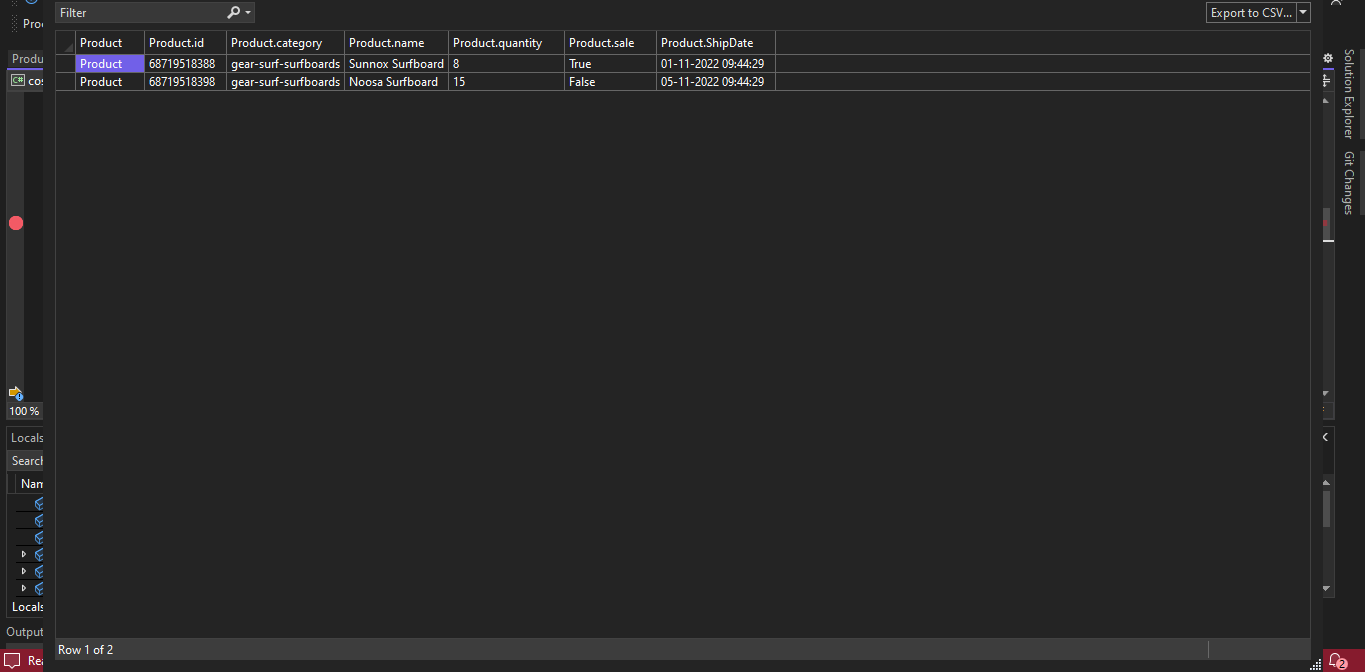
}- 能够根据时间戳筛选条件从cosmos db获取行。
参考链接
页面原文内容由Stack Overflow提供。腾讯云小微IT领域专用引擎提供翻译支持
原文链接:
https://stackoverflow.com/questions/74408815
复制相关文章
相似问题
腾讯云开发者

Copyright © 2013 - 2026 Tencent Cloud. All Rights Reserved. 腾讯云 版权所有
深圳市腾讯计算机系统有限公司 ICP备案/许可证号:粤B2-20090059  粤公网安备44030502008569号
腾讯云计算(北京)有限责任公司 京ICP证150476号 | 京ICP备11018762号