
如何使图像并排与下面的描述,采取完整的长度并排照片?
如何使图像并排与下面的描述,采取完整的长度并排照片?
提问于 2022-11-11 19:45:08
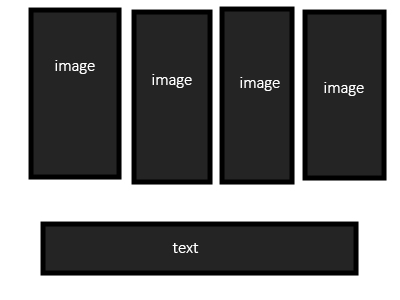
我想做这个-当你悬停在每一张图片上,文字是不同的。这是给公司用的。这让我发疯了。如果文字在图片中没有CSS就做不到?是javascript的唯一解决方案吗?对不起,如果这是个愚蠢的问题,我是自学成才的,可能和在座的大多数人一样:)
我试过了flex,div,list,但是如果文本与照片不同,CSS不会让我这么做吗?(我已经让代码变得非常简单来描述这个想法)
如果我做了
<div id="headshot-row">
<div id="headshot-1">headshot1</div>
<div id="headshot-2">headshot2</div>
<div id="headshot-3">headshot3</div>
<div id="headshot-4">headshot4</div>
</div>

<div id="bios">
<div id="bio-1">bio1</div>
<div id="bio-2">bio2</div>
<div id="bio-3">bio3</div>
<div id="bio-4">bio4</div>
</div>
我想要
#headshot-row {
margin: 0 auto;
display: flex;
justify-content: space-around;
}

#bios {
margin: 0 auto;
display: none;
}

#headshot-1:hover #bio-1 {
display: block
}回答 2
Stack Overflow用户
回答已采纳
发布于 2022-11-11 20:28:57
您可以使用CSS来实现这一点,只需稍微更改HTML结构--图像需要与bios有某种关系,如果图像和bios元素是兄弟关系,则可以实现这一点。
此片段为演示目的详细说明了单独的悬停条件。你可以用它的.查找工具,例如ids启动bio,或者您可以只使用CSS第n-子。
代码片段还使用网格,因为这更适合于二维布局。
.container {
  display: flex;
  justify-content: center;
}

#headshot {
  display: grid;
  gap: 5vw;
  grid-template-columns: repeat(4, 1fr);
}

#headshot>* {
  background: black;
  width: 100%;
  height: 100%;
  color: white;
  display: flex;
  justify-content: center;
  align-items: center;
}

#bios {
  grid-column: 1 / span 4;
}

#bios>* {
  display: none;
}

#headshot-1:hover~#bios #bio-1 {
  display: block;
}

#headshot-2:hover~#bios #bio-2 {
  display: block;
}

#headshot-3:hover~#bios #bio-3 {
  display: block;
}

#headshot-4:hover~#bios #bio-4 {
  display: block;
}<div id="headshot">
<div id="headshot-1">headshot1</div>
<div id="headshot-2">headshot2</div>
<div id="headshot-3">headshot3</div>
<div id="headshot-4">headshot4</div>
<div id="bios">
<div id="bio-1">bio1</div>
<div id="bio-2">bio2</div>
<div id="bio-3">bio3</div>
<div id="bio-4">bio4</div>
</div>
Stack Overflow用户
发布于 2022-11-11 20:25:43
.wrapper {
  position: relative;
}

.wrapper img {
  height: 100%;
  width: 100%;
  object-fit: cover;
}

.wrapper span {
  position: absolute;
  top: 0;
  left: 0;
  height: 100%;
  width: 100%;

  display: flex;
  justify-content: center;
  align-items: center;

  background: red;
  color: white;

  opacity: 0;
  transition: opacity 350ms ease;
}

.wrapper:hover span {
  opacity: 1;
}<div class="wrapper">
<img src="https://via.placeholder.com/350x150" />
<span>Text</span>
</div>
页面原文内容由Stack Overflow提供。腾讯云小微IT领域专用引擎提供翻译支持
原文链接:
https://stackoverflow.com/questions/74407437
复制相关文章
相似问题
腾讯云开发者

Copyright © 2013 - 2026 Tencent Cloud. All Rights Reserved. 腾讯云 版权所有
深圳市腾讯计算机系统有限公司 ICP备案/许可证号:粤B2-20090059  粤公网安备44030502008569号
腾讯云计算(北京)有限责任公司 京ICP证150476号 | 京ICP备11018762号