
如何使用Terraform建立私有链接以访问存储帐户?
我需要使用下面的场景测试我的azure私有端点。
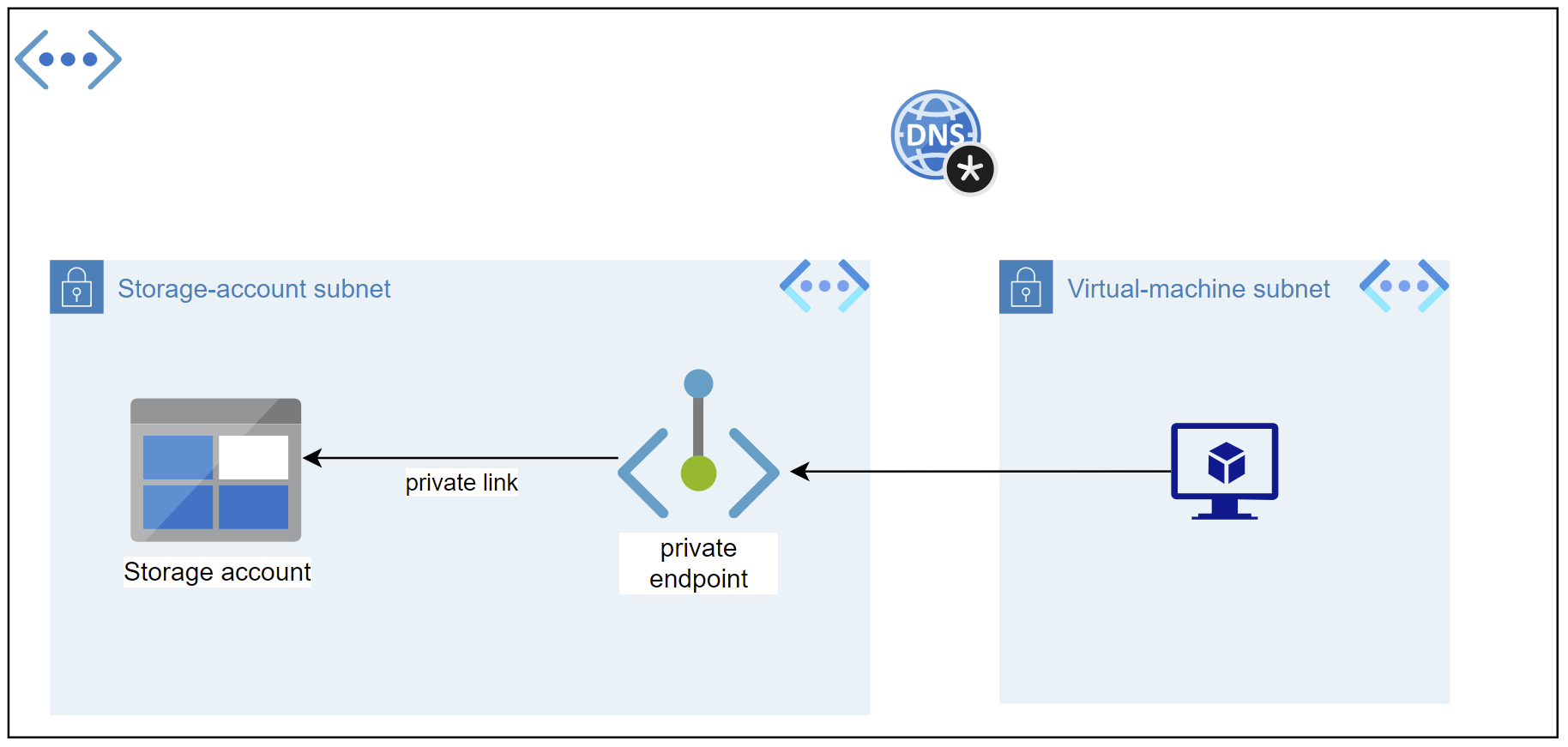
我们有一个具有两个子网的虚拟网络( storage_account_subnet)
- The
virtual-machine (vm)和vm_subnetvirtual-machine (vm)应该能够使用私有链接.
连接到storage-account )。
因此,下面的图像解释了这个场景:
然后,我需要使用下面的手动测试用例测试我的端点:
使用ssh和putty用户名:P@$$w0rd1234!
- In:(
10.0.2.0/24))
终端ping formuleinsstorage.blob.core.windows.net (预期将在storage_account_subnet (10.0.2.0/24))范围内看到存储帐户的ip )将
- 连接到蔚蓝虚拟机
我使用以下Terraform代码部署所有基础设施:
provider "azurerm" {

  features {
    resource_group {
      prevent_deletion_if_contains_resources = false
    }
  }
}

resource "azurerm_resource_group" "main_resource_group" {
  name     = "RG-Terraform-on-Azure"
  location = "West Europe"
}
# Create Virtual-Network

resource "azurerm_virtual_network" "virtual_network" {
  name                = "Vnet"
  address_space       = ["10.0.0.0/16"]
  location            = azurerm_resource_group.main_resource_group.location
  resource_group_name = azurerm_resource_group.main_resource_group.name
}


# Create subnet for virtual-machine

resource "azurerm_subnet" "virtual_network_subnet" {
  name                 = "vm_subnet"
  resource_group_name  = azurerm_resource_group.main_resource_group.name
  virtual_network_name = azurerm_virtual_network.virtual_network.name
  address_prefixes     = ["10.0.1.0/24"]
}

# Create subnet for storage account

resource "azurerm_subnet" "storage_account_subnet" {
  name                 = "storage_account_subnet"
  resource_group_name  = azurerm_resource_group.main_resource_group.name
  virtual_network_name = azurerm_virtual_network.virtual_network.name
  address_prefixes     = ["10.0.2.0/24"]
}

# Create Linux Virtual machine
resource "azurerm_linux_virtual_machine" "example" {
  name                            = "example-machine"
  location                        = azurerm_resource_group.main_resource_group.location
  resource_group_name             = azurerm_resource_group.main_resource_group.name
  size                            = "Standard_F2"
  admin_username                  = "adminuser"
  admin_password                  = "14394Las?"
  disable_password_authentication = false
  network_interface_ids           = [
    azurerm_network_interface.virtual_machine_network_interface.id,
  ]


  os_disk {
    caching              = "ReadWrite"
    storage_account_type = "Standard_LRS"
  }

  source_image_reference {
    publisher = "Canonical"
    offer     = "UbuntuServer"
    sku       = "16.04-LTS"
    version   = "latest"
  }
}

resource "azurerm_network_interface" "virtual_machine_network_interface" {
  name                = "vm-nic"
  location            = azurerm_resource_group.main_resource_group.location
  resource_group_name = azurerm_resource_group.main_resource_group.name

  ip_configuration {
    name                          = "internal"
    subnet_id                     = azurerm_subnet.virtual_network_subnet.id
    private_ip_address_allocation = "Dynamic"
    public_ip_address_id          = azurerm_public_ip.vm_public_ip.id
  }
}

# Create Network-interface and public-ip for virtual-machien

resource "azurerm_public_ip" "vm_public_ip" {
  name                = "vm-public-ip-for-rdp"
  location            = azurerm_resource_group.main_resource_group.location
  resource_group_name = azurerm_resource_group.main_resource_group.name
  allocation_method   = "Static"
  sku                 = "Standard"
}

resource "azurerm_network_interface" "virtual_network_nic" {
  name                = "vm_nic"
  location            = azurerm_resource_group.main_resource_group.location
  resource_group_name = azurerm_resource_group.main_resource_group.name

  ip_configuration {
    name                          = "testconfiguration1"
    subnet_id                     = azurerm_subnet.virtual_network_subnet.id
    private_ip_address_allocation = "Dynamic"
  }
}

# Setup an Inbound rule because we need to connect to the virtual-machine using RDP (remote-desktop-protocol)

resource "azurerm_network_security_group" "traffic_rules" {
  name                = "vm_traffic_rules"
  location            = azurerm_resource_group.main_resource_group.location
  resource_group_name = azurerm_resource_group.main_resource_group.name

  security_rule {
    name                       = "virtual_network_permission"
    priority                   = 100
    direction                  = "Inbound"
    access                     = "Allow"
    protocol                   = "*"
    source_port_range          = "*"
    destination_port_range     = "22"
    source_address_prefix      = "*"
    destination_address_prefix = "*"
  }
}

resource "azurerm_subnet_network_security_group_association" "private_nsg_asso" {
  subnet_id                 = azurerm_subnet.virtual_network_subnet.id
  network_security_group_id = azurerm_network_security_group.traffic_rules.id

}

# Setup storage_account and its container

resource "azurerm_storage_account" "storage_account" {
  name                     = "storagaccountfortest"
  location                 = azurerm_resource_group.main_resource_group.location
  resource_group_name      = azurerm_resource_group.main_resource_group.name
  account_tier             = "Standard"
  account_replication_type = "LRS"
  account_kind             = "StorageV2"
  is_hns_enabled           = "true"

}

resource "azurerm_storage_data_lake_gen2_filesystem" "data_lake_storage" {
  name               = "rawdata"
  storage_account_id = azurerm_storage_account.storage_account.id

  lifecycle {
    prevent_destroy = false
  }
}

# Setup DNS zone
resource "azurerm_private_dns_zone" "dns_zone" {
  name                = "privatelink.blob.core.windows.net"
  resource_group_name = azurerm_resource_group.main_resource_group.name
}

resource "azurerm_private_dns_zone_virtual_network_link" "network_link" {
  name                  = "vnet_link"
  resource_group_name   = azurerm_resource_group.main_resource_group.name
  private_dns_zone_name = azurerm_private_dns_zone.dns_zone.name
  virtual_network_id    = azurerm_virtual_network.virtual_network.id

}

# Setup private-link

resource "azurerm_private_endpoint" "endpoint" {
  name                = "storage-private-endpoint"
  location            = azurerm_resource_group.main_resource_group.location
  resource_group_name = azurerm_resource_group.main_resource_group.name
  subnet_id           = azurerm_subnet.storage_account_subnet.id

  private_service_connection {
    name                           = "private-service-connection"
    private_connection_resource_id = azurerm_storage_account.storage_account.id
    is_manual_connection           = false
    subresource_names              = ["blob"]
  }
}

resource "azurerm_private_dns_a_record" "dns_a" {
  name                = "dns-record"
  zone_name           = azurerm_private_dns_zone.dns_zone.name
  resource_group_name = azurerm_resource_group.main_resource_group.name
  ttl                 = 10
  records             = [azurerm_private_endpoint.endpoint.private_service_connection.0.private_ip_address]
}问题是,我的端点不工作!但是,如果我尝试手动添加服务端点,那么一切都会像魅力一样运行良好。所以,我认为,我的DNS区域是正确的,而且很明显,与存储帐户的链接也运行良好。所以,我觉得我的私人链接应该有问题!知道吗?
更新:
以下是版本:
Terraform v1.2.5
on windows_386
+ provider registry.terraform.io/hashicorp/azurerm v3.30.0回答 1
Stack Overflow用户
发布于 2022-11-16 06:53:44
我相信问题就在dns_a_record的名义上。这应该是您想通过私有链接访问的存储帐户的名称。
下面的Terraform代码正在为我工作:
terraform {
  required_providers {
    azurerm = {
      source  = "hashicorp/azurerm"
      version = "=3.30.0"
    }
  }
}

provider "azurerm" {
  features {
    resource_group {
      prevent_deletion_if_contains_resources = false
    }
  }
}

resource "azurerm_resource_group" "main_resource_group" {
  name     = "RG-Terraform-on-Azure"
  location = "West Europe"
}


# Create Virtual-Network
resource "azurerm_virtual_network" "virtual_network" {
  name                = "Vnet"
  address_space       = ["10.0.0.0/16"]
  location            = azurerm_resource_group.main_resource_group.location
  resource_group_name = azurerm_resource_group.main_resource_group.name
}


# Create subnet for virtual-machine
resource "azurerm_subnet" "virtual_network_subnet" {
  name                 = "vm_subnet"
  resource_group_name  = azurerm_resource_group.main_resource_group.name
  virtual_network_name = azurerm_virtual_network.virtual_network.name
  address_prefixes     = ["10.0.1.0/24"]
}

# Create subnet for storage account
resource "azurerm_subnet" "storage_account_subnet" {
  name                 = "storage_account_subnet"
  resource_group_name  = azurerm_resource_group.main_resource_group.name
  virtual_network_name = azurerm_virtual_network.virtual_network.name
  address_prefixes     = ["10.0.2.0/24"]
}

# Create Linux Virtual machine
resource "azurerm_linux_virtual_machine" "example" {
  name                            = "example-machine"
  location                        = azurerm_resource_group.main_resource_group.location
  resource_group_name             = azurerm_resource_group.main_resource_group.name
  size                            = "Standard_F2"
  admin_username                  = "adminuser"
  admin_password                  = "14394Las?"
  disable_password_authentication = false
  network_interface_ids           = [
    azurerm_network_interface.virtual_machine_network_interface.id,
  ]


  os_disk {
    caching              = "ReadWrite"
    storage_account_type = "Standard_LRS"
  }

  source_image_reference {
    publisher = "Canonical"
    offer     = "UbuntuServer"
    sku       = "16.04-LTS"
    version   = "latest"
  }
}

resource "azurerm_network_interface" "virtual_machine_network_interface" {
  name                = "vm-nic"
  location            = azurerm_resource_group.main_resource_group.location
  resource_group_name = azurerm_resource_group.main_resource_group.name

  ip_configuration {
    name                          = "internal"
    subnet_id                     = azurerm_subnet.virtual_network_subnet.id
    private_ip_address_allocation = "Dynamic"
    public_ip_address_id          = azurerm_public_ip.vm_public_ip.id
  }
}

# Create Network-interface and public-ip for virtual-machien
resource "azurerm_public_ip" "vm_public_ip" {
  name                = "vm-public-ip-for-rdp"
  location            = azurerm_resource_group.main_resource_group.location
  resource_group_name = azurerm_resource_group.main_resource_group.name
  allocation_method   = "Static"
  sku                 = "Standard"
}

resource "azurerm_network_interface" "virtual_network_nic" {
  name                = "storage-private-endpoint-nic"
  location            = azurerm_resource_group.main_resource_group.location
  resource_group_name = azurerm_resource_group.main_resource_group.name

  ip_configuration {
    name                          = "storage-private-endpoint-ip-config"
    subnet_id                     = azurerm_subnet.virtual_network_subnet.id
    private_ip_address_allocation = "Dynamic"
  }
}

# Setup an Inbound rule because we need to connect to the virtual-machine using RDP (remote-desktop-protocol)
resource "azurerm_network_security_group" "traffic_rules" {
  name                = "vm_traffic_rules"
  location            = azurerm_resource_group.main_resource_group.location
  resource_group_name = azurerm_resource_group.main_resource_group.name

  security_rule {
    name                       = "virtual_network_permission"
    priority                   = 100
    direction                  = "Inbound"
    access                     = "Allow"
    protocol                   = "*"
    source_port_range          = "*"
    destination_port_range     = "22"
    source_address_prefix      = "*"
    destination_address_prefix = "*"
  }
}

resource "azurerm_subnet_network_security_group_association" "private_nsg_asso" {
  subnet_id                 = azurerm_subnet.virtual_network_subnet.id
  network_security_group_id = azurerm_network_security_group.traffic_rules.id

}

# Setup storage_account and its container
resource "azurerm_storage_account" "storage_account" {
  name                     = <STORAGE_ACCOUNT_NAME>
  location                 = azurerm_resource_group.main_resource_group.location
  resource_group_name      = azurerm_resource_group.main_resource_group.name
  account_tier             = "Standard"
  account_replication_type = "LRS"
  account_kind             = "StorageV2"
  is_hns_enabled           = "true"

}

resource "azurerm_storage_data_lake_gen2_filesystem" "data_lake_storage" {
  name               = "rawdata"
  storage_account_id = azurerm_storage_account.storage_account.id

  lifecycle {
    prevent_destroy = false
  }
}

# Setup DNS zone
resource "azurerm_private_dns_zone" "dns_zone" {
  name                = "privatelink.blob.core.windows.net"
  resource_group_name = azurerm_resource_group.main_resource_group.name
}

resource "azurerm_private_dns_zone_virtual_network_link" "network_link" {
  name                  = "vnet-link"
  resource_group_name   = azurerm_resource_group.main_resource_group.name
  private_dns_zone_name = azurerm_private_dns_zone.dns_zone.name
  virtual_network_id    = azurerm_virtual_network.virtual_network.id
}

# Setup private-link
resource "azurerm_private_endpoint" "endpoint" {
  name                = "storage-private-endpoint"
  location            = azurerm_resource_group.main_resource_group.location
  resource_group_name = azurerm_resource_group.main_resource_group.name
  subnet_id           = azurerm_subnet.storage_account_subnet.id

  private_service_connection {
    name                           = "storage-private-service-connection"
    private_connection_resource_id = azurerm_storage_account.storage_account.id
    is_manual_connection           = false
    subresource_names              = ["blob"]
  }
}

resource "azurerm_private_dns_a_record" "dns_a" {
  name                = azurerm_storage_account.storage_account.name
  zone_name           = azurerm_private_dns_zone.dns_zone.name
  resource_group_name = azurerm_resource_group.main_resource_group.name
  ttl                 = 10
  records             = [azurerm_private_endpoint.endpoint.private_service_connection.0.private_ip_address]
}此外,我不确定是否有可能使用ping存储帐户。为了进行测试,我从本地机器和Azure运行nslookup <STORAGE_ACCOUNT_NAME>.blob.core.windows.net。在前一种情况下,我获得了一个公共IP,而在后者中,我得到了Terraform配置中定义的范围内的私有IP,这似乎是您正在寻找的行为。
https://stackoverflow.com/questions/74381950
复制相似问题
腾讯云开发者

Copyright © 2013 - 2026 Tencent Cloud. All Rights Reserved. 腾讯云 版权所有
深圳市腾讯计算机系统有限公司 ICP备案/许可证号:粤B2-20090059  粤公网安备44030502008569号
腾讯云计算(北京)有限责任公司 京ICP证150476号 | 京ICP备11018762号