
基于三种相依性下降的大熊猫分类变量分析
我有一个数据文件,它看起来像这样:
df = pd.DataFrame ({'id': {0: 84, 1: 84, 2: 84, 3: 84, 4: 124},
               'Version': { 0: 'SemVer4', 1: 'Timestamps', 2: 'Snapshots', 3: 'Names', 4: 'Numbered Versions'},
               'server_Version': {0: 'v1', 1: 'v2', 2: 'api/v1', 3: '1.1.0', 4: 'v4'},
               'owner': {0: 'vmware', 1:'microsoft', 2: 'nasa', 3: 'swagger-API', 4:'sqaas'},
               'repo_name': {0: 'container-service-extension', 1: 'azure-rest-api-specs', 2: 'api.nasa.gov', 3: 'swagger-ui', 4: 'sqaas'},
'filepath':{0: 'openapi.yaml', 1: 'dapper.json', 2: 'dockstore-webservice/src/main/resources/openapi3/openapi.yaml', 3: 'api/cmd/kubermatic-api/swagger.json', 4: 'cmd/spec/openapi.jsonsqaas'}})我想要创建一个可视化,它以三个依赖的下拉列表作为输入:所有者、回购名称和filepath。这三者之间的关系是,owner代表主API名称,reponames是所有者下存储库的名称,filepath是所选回购中不同操作的名称。
我想要的下拉列表的输出如下:

我在Elasticsearch中创建了这些下拉列表,但是在分析数据时出现了问题,因为有些字段在kibana中没有得到正确的解析。
我想要应用下拉过滤的可视化方法是:
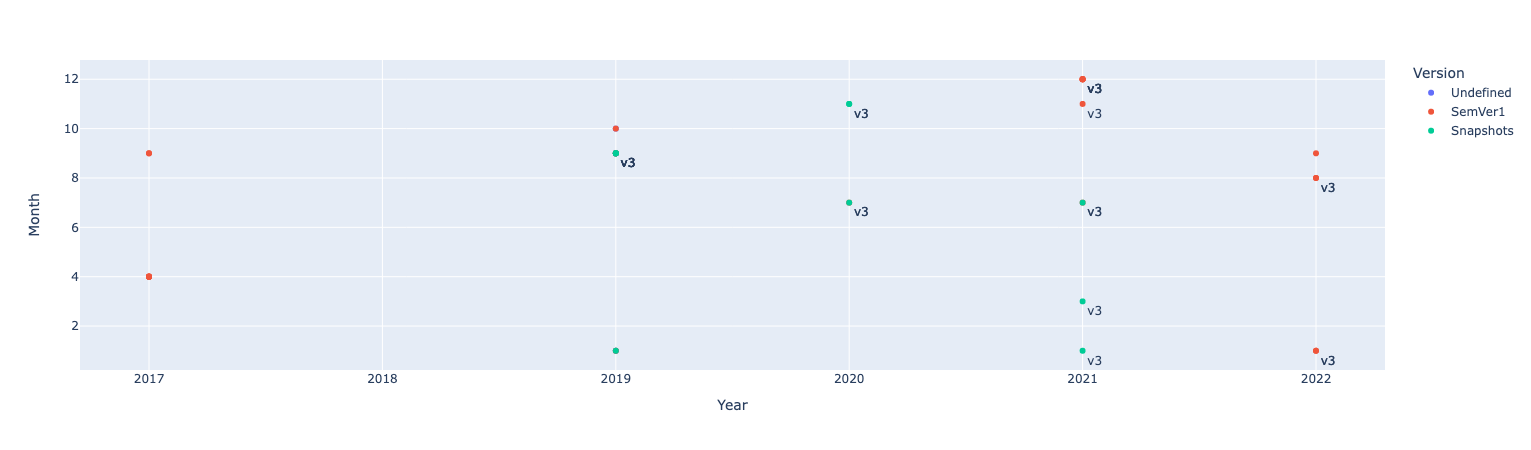
fig = px.scatter(df.query("owner=='swagger-api'"), x="Year", y="Month", color="Version", text="server_version")
fig.update_traces(textposition="bottom right")
fig.show()
我在这里要做的是这些年和几个月,我知道哪些API版本和哪个服务器版本被使用过,但是正如您在代码中看到的那样,当我为一个所有者这样做时,我需要一些过滤来显示特定回购和filepath。
我目前正在使用Plotly作为我的可视化工具,而且我对这个库非常陌生。如果有任何其他的图书馆,可以帮助我实现这一点,请告诉我。任何关于如何进行这方面的帮助或建议都是非常感谢的!
回答 1
Stack Overflow用户
发布于 2022-11-11 20:42:34
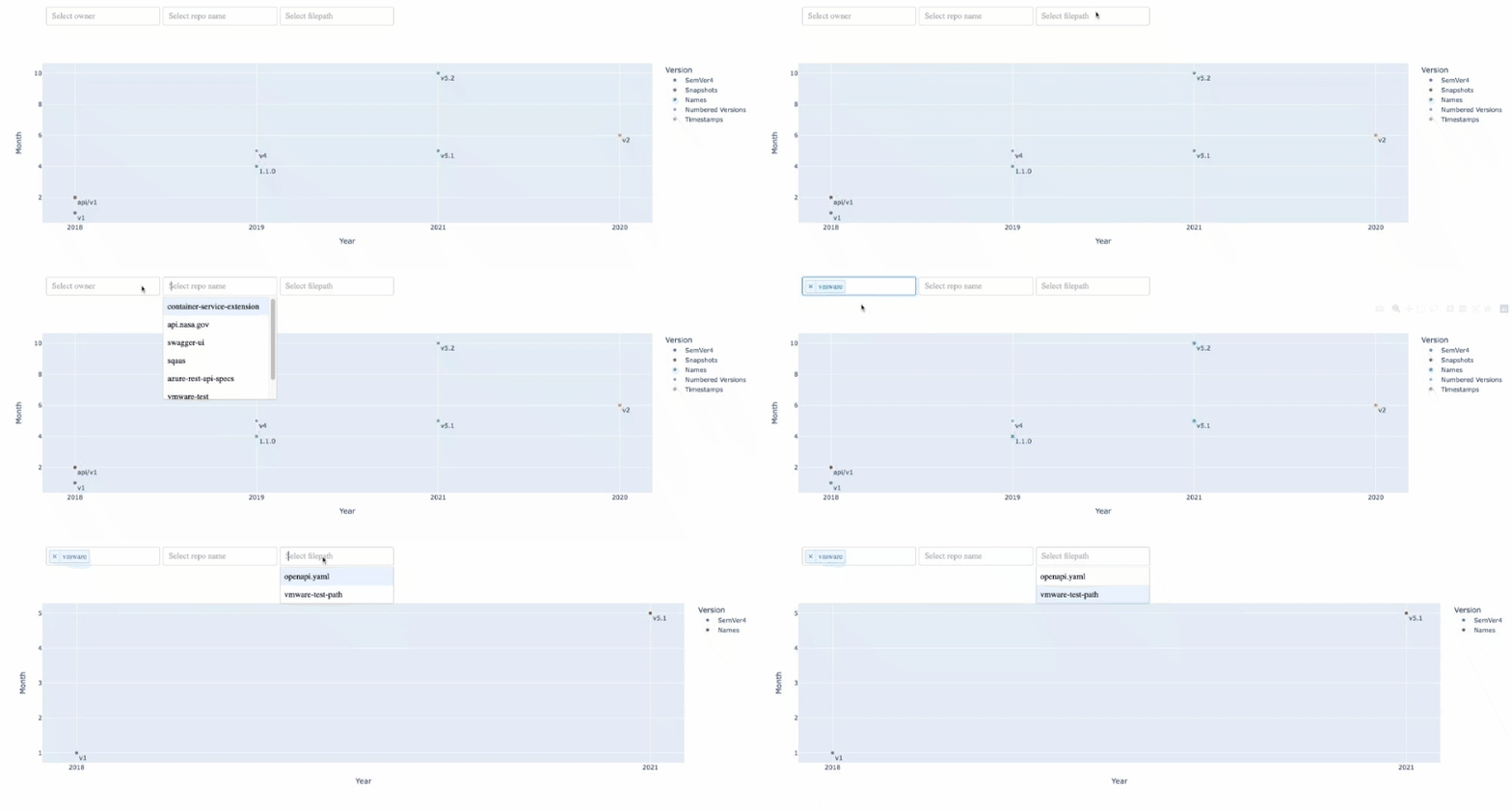
由于您提到希望下拉列表是依赖的,因此下拉必须知道其他下拉列表的状态--这在plotly中是不可能的,但是在plotly-dash中是可能的,因为支持回调。
要做到这一点,我们可以编写一个更新函数,为您的三个下拉列表接受所有可能的选择,并根据您的df来更新所有其他下拉列表。我认为,在同样的功能中,相应地更新数字也是有意义的。
唯一棘手的部分是,当您从一个下拉列表中选择而不是从其他下拉列表中选择时,您将None作为输入,但是如果您清除下拉列表中的选择,则[]作为输入,因此您的更新函数需要考虑到这种情况。如果您清楚从所有下拉列表中选择的内容,您可能希望所有可能的下拉选项再次出现--这种可能性也会被考虑在内。
我还扩展了示例df以包括一些下拉列表的多行,以检查dash应用程序是否仍然适用于这种情况。我可能还没有考虑到一些边缘情况,但目前看来,这个解决方案似乎是可行的。
import pandas as pd
import plotly.express as px
from dash import Dash, dcc, html, Input, Output, ctx

df = pd.DataFrame ({'id': {0: 84, 1: 84, 2: 84, 3: 84, 4: 124, 5:1, 6:1},
               'Version': { 0: 'SemVer4', 1: 'Timestamps', 2: 'Snapshots', 3: 'Names', 4: 'Numbered Versions', 5: 'test', 6: 'test'},
               'server_Version': {0: 'v1', 1: 'v2', 2: 'api/v1', 3: '1.1.0', 4: 'v4', 5: 'v5', 6: 'v5'},
               'owner': {0: 'vmware', 1:'microsoft', 2: 'nasa', 3: 'swagger-API', 4:'sqaas',5:'vmware',6:'nasa'},
               'Year': {0: '2018', 1:'2020', 2:'2018', 3:'2019', 4:'2019', 5:'2021',6:'2021'},
               'Month': {0: 1, 1:6, 2:2, 3:4, 4:5, 5:5, 6:10},
               'repo_name': {0: 'container-service-extension', 1: 'azure-rest-api-specs', 2: 'api.nasa.gov', 3: 'swagger-ui', 4: 'sqaas', 5:'vmware-test',6:'nasa-test'},
               'filepath':{0: 'openapi.yaml', 1: 'dapper.json', 2: 'dockstore-webservice/src/main/resources/openapi3/openapi.yaml', 3: 'api/cmd/kubermatic-api/swagger.json', 4: 'cmd/spec/openapi.jsonsqaas', 5:'vmware-test-path',6:'nasa-test-path'}})

df = df.sort_values(by='Year')

## default is to show all data
fig = px.scatter(df, x="Year", y="Month", color="Version", text="server_Version")
fig.update_traces(textposition="bottom right")

app = Dash(__name__)

## three dependent dropdowns: owner, repo name and filepath
dropdown_selections = {
    category:df[category].unique().tolist()
    for category in ['owner','repo_name','filepath']
}

dropdown_id_to_col_mapping = {
    'owner-dropdown':'owner',
    'repo-name-dropdown': 'repo_name',
    'filepath-dropdown': 'filepath'
}

app.layout = html.Div(
    [
        html.Div(
            children=[
                dcc.Dropdown(
                    dropdown_selections['owner'],
                    id='owner-dropdown',
                    placeholder="Select owner",
                    style={"display": "inline-block", "width": "220px"},
                    multi=True,
                ),
                dcc.Dropdown(
                    dropdown_selections['repo_name'],
                    id='repo-name-dropdown',
                    placeholder="Select repo name",
                    style={"display": "inline-block", "width": "220px", 'padding-left': '5px'},
                    multi=True
                ),
                dcc.Dropdown(
                    dropdown_selections['filepath'],
                    id='filepath-dropdown',
                    placeholder="Select filepath",
                    style={"display": "inline-block", "width": "220px", 'padding-left': '5px'},
                    multi=True
                )
            ],
            style={"padding": "10px", 'padding-left': '6%'},
        ),
        dcc.Graph(figure=fig, id='px-scatter-fig')
    ]
)

## callback so that a selection from one figure updates the others
@app.callback(
    Output('owner-dropdown', 'options'),
    Output('repo-name-dropdown', 'options'),
    Output('filepath-dropdown', 'options'),
    Output('px-scatter-fig', 'figure'),
    Input('owner-dropdown', 'value'),
    Input('repo-name-dropdown', 'value'),
    Input('filepath-dropdown', 'value'),
    prevent_initial_call=True
)
def update_dropdowns(owner_selection, repo_name_selection, filepath_selection):
    # print(f'you selected: {owner_selection}, {repo_name_selection}, {filepath_selection}')
    dropdown_selected = ctx.triggered_id
    col_selected = dropdown_id_to_col_mapping[dropdown_selected]

    change_dropdowns = ['owner-dropdown','repo-name-dropdown','filepath-dropdown']
    change_dropdowns.remove(dropdown_selected)

    ## if you clear ALL dropdown selections, then we reset all dropdowns
    ## (and this will skip all of the following other if statements)
    if (owner_selection == []) & (repo_name_selection == []) & (filepath_selection == []):
        owner_selection = dropdown_selections['owner']
        repo_name_selection = dropdown_selections['repo_name']
        filepath_selection = dropdown_selections['filepath']

    ## if any dropdowns are cleared or not selected, we want all possible selections to return
    ## this is because if we clear some but not all dropdowns, the conditions from other dropdowns remain in place
    ## and the new dropdown selections are calculated from the subset dataframe and should be correct
    if owner_selection == []:
        owner_selection = dropdown_selections['owner']
    if repo_name_selection == []:
        repo_name_selection = dropdown_selections['repo_name']
    if filepath_selection == []:
        filepath_selection = dropdown_selections['filepath']

    if owner_selection == None:
        owner_selection = dropdown_selections['owner']
    if repo_name_selection == None:
        repo_name_selection = dropdown_selections['repo_name']
    if filepath_selection == None:
        filepath_selection = dropdown_selections['filepath']

    ## subset the dataframe by dropdown conditions
    df_subset = df[
        df['owner'].isin(owner_selection)
        & df['repo_name'].isin(repo_name_selection)
        & df['filepath'].isin(filepath_selection)
    ]

    owner_selection = df_subset['owner'].unique().tolist()
    repo_name_selection = df_subset['repo_name'].unique().tolist()
    filepath_selection = df_subset['filepath'].unique().tolist()

    fig_update = px.scatter(df_subset, x="Year", y="Month", color="Version", text="server_Version")
    fig_update.update_traces(textposition="bottom right")

    return owner_selection, repo_name_selection, filepath_selection, fig_update

if __name__ == '__main__':
    app.run_server(debug=True)
https://stackoverflow.com/questions/74380944
复制相似问题
腾讯云开发者

Copyright © 2013 - 2026 Tencent Cloud. All Rights Reserved. 腾讯云 版权所有
深圳市腾讯计算机系统有限公司 ICP备案/许可证号:粤B2-20090059  粤公网安备44030502008569号
腾讯云计算(北京)有限责任公司 京ICP证150476号 | 京ICP备11018762号