
如何创建边导航,像在左边一样图像的边框?
如何创建边导航,像在左边一样图像的边框?
提问于 2022-11-08 22:31:49
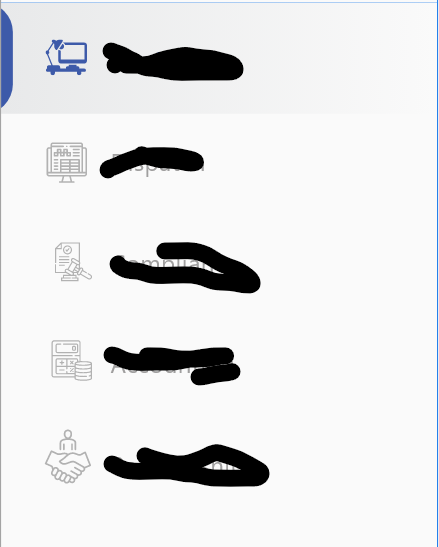
我想用active类在Vue3中创建这样的侧导航。我想在图像中添加左边框。
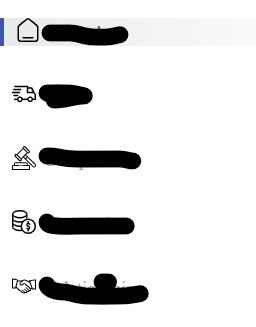
现在我就这样了。
SideBar.vue
  <div class="flex flex-col space-y-9 mt-4 -mx-6 ">
                <RouterLink v-for="(mu, idx) in menu" :key="idx" class="flex  text-[#A09F9F] cursor-pointer "
                    :to="mu.route">
                    <img :src="mu.icon" class="w-6 h-6 mr-2 ml-3" />
                    <span class="text-center text-lg">{{ mu.text }} </span>
                </RouterLink>
            </div>
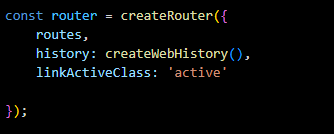
router.js
.active类
.active {
    color: #3C59A8 !important;
    font-weight: bold;
    background: linear-gradient(90deg, #E8E9EA 0%, #FAFAFA 100%);
    transition: .2s;
    border-left: #3C59A8 4px solid;

}
我想让边界像在第一个图像,从左侧圆形的边框。
谢谢。
我试过左边框,没有用,试着补充::在此之前,它也不起作用。
回答 1
Stack Overflow用户
发布于 2022-11-09 03:55:40
我将在活动链接的左侧创建一个新的div,这样我就可以在其上使用右边框CSS属性。
不完全相同的设置,但希望它仍然有意义的概念。
  <div class="flex flex-col space-y-9 mt-4">
    <div
      v-for="(mu, idx) in menu"
      :key="idx"
      class="link cursor-pointer relative"
      :to="mu.route"
      @click="changeActive(idx)"
    >
      <div v-if="mu.active" class="active"></div>
      <span class="text-center text-lg ml-5">{{ mu.text }} </span>
    </div>
</div>.link {
height: 60px;
display: flex;
align-items: center;
}
.active {
color: #3c59a8 !important;
font-weight: bold;
background: linear-gradient(90deg, #e8e9ea 0%, #fafafa 100%);
height: 100%;
border-right: #3c59a8 8px solid;
border-top-right-radius: 15px 30px;
border-bottom-right-radius: 15px 30px;
position: absolute;
}页面原文内容由Stack Overflow提供。腾讯云小微IT领域专用引擎提供翻译支持
原文链接:
https://stackoverflow.com/questions/74367883
复制相关文章
相似问题
腾讯云开发者

Copyright © 2013 - 2026 Tencent Cloud. All Rights Reserved. 腾讯云 版权所有
深圳市腾讯计算机系统有限公司 ICP备案/许可证号:粤B2-20090059  粤公网安备44030502008569号
腾讯云计算(北京)有限责任公司 京ICP证150476号 | 京ICP备11018762号