
如何使Clarifai API响应我的请求?
如何使Clarifai API响应我的请求?
提问于 2022-11-05 15:21:07
我正在尝试使用Clarifai来构建一个人脸检测应用程序,但是我没有得到它的响应。我是新来的,我已经做了所有的事情让它开始工作,但我没有得到回应。
这是我的密码
import React, { Component } from 'react';
import Clarifai from 'clarifai';
import Navigation from "./Components/Navigation/Navigation";
import Rank from './Components/Rank/Rank';
import ImageLinkForm from "./Components/ImageLinkForm/ImageLinkForm";
import FaceDetection from './Components/FaceDetection/FaceDetection';
import Logo from './Components/Logo/Logo';
import ParticlesBg from 'particles-bg';
import './App.css';

const app = new Clarifai.App({
  apiKey: 'e391552cf63245cd91a43b97168d54c7'
 });

const Particles = () => {
  return (
    <>
        <div>...</div>
        <ParticlesBg
          type="cobweb"
          bg={true}
          num={40}
        />
      </>
  )
};

class App extends Component {
constructor() {
  super();
  this.state = {
    input: '',
    imageUrl: ''
  }
};

onInputChange = (event) => {
  console.log(event.target.value)
};

onButtonClick = () => {
console.log('click');
app.models.predict("https://samples.clarifai.com/face-det.jpg%22").then(
 function(response) {
 console.log(response)
  },
  function(err) {

  }
 )
};

  render() {
    return (
      <div className="App">
        <Particles />
        <Navigation />
        <Logo />
        <Rank />
        <ImageLinkForm onInputChange={this.onInputChange} onButtonClick={this.onButtonClick} />
        <FaceDetection />
      </div>
    );
  };
};

export default App;
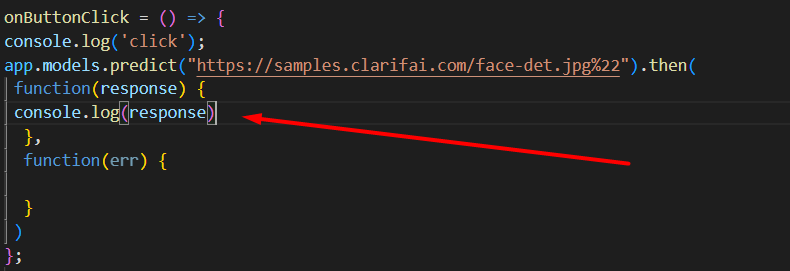
我试图切换我的API密钥,希望它不起作用,但它仍然不起作用。而且它也不是抛出任何错误!
回答 3
Stack Overflow用户
发布于 2022-11-05 16:57:36
当使用带有React的Clarifai时,您需要通过HTTP调用它,而不是使用任何gRPC客户端。此外,不要使用不推荐的JavaScript客户端。您可以参考Clarifai文档中的JavaScript (REST)示例,了解如何使用API。
Stack Overflow用户
发布于 2022-11-05 17:15:46
试试看,我认为这个承诺没有得到妥善处理。
app.models.predict("https://samples.clarifai.com/face-det.jpg%22").then(response => {
 console.log(response)
}).catch(err => {
 console.log(err)
})Stack Overflow用户
发布于 2022-11-21 17:27:41
我知道你在修什么课程,我已经试着让这个课程发挥作用很长时间了。跟着一个小的反应项目会给我们知识去解决它自己是不现实的,所以不要像我那样拔出你的头发。Clarifai help中的一篇文章在搜索"Clarifai React“之后确实有帮助,但它仍然需要完成。到目前为止,这是我所得到的,它至少得到一个数组形式的响应。
onButtonSubmit = () => {
console.log('button clicked');
this.setState({imageUrl: this.state.input});
const USER_ID = 'oxxxxxxxxxx';//(the code by your name)
const PAT = '96d20xxxxxxxxxxxx';//(your Clarifai api key)
const APP_ID = 'facerec';//(what you named your app in Clarifai)
const MODEL_ID = 'face-detection';
const MODEL_VERSION_ID = '6dc7e46bc9124c5c8824be4822abe105';
const IMAGE_URL = this.state.input;
const raw = JSON.stringify({
  "user_app_id": {
      "user_id": USER_ID,
      "app_id": APP_ID
  },
  "inputs": [{"data": {"image": {"url": IMAGE_URL}}}]
});

const requestOptions = {
  method: 'POST',
  headers: {
      'Accept': 'application/json',
      'Authorization': 'Key ' + PAT
  }, body: raw
};
fetch("https://api.clarifai.com/v2/models/" + MODEL_ID + "/versions/" + MODEL_VERSION_ID + "/outputs", requestOptions)
  .then(response => response.text())
  .then(response => {
    const parser = JSON.parse(response)
    console.log('hi', parser.outputs[0].data.regions[0].region_info.bounding_box)
    // console.log(response[])
    if (response) {
      fetch('http://localhost:3000/image', {
        method: 'put',
        headers: {'Content-Type': 'application/json'},
        body: JSON.stringify({
          id: this.state.user.id
        })
      })
      .then(response => response.json())
      .then(count => {
        this.setState(Object.assign(this.state.user, { entries: count }))
      })
    }
    this.displayFaceBox(this.calculateFaceLocation(response))
  })
  .then(result => console.log(result))
  .catch(error => console.log('error', error));
}
页面原文内容由Stack Overflow提供。腾讯云小微IT领域专用引擎提供翻译支持
原文链接:
https://stackoverflow.com/questions/74329008
复制相关文章
相似问题
腾讯云开发者

Copyright © 2013 - 2026 Tencent Cloud. All Rights Reserved. 腾讯云 版权所有
深圳市腾讯计算机系统有限公司 ICP备案/许可证号:粤B2-20090059  粤公网安备44030502008569号
腾讯云计算(北京)有限责任公司 京ICP证150476号 | 京ICP备11018762号