
递归调用时不正确的UIViewPropertyAnimator行为,并且app处于后台
我已经创建了一个非常简单的类(SpinningCircleView),它的类型是UIView,它永远执行旋转循环动画。我想从我的ViewController中调用这个类来在屏幕上显示旋转的循环动画。虽然动画效果很好,但当应用程序放在后台时,我会观察到不正确的行为。下面是旋转圈动画的样子:
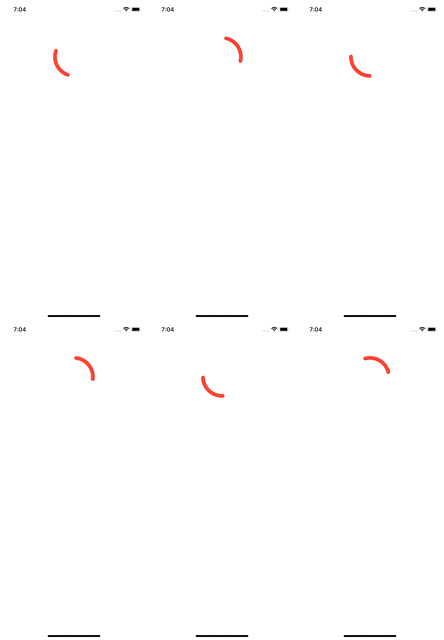
为了创建旋转圆,我使用两个独立的UIViewPropertyAnimator,一个旋转180度(即Pi),另一个完成360度(即0度)。在第二个动画器的完成块中,我递归地调用startSpinningCircleAnimation()函数。我创建了一个计数器来跟踪调用startSpinningCircleAnimation()的次数(即圆旋转的次数)。当应用程序处于活动状态(在前台)时,计数器按预期递增,我可以在我的Xcode终端窗口中看到输出:
Starting animation
1: + START Spinning Circle Animation
2: + START Spinning Circle Animation -> recursive call
3: + START Spinning Circle Animation -> recursive call
4: + START Spinning Circle Animation -> recursive call问题或不正确的行为发生的原因是,当我突然将应用程序放入background...all中时,我在终端上看到了几百个"+开始旋转循环动画->递归调用“。当应用程序返回到前台时,计数器和终端输出将恢复计数器的正常增量。
当应用程序放在后台时,为什么要对startSpinningCircleAnimation()函数进行数百次调用?当应用程序在背景和前景之间移动时,我如何正确地暂停动画并恢复动画?我搜遍了各种帖子,但我想不出解决办法。
救命啊!!
这是我的SpinningCircleView课程:
import UIKit

class SpinningCircleView: UIView
{

    private lazy var spinningCircle = CAShapeLayer()
    private lazy var animator1 = UIViewPropertyAnimator(duration: 1, curve: .linear, animations: nil)
    private lazy var animator2 = UIViewPropertyAnimator(duration: 1, curve: .linear, animations: nil)
    public var counter = 0

    override init (frame: CGRect)
    {
        super.init(frame: frame)

        configure()
    }

    required init?(coder: NSCoder)
    {
        fatalError("init(coder:) has not been implemented")
    }

    private func configure()
    {
        frame = CGRect(x: 0, y: 0, width: 100, height: 100)
        let rect = self.bounds
        let circularPath = UIBezierPath(ovalIn: rect)
        spinningCircle.path = circularPath.cgPath
        spinningCircle.fillColor = UIColor.clear.cgColor
        spinningCircle.strokeColor = UIColor.systemRed.cgColor
        spinningCircle.lineWidth = 10
        spinningCircle.strokeEnd = 0.25
        spinningCircle.lineCap = .round
        self.layer.addSublayer(spinningCircle)
    }

    func startSpinningCircleAnimation()
    {
        counter += 1

        let criteria1 = animator1.state == .active && !animator1.isRunning
        let criteria2 = animator2.state == .active && !animator2.isRunning
        let criteria3 = animator1.state == .inactive && animator2.state == .inactive
        let criteria4 = (animator1.state == .inactive && animator2.state.rawValue == 5) || (animator2.state == .inactive && animator1.state.rawValue == 5)

        if (criteria1)
        {
            // Since animator1 is Paused, we will resume the animation
            print("\(self.counter): ~ RESUME Spinning Circle Animation")
            animator1.startAnimation()
        } else if (criteria2)
        {
            // Since animator2 is Paused, we will resume the animation
            print("\(self.counter): ~ RESUME Spinning Circle Animation")
            animator2.startAnimation()
        } else if (criteria3 || criteria4)
        {

            if (criteria3)
            {
                print("\(self.counter): + START Spinning Circle Animation")
            } else if (criteria4)
            {
                print("\(self.counter): + START Spinning Circle Animation -> recursive call")
            }

            animator1.addAnimations
            {
                self.transform = CGAffineTransform(rotationAngle: .pi)
            }

            animator1.addCompletion
            {   _ in

                self.animator2.addAnimations
                {
                    self.transform = CGAffineTransform(rotationAngle: 0)
                }

                self.animator2.addCompletion
                { _ in
                    // Recursively call this start spinning
                    self.startSpinningCircleAnimation()
                }

                self.animator2.startAnimation()
            }

            animator1.startAnimation()
        } else
        {
            print("\(self.counter): >>>>>>>>> HERE <<<<<<<<<<<  \(self.animator1.state) \(self.animator1.isRunning) \(self.animator2.state) \(self.animator2.isRunning)")
        }

    }


    func stopSpinningCircleAnimation()
    {
        print("\(self.counter): - STOP Spinning Circle Animation Begin: \(self.animator1.state) \(self.animator1.isRunning) \(self.animator2.state) \(self.animator2.isRunning)")

        if (self.animator1.isRunning)
        {
            self.animator1.pauseAnimation()
        } else if (self.animator2.isRunning)
        {
            self.animator2.pauseAnimation()
        }

        print("\(self.counter): - STOP Spinning Circle Animation End: \(self.animator1.state) \(self.animator1.isRunning) \(self.animator2.state) \(self.animator2.isRunning)")
    }

}
下面是我的ViewController,它设置了SpinningCircleView的一个实例并开始动画:
class ViewController: UIViewController
{

    private lazy var spinningCircleView = SpinningCircleView()

    override func viewDidLoad()
    {
        super.viewDidLoad()

        // Setup the spinning circle and display the animation to the screen
        spinningCircleView.frame = CGRect(x: view.center.x - 50, y: 100, width: 100, height: 100)
        spinningCircleView.tag = 100
        view.addSubview(spinningCircleView)
    }

    override func viewDidAppear(_ animated: Bool)
    {
        super.viewDidAppear(animated)

        print("Starting animation")
        spinningCircleView.startSpinningCircleAnimation()
    }

    override func viewDidDisappear(_ animated: Bool)
    {
        super.viewDidDisappear(animated)
        print("Pausing animation")
        spinningCircleView.stopSpinningCircleAnimation()
    }

}回答 1
Stack Overflow用户
发布于 2022-11-05 16:05:02
我会回答你的每一个问题
为什么在将应用程序放在后台时对startSpinningCircleAnimation()函数进行数百次调用?
我认为,因为每次您在完成时调用startSpinningCircleAnimation()并检查不活动的state,.之前的动画。这里错误的地方可能是递归中检查状态的逻辑。
我不会深入到您的代码中去寻找错误的代码。但我会重构你的SpinningCircleView
首先,不需要使用两个UIViewPropertyAnimator来使视图连续旋转。这里的简单逻辑就是让视图旋转并重复。
let rotation : CABasicAnimation = CABasicAnimation(keyPath: "transform.rotation.z")
rotation.toValue = Double.pi * 2
rotation.duration = 1
rotation.isCumulative = true
rotation.repeatCount = .greatestFiniteMagnitude
rotation.isRemovedOnCompletion = false
self.layer.add(rotation, forKey: "rotateInfinityAnimation")
至于你的第二个问题
,当应用程序在背景和前景之间移动时,我如何正确地暂停动画并恢复动画呢?
您只需捕捉应用程序从NotificationCenter输入前台或背景的通知即可。
private func addNotification() {
    let notificationCenter = NotificationCenter.default
    notificationCenter.addObserver(self, selector: #selector(appMovedToBackground), name: UIApplication.willResignActiveNotification, object: nil)
    notificationCenter.addObserver(self, selector: #selector(appEnterForground), name: UIApplication.didBecomeActiveNotification, object: nil)
}对于停止并恢复动画,您只需要知道,当动画发生时,视图层就是发生动画的层。因此,您只需要添加函数,停止并继续在视图层。那么每次你想暂停或继续的时候,只需从view.layer.resume()或view.layer.stop()调用
extension CALayer {
    func pause() {
        let pausedTime: CFTimeInterval = self.convertTime(CACurrentMediaTime(), from: nil)
        self.speed = 0.0
        self.timeOffset = pausedTime
    }

    func resume() {
        let pausedTime: CFTimeInterval = self.timeOffset
        self.speed = 1.0
        self.timeOffset = 0.0
        self.beginTime = 0.0
        let timeSincePause: CFTimeInterval = self.convertTime(CACurrentMediaTime(), from: nil) - pausedTime
        self.beginTime = timeSincePause
    }
}你的SpinningCircleView会是这样的
class SpinningCircleView: UIView {
    private lazy var spinningCircle = CAShapeLayer()
    private var didStopAnimation = false

    override init (frame: CGRect)
    {
        super.init(frame: frame)
        configure()
    }

    required init?(coder: NSCoder)
    {
        fatalError("init(coder:) has not been implemented")
    }

    private func configure()
    {
        didStopAnimation = false
        frame = CGRect(x: 0, y: 0, width: 100, height: 100)
        let rect = self.bounds
        let circularPath = UIBezierPath(ovalIn: rect)
        spinningCircle.path = circularPath.cgPath
        spinningCircle.fillColor = UIColor.clear.cgColor
        spinningCircle.strokeColor = UIColor.systemRed.cgColor
        spinningCircle.lineWidth = 10
        spinningCircle.strokeEnd = 0.25
        spinningCircle.lineCap = .round
        self.layer.addSublayer(spinningCircle)
        self.addNotification()
    }

    private func addNotification() {
        let notificationCenter = NotificationCenter.default
        notificationCenter.addObserver(self, selector: #selector(appMovedToBackground), name: UIApplication.willResignActiveNotification, object: nil)
        notificationCenter.addObserver(self, selector: #selector(appEnterForeground), name: UIApplication.didBecomeActiveNotification, object: nil)
    }

    @objc func appEnterForeground() {
        if didStopAnimation {
            return
        }

        self.layer.resume()
    }

    @objc func appMovedToBackground() {
        if didStopAnimation {
            return
        }

        self.layer.pause()
    }

    func startSpinningCircleAnimation() {
        if didStopAnimation {
            return
        }

        let rotation : CABasicAnimation = CABasicAnimation(keyPath: "transform.rotation.z")
        rotation.toValue = Double.pi * 2
        rotation.duration = 1
        rotation.isCumulative = true
        rotation.repeatCount = .greatestFiniteMagnitude
        rotation.isRemovedOnCompletion = false
        self.layer.add(rotation, forKey: "rotateInfinityAnimation")
    }


    func stopSpinningCircleAnimation() {
        didStopAnimation = true
        self.layer.removeAllAnimations()
    }
}https://stackoverflow.com/questions/74328529
复制相似问题
腾讯云开发者

Copyright © 2013 - 2026 Tencent Cloud. All Rights Reserved. 腾讯云 版权所有
深圳市腾讯计算机系统有限公司 ICP备案/许可证号:粤B2-20090059  粤公网安备44030502008569号
腾讯云计算(北京)有限责任公司 京ICP证150476号 | 京ICP备11018762号