
如何为在线音乐播放器创建功能?
如何为在线音乐播放器创建功能?
提问于 2022-11-04 11:30:50
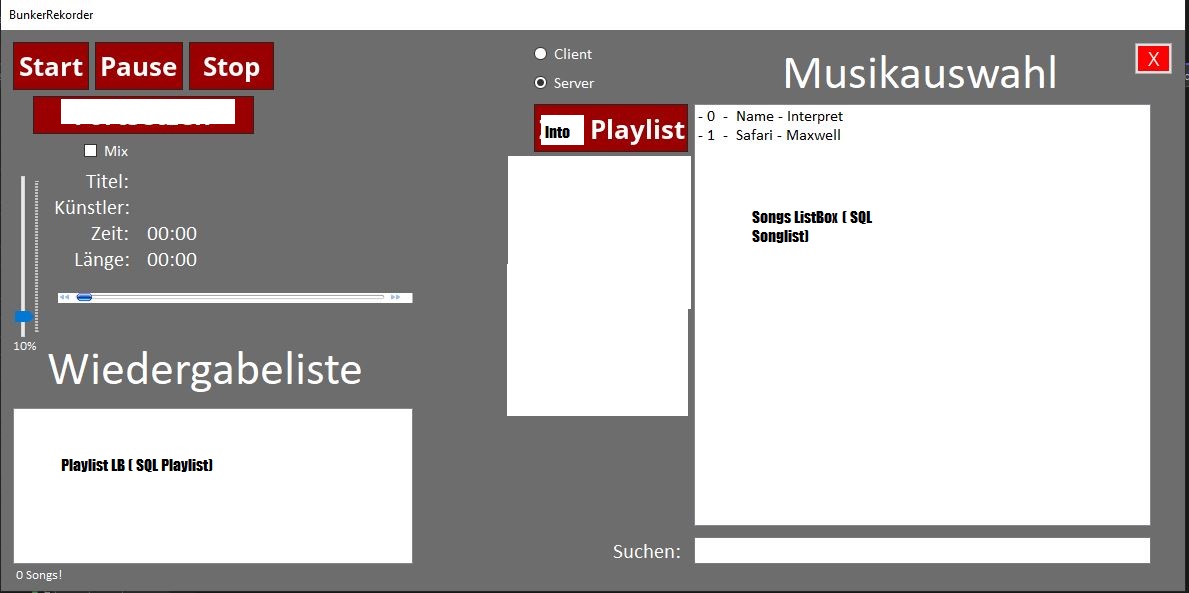
我已经为两个人创建了一个在线音乐播放器。一个服务器和一个客户端。服务器拥有音乐文件。客户端只有来自在线音乐播放器的接口。服务器和客户端应该使用相同的应用程序。现在,我希望客户端将歌曲中的SQL数据输入到ListBox / ComboBox中,比如"ID、Name、Writer、Path“,然后将这些数据放到中。服务器和客户端可以在歌曲数据SQL中添加歌曲。
应用程序
[
播放列表SQL
[

歌曲SQL
[

我的目标是客户机和服务器IMG 1可以从ListBox ( SQL歌曲列表IMG 3)中选择歌曲,并将它们放入播放列表( Songlist 2 )中
问题是我不知道如何完成这个相当困难的任务。从ListBox和播放之后,需要删除歌曲。
我不知道如何从SQL方面做这件事。
我的代码是干净的还是我能做得更好?
我真的希望你能帮我一把。
“守则”:
        private void Button_Add_Click(object sender, EventArgs e)
        {

            string songInfo = LB_Liste.SelectedItem.ToString();
            int startIndex = 2;
            int length = 3;
            string substring = songInfo.Substring(startIndex, length);
            int songId = Convert.ToInt32(substring);
            string songName = lstSongName[songId];
            string songPath = lstSongPfad[songId];

            MySqlCommand mySqlCommand = new MySqlCommand("INSERT INTO playlist values(@ID, @Name, @Path, @Que)", MyCon);
            mySqlCommand.Parameters.AddWithValue("@ID", songId);
            mySqlCommand.Parameters.AddWithValue("@Name", songName);
            mySqlCommand.Parameters.AddWithValue("@Path", songPath);
            mySqlCommand.Parameters.AddWithValue("@Que", 0);
            mySqlCommand.ExecuteNonQuery();
            AbrufLeser.Close();
            LB_Playlist.Items.Add(songName);
            UpdateUI();
} private void Button_Play_Click(object sender, EventArgs e)
{
int playId, playQue;
string playName = "";
string playPath = "";
AbrufKommando = new MySqlCommand("SELECT * FROM playlist ORDER BY que", MyCon);
AbrufLeser = AbrufKommando.ExecuteReader();
while( AbrufLeser.Read())
{
playId = Convert.ToInt32(AbrufLeser[0]);
playName = AbrufLeser[1].ToString();
playPath = AbrufLeser[2].ToString();
playQue = Convert.ToInt32(AbrufLeser[3]);
}
Player.URL = playPath;
TimerR.Start();
Timer_GIf.Start();
UpdateUI();
AbrufLeser.Close();
}回答 1
Stack Overflow用户
发布于 2022-11-28 07:37:45
根据您的需要,我编写了一个没有使用数据库的WinForm应用程序。但他们的逻辑是一样的。
因为您需要对一组数据执行频繁的操作,所以我建议您使用List作为存储数据的容器。
你可以参考我对重要地方的评论。
代码如下所示
List<string> urlList = new List<string>(); //Container for storing playlists
    private void btnInsert_Click(object sender, EventArgs e)
    {
            OpenFileDialog of = new OpenFileDialog();  //open local directory
            of.Multiselect = true;
            of.Title = "Please select a music file";
            of.Filter = "(*.mp3)|*.mp3";
            if (of.ShowDialog() == DialogResult.OK)
            {
                string[] namelist = of.FileNames;       //Save selected song path
                foreach (string url in namelist)
                {

                    listBoxMusics.Items.Add(Path.GetFileNameWithoutExtension(url));   //Display the selected songs in the listbox
                    urlList.Add(url);        //Store selected songs in previous container
                }
            }
       }
    }

    private void btnPlay_Click(object sender, EventArgs e)
    {
        int selectedIndex = listBoxMusics.SelectedIndex;   //Define an int type to point to the subscript of the listbox
       axWindowsMediaPlayer1.URL = urlList[selectedIndex];  //The player points to the song stored in the container, that is, plays the selected song in the listbox
    }

private void timer1_Tick(object sender, EventArgs e)   //The interval of the timer should be adjusted to less than 1000ms
{


     max = axWindowsMediaPlayer1.currentMedia.duration;  //duration of a song


    min = axWindowsMediaPlayer1.Ctlcontrols.currentPosition;  //The current time a song is playing

    trackBar1.Maximum = (int)(max);      //The maximum time of the progress bar
    trackBar1.Value = (int)(min);         //The current time of the progress bar

    if (trackBar1.Value == trackBar1.Maximum)
        {
        urlList.RemoveAt(listBoxMusics.SelectedIndex);  //Remove the currently playing song in the container
        listBoxMusics.Items.Clear();      //empty listbox
        foreach (string url in urlList)
        {
            listBoxMusics.Items.Add(Path.GetFileNameWithoutExtension(url));    //Re-add songs in container to listbox
        }
    }
}页面原文内容由Stack Overflow提供。腾讯云小微IT领域专用引擎提供翻译支持
原文链接:
https://stackoverflow.com/questions/74316351
复制相关文章
相似问题
腾讯云开发者

Copyright © 2013 - 2026 Tencent Cloud. All Rights Reserved. 腾讯云 版权所有
深圳市腾讯计算机系统有限公司 ICP备案/许可证号:粤B2-20090059  粤公网安备44030502008569号
腾讯云计算(北京)有限责任公司 京ICP证150476号 | 京ICP备11018762号