
如何在同步图中改变y轴的LabelFormat值?
如何在同步图中改变y轴的LabelFormat值?
提问于 2022-11-01 19:45:34
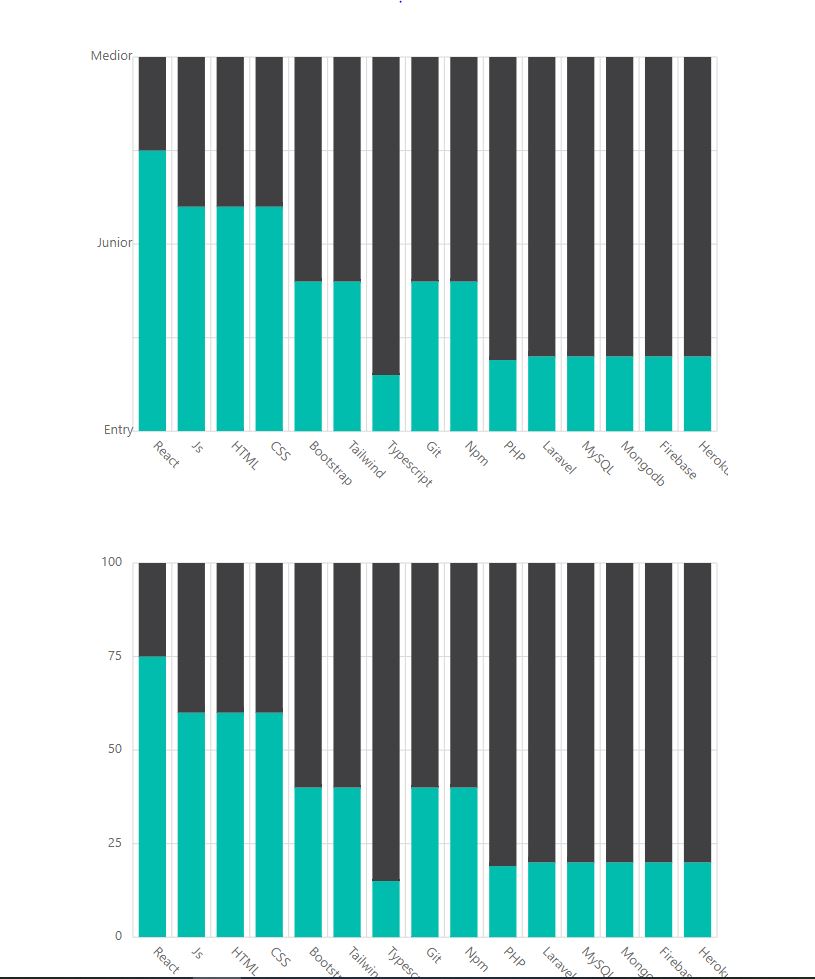
我制作了一个有反应和同步的图表,但是我不知道改变y轴值的最好方法是什么。我解决了,所以我搜索id并在useEffect中编写DOM。
但是,在同步图中改变y轴值的最佳方法是什么?
import React, { useEffect } from "react";
import { skillsIcon } from "../data/dummy";
import { GoPrimitiveDot } from "react-icons/go";
import { Stacked, Pie, Button, SparkLine,BackendStacked } from "../components";
import {
  earningData,
  SparklineAreaData,
  ecomPieChartData,
} from "../data/dummy";
import { useStateContext } from "../contexts/ContextProvider";

const Skills = () => {
  const {

    screenSize,
    setScreenSize,
  } = useStateContext();

  useEffect(() => {

    document.getElementById("charts1_AxisLabel_4").innerHTML = "Medior"
    document.getElementById("charts1_AxisLabel_3").innerHTML = ""
    document.getElementById("charts1_AxisLabel_2").innerHTML = "Junior"
    document.getElementById("charts1_AxisLabel_1").innerHTML = ""
    document.getElementById("charts1_AxisLabel_0").innerHTML = "Entry"

  }, [screenSize,setScreenSize]);

  return (
    <div>
      <h1 className="text-center text-4xl my-10 font-bold">Skills</h1>
      <div className="flex m-3 flex-wrap justify-center gap-1 items-center">
        {skillsIcon.map((skill) => (
          <div
            key={skill.title}
            className="bg-white dark:text-gray-200 dark:bg-secondary-dark-bg md:w-40
       p-4 pt-9 rounded-2xl"
          >
            <button
              type="button"
              style={{ color: skill.iconColor, backgroundColor: skill.iconBg }}
              className="text-2xl opacity-0.9 rounded-full p-4 hover:drop-shadow-xl"
            >
              {skill.icon}
            </button>
            <p className="mt-3">
              <span className="text-lg font-semibold">{skill.title}</span>
              <span className={`text-sm text-${skill.pcColor} ml-2`}>
                {skill.percentage}
              </span>
            </p>

          </div>
        ))}
      </div>
      <div className="flex gap-10 flex-wrap justify-center">
        <div
          className="bg-white dark:text-gray-200
         dark:bg-secondary-dark-bg m-3 p-4 rounded-2xl md:w-780"
        >
          <div className="">
            <h2 className="font-semibold text-center text-xl ">
              Skills - graph
            </h2>
          </div>

          <div className="mt-10 flex gap-10 flex-wrap justify-center">
            <div>
              <Stacked height="420px" width="580px" />
            </div>


            <div>
              <BackendStacked height="420px" width="580px" />
            </div>
          </div>
        </div>
      </div>
    </div>
  );
};

export default Skills;回答 1
Stack Overflow用户
回答已采纳
发布于 2022-11-03 07:31:45
这个要求可以使用图表axisLabelRender事件来实现。请查看下面共享的代码段和示例链接,该链接使用事件更改轴标签。
export let ylabels = ["Zero", "Twenty", "Fourty", "Sixty","Eighty", "Hundred"];
export let i = 0;
<ChartComponent id='charts' axisLabelRender={this.onAxisLabelRender.bind(this)}>
</ChartComponent>
onAxisLabelRender(args){
    if (args.axis.name == "primaryYAxis") {
        if(ylabels.length == i)
            i =0;
        args.text = ylabels[i]+" %";
        i++;
    }
}
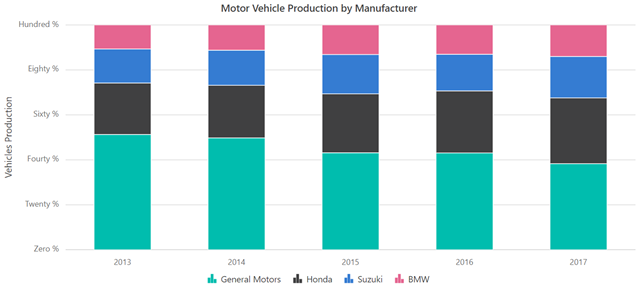
样本:https://stackblitz.com/edit/react-w6o5wf
这里有一些更多的相关信息,从我们的文档,以了解更多关于axisLabelRender事件。https://ej2.syncfusion.com/react/documentation/chart/axis-labels/#customizing-specific-point
如果你还有什么问题,请告诉我们。
页面原文内容由Stack Overflow提供。腾讯云小微IT领域专用引擎提供翻译支持
原文链接:
https://stackoverflow.com/questions/74281066
复制相关文章
相似问题
腾讯云开发者

Copyright © 2013 - 2026 Tencent Cloud. All Rights Reserved. 腾讯云 版权所有
深圳市腾讯计算机系统有限公司 ICP备案/许可证号:粤B2-20090059  粤公网安备44030502008569号
腾讯云计算(北京)有限责任公司 京ICP证150476号 | 京ICP备11018762号