
“输入字符串格式”错误将DetailView绑定到Gridview单击的行
我正在重新熟悉Web窗体编程,使用无处不在的Northwind数据库作为我的项目的后台数据库。我遵循一种简单的设计模式,用于显示客户、产品等,方法是在页面顶部显示数据库网格视图,然后使用网格视图的选定行在DetailsView中显示单个项目详细信息。由于某种原因,直到我开始使用特定的表(供应商)为止,它一直运行得很好。我得到了以下错误:
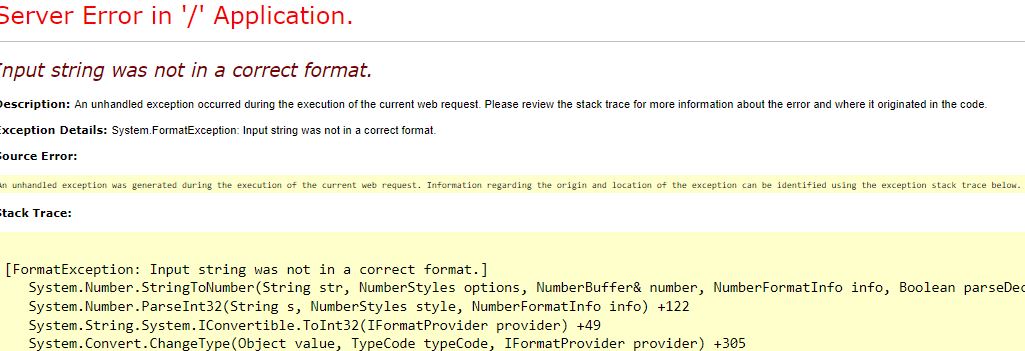
在我添加DetailsView代码之前,供应商Gridview本身的显示工作得很好。我的Gridview相关代码如下:
    <asp:GridView ID="gvSuppliers" class="table table-bordered table-condensed table-responsive table-hover" runat="server" AutoGenerateColumns="False"
    autogenerateselectbutton="True" AllowPaging="True" DataSourceID="dsSuppliersObjectSource" DataKeyNames="SupplierID" >
    <columns>
        <asp:BoundField DataField="SupplierID" HeaderText="SupplierID" SortExpression="SupplierID" />
        <asp:BoundField DataField="CompanyName" HeaderText="CompanyName" SortExpression="CompanyName" />
        <asp:BoundField DataField="ContactName" HeaderText="ContactName" SortExpression="ContactName" />
        <asp:BoundField DataField="ContactTitle" HeaderText="ContactTitle" SortExpression="ContactTitle" />
        <asp:BoundField DataField="Address" HeaderText="Address" SortExpression="Address" />
        <asp:BoundField DataField="City" HeaderText="City" SortExpression="City" />
        <asp:BoundField DataField="Region" HeaderText="Region" SortExpression="Region" />
        <asp:BoundField DataField="PostalCode" HeaderText="PostalCode" SortExpression="PostalCode" />
        <asp:BoundField DataField="Country" HeaderText="Country" SortExpression="Country" />
        <asp:BoundField DataField="Phone" HeaderText="Phone" SortExpression="Phone" />
        <asp:BoundField DataField="Fax" HeaderText="Fax" SortExpression="Fax" />
        <asp:BoundField DataField="HomePage" HeaderText="HomePage" SortExpression="HomePage" />
    </columns>
</asp:GridView>

 <asp:ObjectDataSource ID="dsSuppliersObjectSource" runat="server" EnablePaging="True" SelectMethod="GetSuppliers"
    SelectCountMethod="GetSuppliersCount" TypeName="Unknown_Web_Forms.SupplierDS" MaximumRowsParameterName="maxRows"
    StartRowIndexParameterName="startIndex">
</asp:ObjectDataSource>
注意,我使用的是一个对象数据源;相关的代码,一个名为"GetSuppliers“的方法,是一个简单的LINQ查询,它同样工作得很好:
        public List<Supplier> GetSuppliers(int startIndex, int maxRows)
    {
        using (NorthwindEntities entities = new NorthwindEntities())
        {
            return (from supplier in entities.Suppliers
                    select supplier)
                        .OrderBy(supplier => supplier.SupplierID)
                        .Skip(startIndex)
                        .Take(maxRows).ToList();
        }
    }
到目前一切尚好。但是,随后我添加了我的DetailsView并尝试将它连接到Gridview的selectedValue作为数据源:
      <asp:DetailsView ID="DetailsView1" runat="server" Height="50px" Width="125px" AutoGenerateRows="False" DataSourceID="SuppliersSingleItemDataSource">
    <Fields>
        <asp:BoundField DataField="SupplierID" HeaderText="SupplierID" SortExpression="SupplierID" />
        <asp:BoundField DataField="CompanyName" HeaderText="CompanyName" SortExpression="CompanyName" />
    </Fields>
</asp:DetailsView>
<asp:SqlDataSource ID="SuppliersSingleItemDataSource" runat="server" ConnectionString="<%$ ConnectionStrings:NorthwindConnectionString2 %>"
    SelectCommand="SELECT * FROM [Suppliers] WHERE ([SupplierID] = @SupplierID)">
    <SelectParameters>
        <asp:ControlParameter ControlID="gvSuppliers" DefaultValue="null" Name="SupplierID" PropertyName="SelectedValue" Type="Int32" />
    </SelectParameters>
</asp:SqlDataSource>
一旦我这样做,我就得到了你在这个问题开头所看到的错误。
我试过的是:
- 一些人在谷歌上搜索,建议我尝试限制在DetailsView中显示为BoundFields的列;表中可能有错误的数据。我已经将字段的数量减少到一个最小值,即SupplierID,它是一个整数主键,因此不能为null或非整数值。我还保留了公司名称(字符串).
- 确保了我在网格视图中指定了一个整数DataKeyName (SupplierID),它与DetailViews的数据源(SupplierID,Int32)的数据类型相匹配。
这个错误信息是如此的无用和通用,以至于我对如何解决这个问题的想法已经不多了。同样,对于其他表,我也使用了相同的技术(DetailsView在Gridview中获取一个选择),而没有出现这个问题。我仔细地比较了我在页面上的技巧,这些技巧与这个不起作用且看不到任何区别的页面相反。看来这个应该可以使用了。有人想过吗?
回答 1
Stack Overflow用户
发布于 2022-11-02 12:51:58
我自己解决了这个问题。罪魁祸首似乎是DetailsView的数据源中的默认值为null。如果我不使用默认值(嘿,它在我所遵循的教程中!)DetailsView将不会尝试显示任何东西,直到它从网格视图上的点击中获得一个实际的整数。我想我会把我的问题和答案留在这里以防其他人遇到这种情况。根据谷歌的判断,这是一个相当常见的错误。
<asp:SqlDataSource ID="SuppliersSingleItemDataSource" runat="server" ConnectionString="<%$ ConnectionStrings:NorthwindConnectionString2 %>"
SelectCommand="SELECT * FROM [Suppliers] WHERE ([SupplierID] = @SupplierID)">
<SelectParameters>
    <asp:ControlParameter ControlID="gvSuppliers"  Name="SupplierID" PropertyName="SelectedValue" Type="Int32" />
</SelectParameters>https://stackoverflow.com/questions/74279464
复制相似问题
腾讯云开发者

Copyright © 2013 - 2026 Tencent Cloud. All Rights Reserved. 腾讯云 版权所有
深圳市腾讯计算机系统有限公司 ICP备案/许可证号:粤B2-20090059  粤公网安备44030502008569号
腾讯云计算(北京)有限责任公司 京ICP证150476号 | 京ICP备11018762号