
基于JS搜索的实时新闻输入更新
基于JS搜索的实时新闻输入更新
提问于 2022-10-30 14:35:17
在过去的两周里,我一直在学习JS,并且正在尝试使用“卫报”的Api构建一个新闻应用程序。我成功地获得了图片、链接和标题,但我很难让搜索功能发挥作用。我希望它的工作,使页面立即更新,一旦你开始打字。我可以看到下面是‘工作’在控制台,但我不知道如何有效地显示在页面上。
我尝试过为“搜索文章”创建一个新的数组,但是这个数组太长了,并且在输入时没有返回一个实时更新的提要。
我试着“切换”文章中的h1 (标题)元素,但一直出现“not a function”错误。任何见解都将不胜感激,因为我不确定这里的最佳方法。
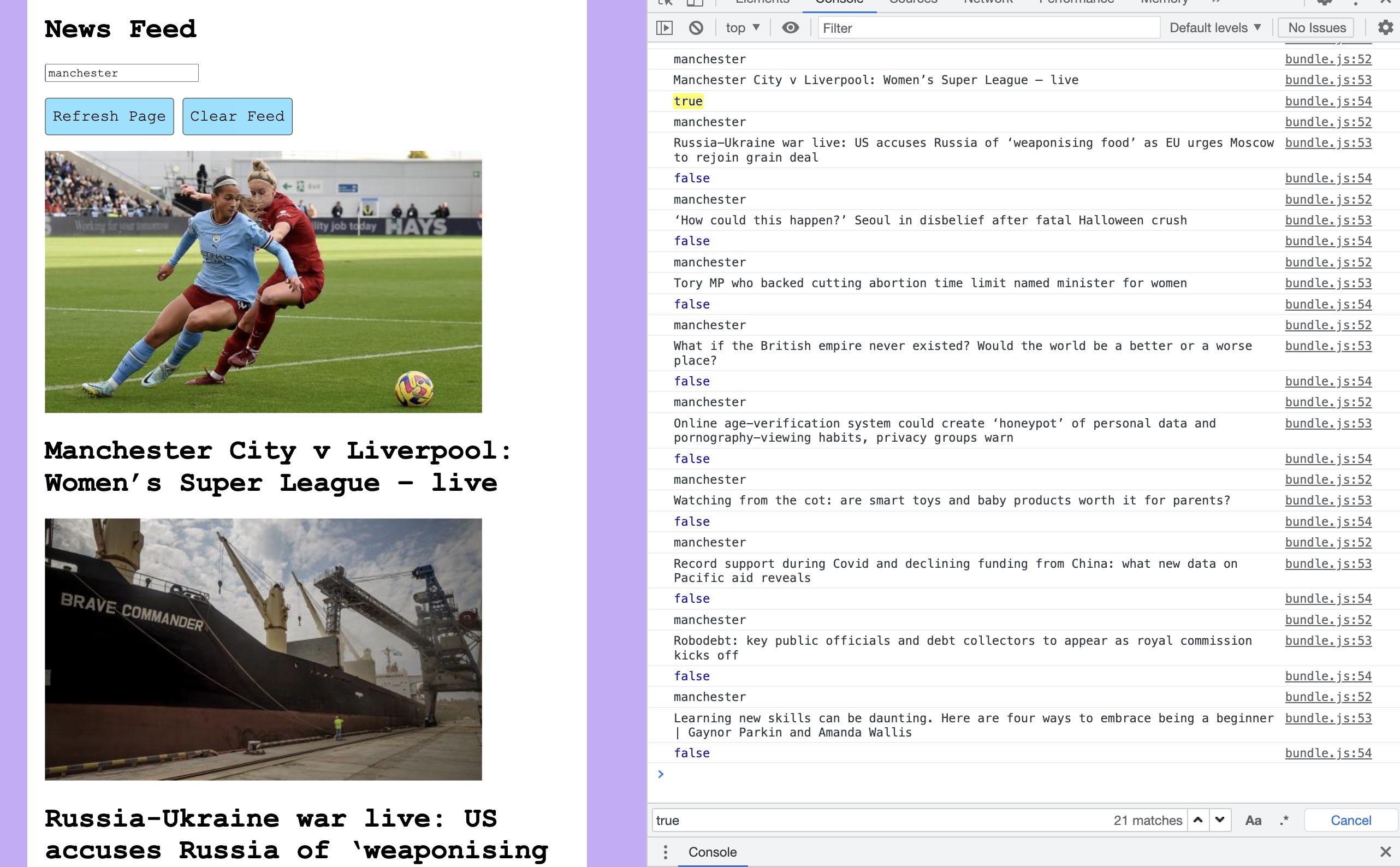
VIEW CLASS
class ArticlesView {
  constructor(model, api) {
    this.model = model;
    this.api = api;
    this.articlesFromModel = this.model.getArticles();
    this.newsFeed = document.querySelector("#news-feed");
    this.clearFeedBtn = document.querySelector("#clear-feed-button");
    this.refreshBtn = document.querySelector("#refresh-button");
    this.searchInput = document.querySelector("#search-input");
    this.allHeadlines = [document.querySelectorAll("h1")];
    this.clearFeedBtn.addEventListener("click", () => {
      this.clearFeed();
    });
    this.searchInput.addEventListener("input", (e) => {
      this.articlesFromModel.forEach((article) => {
        const searchInput = e.target.value.toLowerCase();
        const isVisible = article.webTitle.toLowerCase().includes(searchInput);
        if (!isVisible) {
**        // not sure what to do here
**        }
        console.log(searchInput);
        console.log(article.webTitle);
        console.log(isVisible);
      });
    });
  }

  displayArticlesFromApi() {
    this.api.loadArticles(
      (repoData) => {
        this.model.addArticle(repoData.response.results);
        this.displayArticles();
      },
      () => {
        this.displayError();
      }
    );
  }

  displayArticles() {
    this.articlesFromModel.forEach((article) => {
      this.addImage(article);
      this.addHeadline(article);
    });
  }

  addHeadline(article) {
    const h1 = document.createElement("h1");
    h1.className = "news-title";
    h1.innerText = article.webTitle;
    h1.onclick = () => {
      window.location.href = article.webUrl;
    };
    this.newsFeed.append(h1);
  }

  addImage(article) {
    const img = document.createElement("img");
    img.className = "news-image";
    img.setAttribute("id", article.id);
    img.src = article.fields.thumbnail;
    img.onclick = () => {
      window.location.href = article.webUrl;
    };
    this.newsFeed.append(img);
  }

  displayError() {
    let errorMessage = document.createElement("div");
    errorMessage.className = "error";
    errorMessage.textContent = "Oops, something went wrong!";
    this.newFeed.append(errorMessage);
  }

  clearFeed() {
    const images = document.querySelectorAll("img.news-image");
    images.forEach((element) => {
      element.remove();
    });
    const headlines = document.querySelectorAll("h1.news-title");
    headlines.forEach((element) => {
      element.remove();
    });
  }
}

module.exports = ArticlesView;
MODEL CLASS
class ArticlesModel {
  constructor() {
    this.articles = [];
  }

  getArticles() {
    return this.articles;
  }

  addArticle(article) {
    article.forEach((a) => {
      this.articles.push(a);
    });
  }

  reset() {
    this.articles = [];
  }
}

module.exports = ArticlesModel;
API CLASS
class GuardianApi {
  constructor() {
    this.apiURL = `https://content.guardianapis.com/search?api-key=${apikey}&show-fields=thumbnail`;
  }
  loadArticles(callback) {
    fetch(this.apiURL)
      .then((response) => response.json())
      .then((data) => {
        callback(data);
      });
  }
}

module.exports = GuardianApi;
INDEX.js
console.log("the app is running");
const ArticlesModel = require("./src/ArticlesModel.js");
const ArticlesView = require("./src/ArticlesView.js");
const GuardianApi = require("./src/GuardianApi.js");

const client = new GuardianApi();
const model = new ArticlesModel();
const view = new ArticlesView(model, client);

view.displayArticlesFromApi();
HTML FILE
<!doctype html>
<html>
   <head>
    <link rel="stylesheet" href="style.css">
      <title> Your Daily News Feed</title>
   </head>
   <body>
      <h1>News Feed</h1>

        <input type="search" id="search-input" placeholder="e.g. Football...">

      <br><br>
      <button onClick="window.location.reload();">Refresh Page</button> <button id="clear-feed-button">Clear Feed</button>

      <br> <br>

      <div id="news-feed">

      </div>
   </body>
   <script src="bundle.js"></script>

</html>回答 1
Stack Overflow用户
回答已采纳
发布于 2022-10-30 17:20:21
我为你的案子创建了一个代码片段。您需要调整api键的行。目前,我使用了一个为虚拟电子邮件生成的密钥。我还强调了代码更改的位置
新的搜索功能是:
this.searchInput.addEventListener("input", (e) => {
    const searchInput = e.target.value.toLowerCase();
    // Create a filtered copy of articlesFromModel
    const filteredArticles = this.articlesFromModel.filter((article) => {
        return article.webTitle.toLowerCase().includes(searchInput);
    });
    this.clearFeed()
    // Display filtered list.
    this.displayArticles(filteredArticles);
});displayArticles()已被修改为接受一个参数
displayArticles(articles) {
    articles.forEach((article) => {
        this.addImage(article);
        this.addHeadline(article);
  });
}
过滤现有物品
class ArticlesView {
  constructor(model, api) {
    this.model = model;
    this.api = api;
    this.articlesFromModel = this.model.getArticles();
    this.newsFeed = document.querySelector("#news-feed");
    this.clearFeedBtn = document.querySelector("#clear-feed-button");
    this.refreshBtn = document.querySelector("#refresh-button");
    this.searchInput = document.querySelector("#search-input");
    this.allHeadlines = [document.querySelectorAll("h1")];
    this.clearFeedBtn.addEventListener("click", () => {
      this.clearFeed();
    });
    // New search function
    this.searchInput.addEventListener("input", (e) => {
      const searchInput = e.target.value.toLowerCase();
      // Create a filtered copy of articlesFromModel
      const filteredArticles = this.articlesFromModel.filter((article) => {
        return article.webTitle.toLowerCase().includes(searchInput);
      });
      this.clearFeed()
      // Display filtered list.
      this.displayArticles(filteredArticles);
    });
}

displayArticlesFromApi() {
  this.api.loadArticles(
    (repoData) => {
      this.model.addArticle(repoData.response.results);
      // displayArticles() is now being passed an argument
      this.displayArticles(this.articlesFromModel);
    },
    () => {
      this.displayError();
    }
  );
}

// displayArticles() now accepts an argument
displayArticles(articles) {
  articles.forEach((article) => {
    this.addImage(article);
    this.addHeadline(article);
  });
}

addHeadline(article) {
  const h1 = document.createElement("h1");
  h1.className = "news-title";
  h1.innerText = article.webTitle;
  h1.onclick = () => {
    window.location.href = article.webUrl;
  };
  this.newsFeed.append(h1);
}

addImage(article) {
  const img = document.createElement("img");
  img.className = "news-image";
  img.setAttribute("id", article.id);
  img.src = article.fields.thumbnail;
  img.onclick = () => {
    window.location.href = article.webUrl;
  };
  this.newsFeed.append(img);
}

displayError() {
  let errorMessage = document.createElement("div");
  errorMessage.className = "error";
  errorMessage.textContent = "Oops, something went wrong!";
  this.newFeed.append(errorMessage);
}

clearFeed() {
  const images = document.querySelectorAll("img.news-image");
  images.forEach((element) => {
    element.remove();
  });
  const headlines = document.querySelectorAll("h1.news-title");
  headlines.forEach((element) => {
    element.remove();
  });
}
}

class ArticlesModel {
  constructor() {
    this.articles = [];
  }

  getArticles() {
    return this.articles;
  }

  addArticle(article) {
    article.forEach((a) => {
      this.articles.push(a);
    });
  }

  reset() {
    this.articles = [];
  }
}

class GuardianApi {
  constructor() {
    this.apiURL = `https://content.guardianapis.com/search?api-key=bb887d29-f877-4222-96b2-c1e7051bcf71&show-fields=thumbnail`;
  }
  loadArticles(callback) {
    fetch(this.apiURL)
      .then((response) => response.json())
      .then((data) => {
        callback(data);
      });
  }
}

const client = new GuardianApi();
const model = new ArticlesModel();
const view = new ArticlesView(model, client);

view.displayArticlesFromApi();<!doctype html>
<html>
<head>
<link rel="stylesheet" href="style.css">
<title> Your Daily News Feed</title>
</head>
<body>
<h1>News Feed</h1>
<input type="search" id="search-input" placeholder="e.g. Football...">
<br><br>
<button onClick="window.location.reload();">Refresh Page</button> <button id="clear-feed-button">Clear Feed</button>
<br> <br>
<div id="news-feed">
</div>
</body>
<script src="bundle.js"></script>
</html>
页面原文内容由Stack Overflow提供。腾讯云小微IT领域专用引擎提供翻译支持
原文链接:
https://stackoverflow.com/questions/74253950
复制相关文章
相似问题
腾讯云开发者

Copyright © 2013 - 2026 Tencent Cloud. All Rights Reserved. 腾讯云 版权所有
深圳市腾讯计算机系统有限公司 ICP备案/许可证号:粤B2-20090059  粤公网安备44030502008569号
腾讯云计算(北京)有限责任公司 京ICP证150476号 | 京ICP备11018762号