
如何在面板上显示MonthCalendar控件?
如何在面板上显示MonthCalendar控件?
提问于 2022-10-25 04:23:43
如何将MonthCalendar显示在顶部,类似于DateTimePicker下拉列表?我有一个自定义控件(TextBox和Button),它在单击时动态显示MonthCalendar。
我能够把它放在面板的控制板前面,而不是面板上。下图;
private void btn_Click(object sender, EventArgs e)
{
       if (mc.Parent == null)
       {
            this.Parent.Controls.Add(mc);
            mc.Location = new Point(this.Location.X, this.Location.Y + this.Height);
            mc.BringToFront();
        }
        else
        {
            mc.Show();
        }
}
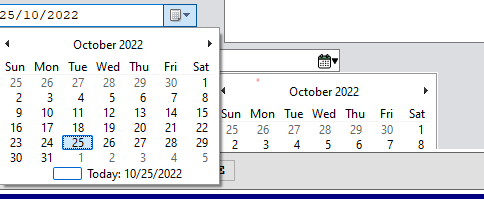
回答 1
Stack Overflow用户
回答已采纳
发布于 2022-10-25 04:28:39
DateTimePicker上的下拉日历是一个浮动窗口,ComboBox上的下拉列表也是一个浮动窗口。MonthCalendar只是一个常规控件,因此,就像任何其他控件一样,它不能显示在父控件的边界之外。如果您希望它显示在窗体上,并且超出Panel的界限,那么您需要让它的父窗体,而不是Panel。如果希望它也显示在窗体的边界之外,则需要创建一个新的、无边界的窗体,并使其成为控件的父窗体。
下面是一种方法,您可以使用该方法将子控件从一个父控件移动到另一个父控件,而不更改其在屏幕上的绝对位置:
/// <summary>
/// Moves a child control from its current parent to a new parent while maintaining the same absolute location.
/// </summary>
/// <param name="child">
/// The child control to move.
/// </param>
/// <param name="newParent">
/// The new parent to move the child control to.
/// </param>
private void ChangeParent(Control child, Control newParent)
{
    var screenLocation = child.PointToScreen(Point.Empty);

    child.Parent = null;
    child.Location = newParent.PointToClient(screenLocation);
    child.Parent = newParent;
}
在您的例子中,您可能想这样称呼它:
ChangeParent(mc, this);之后您可能需要在子控件上调用BringToFront,这取决于您的z顺序。
注意,您也可以将MonthCalendar添加到设计器中的表单中,然后在“属性”窗口中更改其Location以使其位于正确的位置。
页面原文内容由Stack Overflow提供。腾讯云小微IT领域专用引擎提供翻译支持
原文链接:
https://stackoverflow.com/questions/74189107
复制相关文章
相似问题
腾讯云开发者

Copyright © 2013 - 2026 Tencent Cloud. All Rights Reserved. 腾讯云 版权所有
深圳市腾讯计算机系统有限公司 ICP备案/许可证号:粤B2-20090059  粤公网安备44030502008569号
腾讯云计算(北京)有限责任公司 京ICP证150476号 | 京ICP备11018762号