
根据项的类别更改图像
根据项的类别更改图像
提问于 2022-10-24 09:33:37
我在做一个预算跟踪应用程序。我正在为应用程序实现函数显示和添加事务。但是,我很难找到一种基于事务类别类型动态设置图像URL (图标)的方法。
这个应用程序是用Reacti原住民编写的。
例如,我有如下所示的事务列表:
[
  {
    id: 1,
    type: 'Expense',
    category: 'Food',
    description: 'Burger',
    amount: 100,
    date: '2020-10-10',
    createdAt: '2021-01-01',
  },
  {
    id: 2,
    type: 'Expense',
    category: 'Entertainment',
    description: 'Movie',
    amount: 200,
    date: '2020-10-10',
    createdAt: '2021-10-02',
  },
  {
    id: 3,
    type: 'Income',
    category: 'Salary',
    description: 'Salary',
    amount: 1000,
    date: '2020-10-10',
    createdAt: '2021-10-03',
  },
  {
    id: 4,
    type: 'Expense',
    category: 'Food',
    description: 'Burger',
    amount: 100,
    date: '2020-10-10',
    createdAt: '2021-01-01',
  },
]
然后,我想在列表中显示它,每个列表项都包含表示类别的图标,如以下图像:
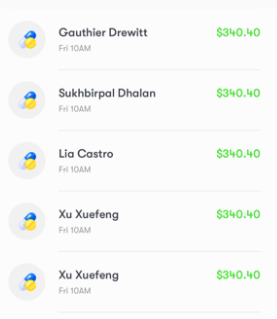
回答 2
Stack Overflow用户
发布于 2022-10-24 09:46:06
您只需导入图像并将它们添加为如下所示的键:
import burgerImage from '../images/burger.jpg';
import movieImage from '../images/movie.jpg';

[
  {
    id: 1,
    type: 'Expense',
    category: 'Food',
    description: 'Burger',
    amount: 100,
    date: '2020-10-10',
    createdAt: '2021-01-01',
    icon: burgerImage,

  },
  {
    id: 2,
    type: 'Expense',
    category: 'Entertainment',
    description: 'Movie',
    amount: 200,
    date: '2020-10-10',
    createdAt: '2021-10-02',
    icon: movieImage
  },
]
将图标键作为源传递给Image组件,如下所示:
data.map((datum)=> <Image source={datum.icon} />);Stack Overflow用户
发布于 2022-10-25 09:31:02
我认为您应该使用category字段呈现图标,如下所示:
const renderIcon = (icon) => {
  switch (icon) {
    case "Food":
      return <Icon icon="food" />
    case "Movie":
      return <Icon icon="movie" />
    // Diff case
    default:
      return <Icon icon="iconDefault" />
}
在renderItem of FlatList中:
const renderItem = ({ item, index }) => {
  return (
    // render wrapper
    {renderIcon(item.category)}
    // render name, time, price of product
  )
}页面原文内容由Stack Overflow提供。腾讯云小微IT领域专用引擎提供翻译支持
原文链接:
https://stackoverflow.com/questions/74179136
复制相关文章
相似问题
腾讯云开发者

Copyright © 2013 - 2026 Tencent Cloud. All Rights Reserved. 腾讯云 版权所有
深圳市腾讯计算机系统有限公司 ICP备案/许可证号:粤B2-20090059  粤公网安备44030502008569号
腾讯云计算(北京)有限责任公司 京ICP证150476号 | 京ICP备11018762号