
Quarto中的两列布局
Quarto中的两列布局
提问于 2022-10-22 08:54:40
Quarto
我正在创建一个Quarto网站,并希望有一个两列布局,以便我可以很好地显示文本并排。在streamlit中,您可以使用columns获得两列布局。下面是如何布局的示例代码:
---
title: "Two columns layout Quarto"
format:
  html:
    code-fold: true
engine: knitr
---

I would like to have text here                                               and here

Sentence becomes longer, it should automatically stay in their column        More text
输出:
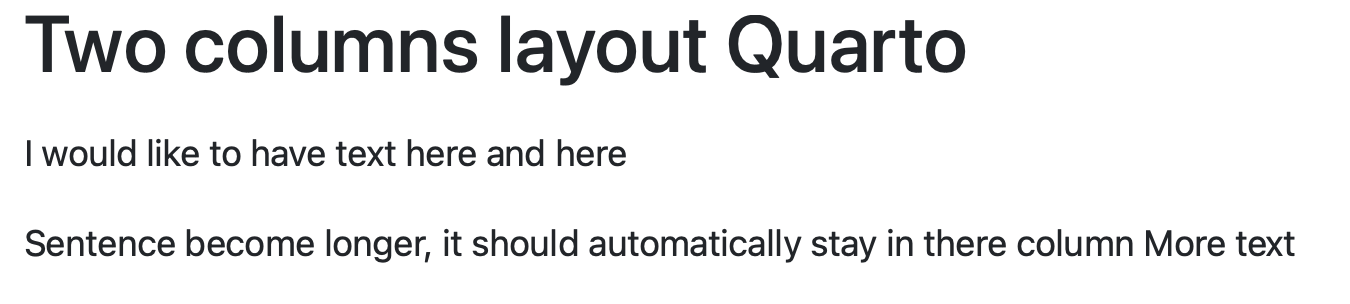
正如你所看到的,文本被组合成一个句子,而我想让它像两列布局一样分开。所以我想知道这在Quarto中是否可行
流光
下面是streamlit中的一个示例
# Package
import streamlit as st

# Function with columns
def txt(a, b):
    col1, col2 = st.columns([7,2])
    with col1:
        st.markdown(a)
    with col2:
        st.markdown(b)

# Example
st.write('# Example in Streamlit')
txt('I would like to have text here', 'and here')
输出:

如您所见,在两列布局中很好地显示了这一点。
回答 1
Stack Overflow用户
回答已采纳
发布于 2022-10-22 09:19:23
可以使用pandoc .columns div创建列布局。
---
title: "Two columns layout Quarto"
format:
  html:
    code-fold: true
engine: knitr
---

:::: {.columns}

::: {.column width="70%"}
I would like to have text here

Sentence becomes longer, it should automatically stay in their column
:::

::: {.column width="10%"}
<!-- empty column to create gap -->
:::

::: {.column width="20%"}
and here

More text
:::

::::
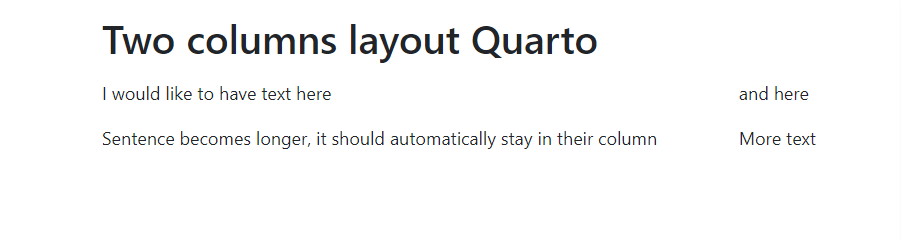
页面原文内容由Stack Overflow提供。腾讯云小微IT领域专用引擎提供翻译支持
原文链接:
https://stackoverflow.com/questions/74162212
复制相关文章
相似问题
腾讯云开发者

Copyright © 2013 - 2026 Tencent Cloud. All Rights Reserved. 腾讯云 版权所有
深圳市腾讯计算机系统有限公司 ICP备案/许可证号:粤B2-20090059  粤公网安备44030502008569号
腾讯云计算(北京)有限责任公司 京ICP证150476号 | 京ICP备11018762号