
C#中swagger生成的API文档中的自定义字段
C#中swagger生成的API文档中的自定义字段
提问于 2022-10-21 13:57:28
我有一个ASP.NET 6 API项目,我正在使用Swagger生成文档。
现在的问题是,客户需要一个具有端点级附加属性的YAML文件,如以下所示(我已将它们命名为x- customer -支柱-.):
...
/Commodities/Categories/List:
    get:
      x-customer-prop-production-ready: true
      x-customer-prop-access-policy:  open
      x-customer-prop-data-classification: public
      x-customer-prop-api-pattern: Hey Jude
      tags:
        - Commodities
      summary: Provides the list of categories.
      description: Categories are matched with high level commodity classification at level 1. \n\nNo mandatory parameter.
      parameters:
        - name: countryCode
          in: query
          description: The code to identify the country. It can be a ISO-3166 Alpha 3 code
          schema:
            type: string
        - name: categoryName
          in: query
          description: The name, even partial and case insensitive, of a commodity category.
          schema:
            type: string
如何为每个端点生成这些属性?
如何生成YAML而不是常规的JSON?
目前,为了生成文档,我在方法的顶部使用该属性:
/// <summary>
/// Provides the list of categories.
/// </summary>
/// <remarks>
/// Categories are matched with high level commodity classification at level 1. \n\nNo mandatory parameter.
/// </remarks>
/// <param name="countryCode">The code to identify the country. It can be a ISO-3166 Alpha 3 code</param>
/// <param name="categoryName">The name, even partial and case insensitive, of a commodity category.</param>
/// <param name="categoryID">The exact ID of a Commodity, as found in /Commodities/List.</param>
/// <param name="page">page number for paged results</param>
/// <param name="format">Output format: [JSON|CSV] Json is the default value</param>        ///
/// <returns></returns>
[HttpGet]
[ApiVersion("1.0")]
[Route("Categories/List")]
[ProducesResponseType(typeof(BusinessLogic.Dto.PagedCommodityListDTO), 200)]
[ProducesResponseType(typeof(BusinessLogic.Dto.BadRequestDTO), 400)]
public async Task<IActionResult> GetCategoriesList(string? countryCode, string? categoryName, int categoryID = 0, int page = 1, string format = "json")
....
}
在启动过程中,我以以下方式添加了swagger生成:
services.AddSwaggerGen(
    options =>
    {
        options.DocumentFilter<Swagger.CustomModelDocumentFilter>();
        options.SwaggerDoc("v1.0", new OpenApiInfo {
            Title = "XXXX API",
            Description= "API Documentation of the XXXXXX platform: ...",
            Contact = new OpenApiContact()
            {
                Name= "XXX-INFO",
                Email= "email@somewhere.com"
            },
            Version = "v1.0" });
        options.IncludeXmlComments(XmlCommentsFilePath, true);
    });
其中,CustomModelDocumentFilter类用于添加其他属性,但仅在根级:
public class CustomModelDocumentFilter : IDocumentFilter
{
    public void Apply(OpenApiDocument swaggerDoc, DocumentFilterContext context)
    {
        swaggerDoc.Extensions.Add("x-customer-root-prop-xxx", new CustomExtensionValue("false"));
    }
}回答 1
Stack Overflow用户
发布于 2022-11-08 09:38:29
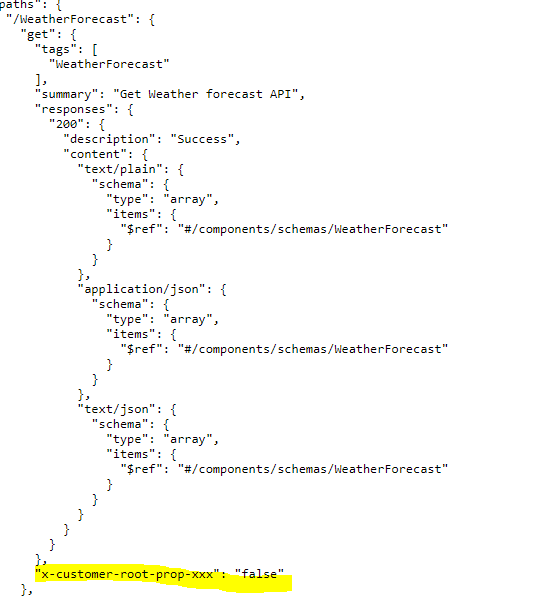
还可以在端点级别添加扩展。您需要像下面这样使用OperationFilter
public class MyOperationFilter : IOperationFilter
{
    public void Apply(OpenApiOperation operation, OperationFilterContext context)
    {
        operation.Extensions.Add("x-customer-root-prop-xxx", new Microsoft.OpenApi.Any.OpenApiString("false"));
    }
}
和
options.DocumentFilter<MyOperationFilter>();一旦再次运行并看到json文档,您就可以看到每个端点的这些属性。
页面原文内容由Stack Overflow提供。腾讯云小微IT领域专用引擎提供翻译支持
原文链接:
https://stackoverflow.com/questions/74154762
复制相关文章
相似问题
腾讯云开发者

Copyright © 2013 - 2026 Tencent Cloud. All Rights Reserved. 腾讯云 版权所有
深圳市腾讯计算机系统有限公司 ICP备案/许可证号:粤B2-20090059  粤公网安备44030502008569号
腾讯云计算(北京)有限责任公司 京ICP证150476号 | 京ICP备11018762号