
顺风和DaisyUI在Next.js应用程序中,我无法让肚脐伸展到整个网页
顺风和DaisyUI在Next.js应用程序中,我无法让肚脐伸展到整个网页
提问于 2022-10-19 22:21:41
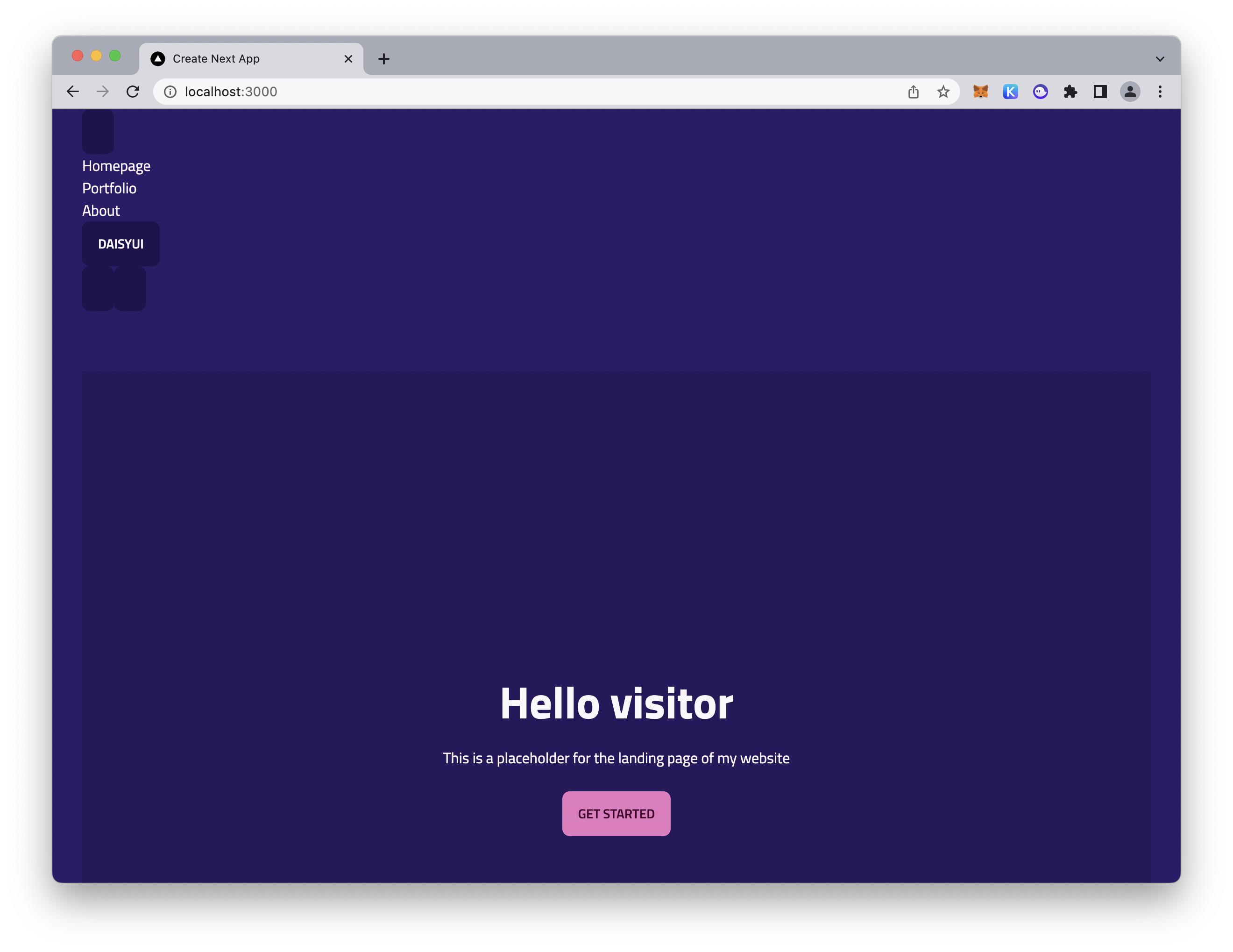
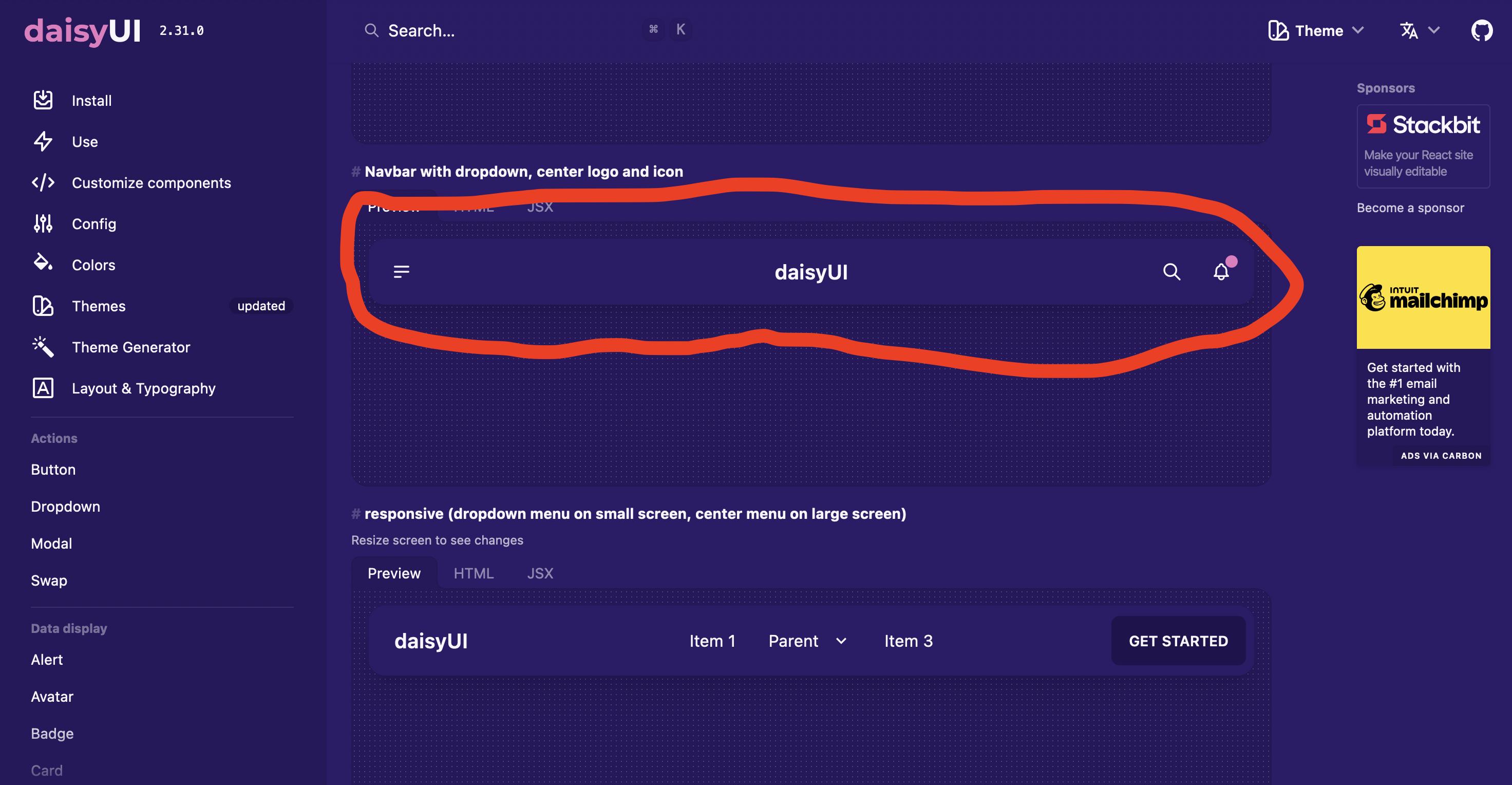
我有一个next.js应用程序,它使用DaisyUI,这是一个基于顺风的css组件库。问题是,我无法让任何DaisyUI导航条一直延伸到整个网页水平。导航栏组件垂直地聚集到页面的左侧。
这就是它应该看起来的样子
因此,我将DaisyUI示例中的JSX代码复制到我的next.js应用程序的布局中,但正如您从第一个图像中看到的那样,它没有工作。
这是我的应用程序的相关代码:“_app.tsx”
import '../styles/globals.css'
import type { AppProps } from 'next/app'
import Layout from '../components/Layout'

function MyApp({ Component, pageProps }: AppProps) {
  return (
    <Layout>
      <Component {...pageProps} />
    </Layout>
  )
}

export default MyApp
"index.tsx“
import type { NextPage } from 'next'
import { useState } from 'react'
import styles from '../styles/Home.module.css'

const Home: NextPage = () => {
  return (
    <div className="hero min-h-screen bg-base-200">
      <div className="hero-content text-center">
        <div className="max-w-md">
          <h1 className="text-5xl font-bold">Hello visitor</h1>
          <p className="py-6">This is a placeholder for the landing page of my website</p>
          <button className="btn btn-primary">Get Started</button>
        </div>
      </div>
    </div>
  )
}

export default Home
“组件/Layout.tsx”
import Head from 'next/head'
import Image from 'next/image'
import styles from '../styles/Home.module.css'

const Layout = ({ children } : { children: any }) => {
    return (
        <div data-theme="synthwave" className={styles.container}>
            <Head>
                <title>Create Next App</title>
                <meta name="description" content="Generated by create next app" />
                <link rel="icon" href="/favicon.ico" />
            </Head>
            <div className="navbar bg-base-100">
                <div className="navbar-start">
                    <div className="dropdown">
                    <label tabIndex={0} className="btn btn-ghost btn-circle">
                        <svg xmlns="http://www.w3.org/2000/svg" className="h-5 w-5" fill="none" viewBox="0 0 24 24" stroke="currentColor"><path strokeLinecap="round" strokeLinejoin="round" strokeWidth="2" d="M4 6h16M4 12h16M4 18h7" /></svg>
                    </label>
                    <ul tabIndex={0} className="menu menu-compact dropdown-content mt-3 p-2 shadow bg-base-100 rounded-box w-52">
                        <li><a>Homepage</a></li>
                        <li><a>Portfolio</a></li>
                        <li><a>About</a></li>
                    </ul>
                    </div>
                </div>
                <div className="navbar-center">
                    <a className="btn btn-ghost normal-case text-xl">daisyUI</a>
                </div>
                <div className="navbar-end">
                    <button className="btn btn-ghost btn-circle">
                    <svg xmlns="http://www.w3.org/2000/svg" className="h-5 w-5" fill="none" viewBox="0 0 24 24" stroke="currentColor"><path strokeLinecap="round" strokeLinejoin="round" strokeWidth="2" d="M21 21l-6-6m2-5a7 7 0 11-14 0 7 7 0 0114 0z" /></svg>
                    </button>
                    <button className="btn btn-ghost btn-circle">
                    <div className="indicator">
                        <svg xmlns="http://www.w3.org/2000/svg" className="h-5 w-5" fill="none" viewBox="0 0 24 24" stroke="currentColor"><path strokeLinecap="round" strokeLinejoin="round" strokeWidth="2" d="M15 17h5l-1.405-1.405A2.032 2.032 0 0118 14.158V11a6.002 6.002 0 00-4-5.659V5a2 2 0 10-4 0v.341C7.67 6.165 6 8.388 6 11v3.159c0 .538-.214 1.055-.595 1.436L4 17h5m6 0v1a3 3 0 11-6 0v-1m6 0H9" /></svg>
                        <span className="badge badge-xs badge-primary indicator-item"></span>
                    </div>
                    </button>
                </div>
            </div>
            <main className={styles.main}>
                {children}
            </main>
            <footer className={styles.footer}>
                <a
                href="https://vercel.com?utm_source=create-next-app&utm_medium=default-template&utm_campaign=create-next-app"
                target="_blank"
                rel="noopener noreferrer"
                >
                Powered by{' '}
                <span className={styles.logo}>
                    <Image src="/vercel.svg" alt="Vercel Logo" width={72} height={16} />
                </span>
                </a>
            </footer>
        </div>
    );
};

export default Layout这也是tailwind.config.js文件:
/** @type {import('tailwindcss').Config} */
module.exports = {
    //...
    content: ['./pages/**/*.{js,ts,jsx,tsx}'],
    plugins: [require("daisyui")],
    daisyui: {
      styled: true,
      themes: true,
      base: true,
      utils: true,
      logs: true,
      rtl: false
    }
}我不明白为什么肚脐会在左边缩在一起。如您所见,synthwave主题被加载得很好。还有Head,“你好访客”hero,开始button,等等.都装得很好。肚脐就是伸不开。那么,为什么导航栏不是水平延伸到整个页面的呢?
回答 1
Stack Overflow用户
回答已采纳
发布于 2022-10-20 03:12:05
问题在于tailwind.config.js文件。我把它改成了这个
/** u/type {import('tailwindcss').Config} */
module.exports = {
    //...
    content: ['./pages/**/*.{js,ts,jsx,tsx}', './components/**/*.{js,ts,jsx,tsx}'],
    plugins: [require("daisyui")],
    daisyui: {
      styled: true,
      themes: true,
      base: true,
      utils: true,
      logs: true,
      rtl: false
    }
}如您所见,我将'./components/**/*.{js,ts,jsx,tsx}'添加到文件的content部分。这将DaisyUI应用于Layout.tsx文件。
页面原文内容由Stack Overflow提供。腾讯云小微IT领域专用引擎提供翻译支持
原文链接:
https://stackoverflow.com/questions/74132550
复制相关文章
相似问题
腾讯云开发者

Copyright © 2013 - 2026 Tencent Cloud. All Rights Reserved. 腾讯云 版权所有
深圳市腾讯计算机系统有限公司 ICP备案/许可证号:粤B2-20090059  粤公网安备44030502008569号
腾讯云计算(北京)有限责任公司 京ICP证150476号 | 京ICP备11018762号