
反应传单=>侧边栏渲染两次
反应传单=>侧边栏渲染两次
提问于 2022-10-19 12:09:18
从昨天到现在,我发现了一个bug,找到了解决办法。
因此,缺陷是边栏出现了2次,如图片所示。
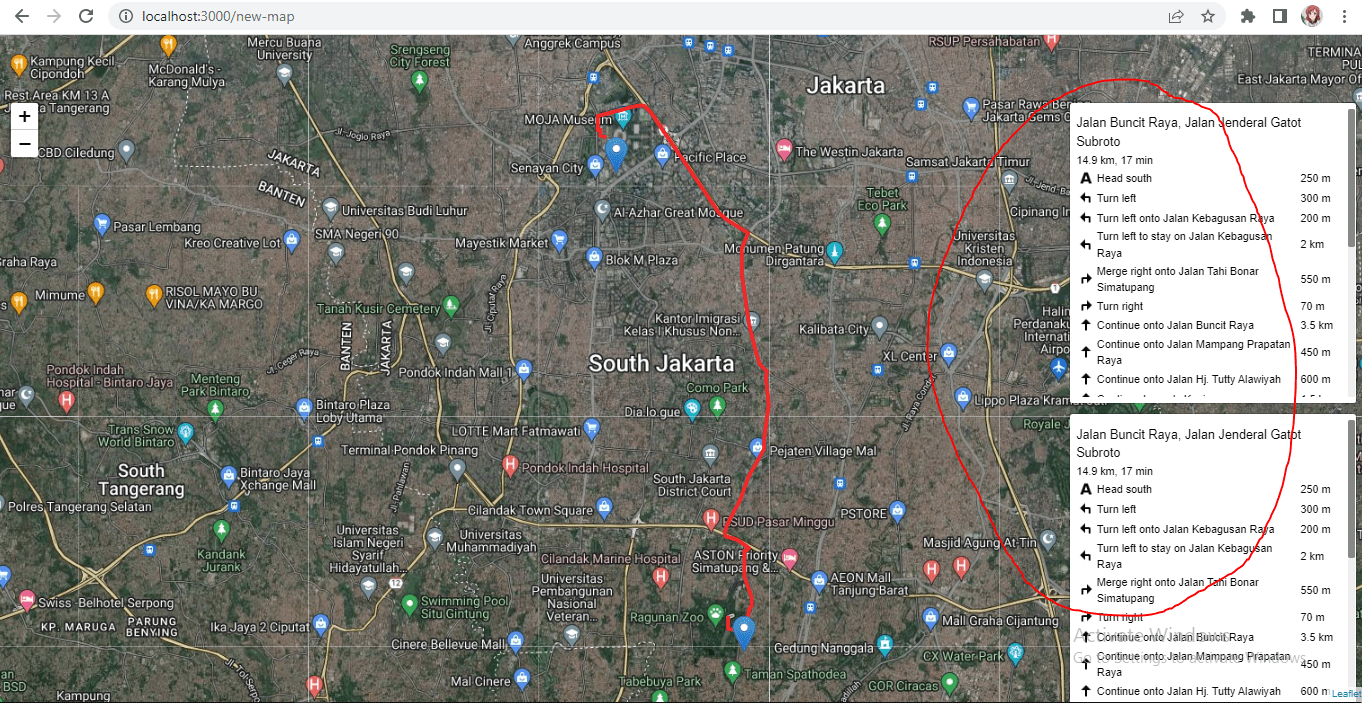
你认为解决办法是什么?
谢谢,我真的很感激你的帮助。
我的代码https://pastebin.com/xZaKFLaS
import { useEffect } from "react";
import L from "leaflet";
import "leaflet-routing-machine/dist/leaflet-routing-machine.css";
import "leaflet-routing-machine";
import { useMap } from "react-leaflet";

L.Marker.prototype.options.icon = L.icon({
  iconUrl: "https://unpkg.com/leaflet@1.7.1/dist/images/marker-icon.png",
});

export default function Routing() {
  const map = useMap();

  const routingControl = L.Routing.control({
    waypoints: [
      L.latLng(-6.3094117, 106.8240261),
      L.latLng(-6.2185648, 106.7996082),
    ],
    lineOptions: {
      styles: [{ color: "#ED2A2A", weight: 4 }],
    },
    routeWhileDragging: true,
    draggableWaypoints: true,
    fitSelectedRoutes: true,
  }).addTo(map);

  useEffect(() => {
    return routingControl.getPlan();
  }, [map, routingControl]);

  function createButton(label, container) {
    let btn = L.DomUtil.create("button", "", container);
    btn.setAttribute("type", "button");
    btn.innerHTML = label;
    return btn;
  }
  map.on("click", function (e) {
    let container = L.DomUtil.create("div"),
      startBtn = createButton("Start from this location", container),
      destBtn = createButton("Go to this location", container);

    L.DomEvent.on(startBtn, "click", function () {
      routingControl.spliceWaypoints(0, 1, e.latlng);
      map.closePopup();
    });
    L.DomEvent.on(destBtn, "click", function () {
      routingControl.spliceWaypoints(
        routingControl.getWaypoints().length - 1,
        1,
        e.latlng
      );
      map.closePopup();
    });

    L.popup().setContent(container).setLatLng(e.latlng).openOn(map);
  });

  return null;
}回答 1
Stack Overflow用户
发布于 2022-10-19 14:53:34
这似乎是一个已知的缺陷/限制,有一些解决办法。
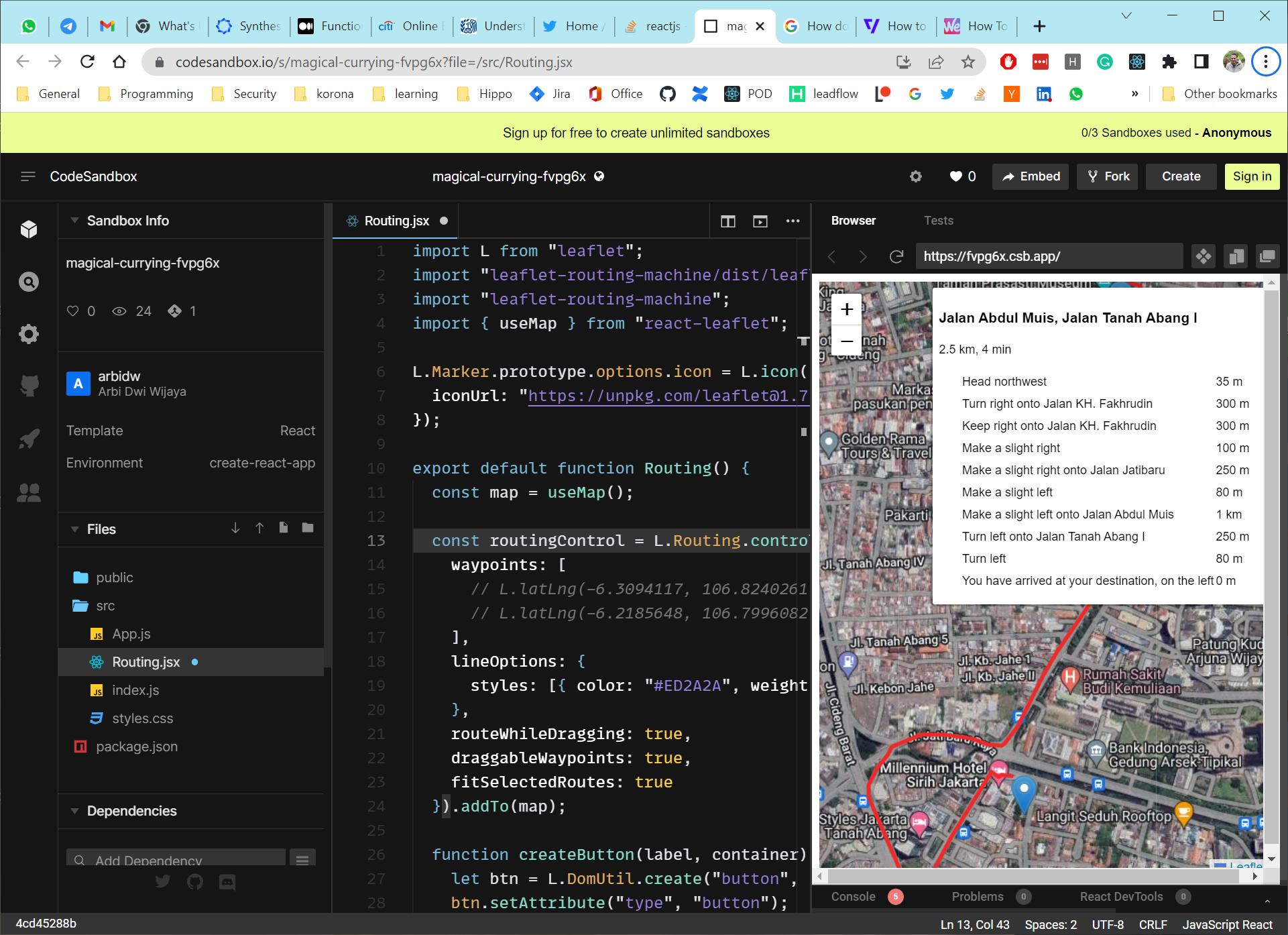
我认为,最简单的方法是不提供路径点(并允许用户创建自己的路径点)。以下代码适用于我:
 const routingControl = L.Routing.control({
    waypoints: [
      // L.latLng(-6.3094117, 106.8240261),
      // L.latLng(-6.2185648, 106.7996082)
    ],
    lineOptions: {
      styles: [{ color: "#ED2A2A", weight: 4 }]
    },
    routeWhileDragging: true,
    draggableWaypoints: true,
    fitSelectedRoutes: true
  }).addTo(map);
页面原文内容由Stack Overflow提供。腾讯云小微IT领域专用引擎提供翻译支持
原文链接:
https://stackoverflow.com/questions/74125087
复制相关文章
相似问题
腾讯云开发者

Copyright © 2013 - 2026 Tencent Cloud. All Rights Reserved. 腾讯云 版权所有
深圳市腾讯计算机系统有限公司 ICP备案/许可证号:粤B2-20090059  粤公网安备44030502008569号
腾讯云计算(北京)有限责任公司 京ICP证150476号 | 京ICP备11018762号