
如何使用草稿-js Draft.js ()从Draft.js中的URL生成链接
我有一个任务的网页表单。控件的description字段是一个Draft.js富文本编辑器。表单提交后,数据将持久化到DB。它在UI中呈现为卡片中的HTML。卡片可以内联编辑。在编辑模式下,持久化数据将原始表单预先填充为Draft.js编辑器。
我刚添加了linkify插件。我在这个页面上复制了名为“主题链接示例”的代码:https://www.draft-js-plugins.com/plugin/linkify。我看到,如果我键入类似于"cnn.com“的内容,它就会在编辑器中创建一个链接。(它实际上是一个具有嵌套跨度的锚标记。)然而,一旦我提交表单,呈现的HTML是一个段落,而不是链接。如果我编辑它,它将在Draft.js编辑器中再次显示为链接。
我要改变什么使链接显示一个实际的(可点击的)链接在呈现的卡片?其他格式看起来完好无损(例如,我可以制作粗体文本、列表、斜体等等)--这只是我遇到问题的链接。
这是我编辑的代码。有点长。在onChange()函数中,我添加了一些console.log调用,以了解正在发生的事情。我在编辑器中输入了字符串'cnn.com',下面是控制台日志调用的结果:
"rawContent:" {
"blocks": [
{
"key": "66gvt",
"text": "cnn.com ",
"type": "unstyled",
"depth": 0,
"inlineStyleRanges": [],
"entityRanges": [],
"data": {}
}
],
"entityMap": {}
}
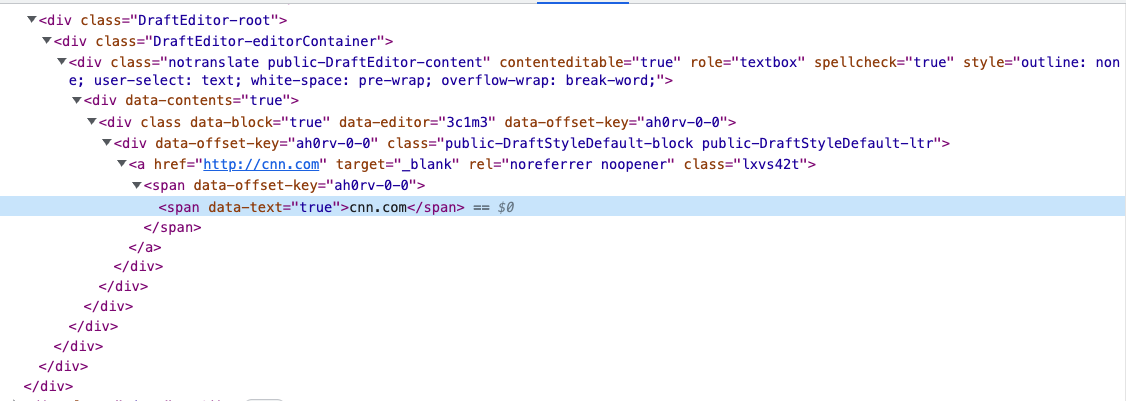
htmlContent:"<p>cnn.com </p>"下面是当编辑器打开(创建/编辑模式)时标记显示为的屏幕截图
import React, {useState, useRef} from 'react'
import {useStyletron} from 'baseui'
import {
    EditorState,
    RichUtils,
    getDefaultKeyBinding,
    ContentBlock,
    ContentState,
    DraftHandleValue,
    convertToRaw,
    convertFromHTML,
    RawDraftContentState,
} from 'draft-js'
import Editor from '@draft-js-plugins/editor'
import 'draft-js/dist/Draft.css'
import createLinkifyPlugin from '@draft-js-plugins/linkify'
import BlockStyleControls from './BlockStyleControls'
import InlineStyleControls from './InlineStyleControls'
import {stateToHTML} from 'draft-js-export-html'
import linkifyIt from 'linkify-it'
import tlds from 'tlds'

type Props = {
    setContent: (state: RawDraftContentState) => void
    setCount: (number) => void
    input: any,
    placeholder?: string | undefined
    initialValue?: string | undefined
}

const DraftEditor = ({setContent, setCount, input, placeholder, initialValue}: Props) => {
    const editorRef = useRef(null)
    const [editorState, setEditorState] = useState(EditorState.createWithContent(ContentState.createFromBlockArray(convertFromHTML(initialValue))))
    const [css] = useStyletron()

    const linkifyPlugin = createLinkifyPlugin({
        target: '_blank',
        component(props) {
            // eslint-disable-next-line no-alert, jsx-a11y/anchor-has-content
            return <a {...props} />;
        },
        customExtractLinks: (text) =>
            linkifyIt().tlds(tlds).set({ fuzzyEmail: false }).match(text),
    })

    const styleMap = {
        CODE: {
            backgroundColor: 'rgba(0, 0, 0, 0.05)',
            fontFamily: '"Inconsolata", "Menlo", "Consolas", monospace',
            fontSize: 16,
            padding: 2,
        },
        STRIKETHROUGH: {
            textDecoration: 'line-through',
        },
    }

    const getBlockStyle = (block: ContentBlock) => {
        switch (block.getType()) {
            case 'blockquote':
                return 'RichEditor-blockquote'
            default:
                return ''
        }
    }

    const onChange = (state: EditorState) => {
        const rawContent = convertToRaw(editorState.getCurrentContent())
        const htmlContent = stateToHTML(editorState.getCurrentContent())
        console.log(`rawContent: ${JSON.stringify(rawContent)}`)
        console.log(`htmlContent:${JSON.stringify(htmlContent)}`)
        setEditorState(state)
        setContent(rawContent)
        setCount(htmlContent.length)
        input.onChange(htmlContent)
    }

    const mapKeyToEditorCommand = (e: any): string | null => {
        if (e.keyCode === 9 /* TAB */) {
            const newEditorState = RichUtils.onTab(e, editorState, 4 /* maxDepth */)
            if (newEditorState !== editorState) {
                onChange(newEditorState)
            }
            return null
        }
        return getDefaultKeyBinding(e)
    }

    const handleKeyCommand = (
        command: string,
        editorState: EditorState,
        eventTimeStamp: number,
    ): DraftHandleValue => {
        const newState = RichUtils.handleKeyCommand(editorState, command)
        if (newState) {
            onChange(newState)
            return 'handled'
        }
        return 'not-handled'
    }

    const toggleBlockType = (blockType: string) => {
        onChange(RichUtils.toggleBlockType(editorState, blockType))
    }

    const toggleInlineStyle = (inlineStyle: string) => {
        onChange(RichUtils.toggleInlineStyle(editorState, inlineStyle))
    }

    return (
        <>
            <div className={css({
                border: '1px solid #dadada',
                padding: '3px',
                borderTopLeftRadius: '3px',
                borderTopRightRadius: '3px',
                background: 'white'
            })}>
                <InlineStyleControls
                    editorState={editorState}
                    onToggle={toggleInlineStyle}
                />
                <BlockStyleControls
                    editorState={editorState}
                    onToggle={toggleBlockType}
                />
            </div>
            <Editor
                ref={editorRef}
                editorState={editorState}
                customStyleMap={styleMap}
                blockStyleFn={(block: ContentBlock) => getBlockStyle(block)}
                placeholder={placeholder}
                plugins={[linkifyPlugin]}
                keyBindingFn={(e) => mapKeyToEditorCommand(e)}
                onChange={onChange}
                spellCheck={true}
                handleKeyCommand={handleKeyCommand}
            />
        </>
    )
}

export default React.memo(DraftEditor)回答 1
Stack Overflow用户
发布于 2022-10-19 02:11:48
我想出了怎么做。根据上面的源代码,我使用从stateToHTML()导出的draft-js-utils函数来持久化draft-js-utils。这个问题的措辞可能更好一些:“如何使用草稿- question ()将URL转换为链接?”
我履行了以下职能:
const isLink = (text) => linkifyIt().tlds(tlds).set({fuzzyEmail: false}).match(text)

const renderLink = block => {
    if (isLink(block.getText())) {
        return `<a href="${block.getText()}" target='_blank' rel='noreferrer'>${block.getText()}</a>`
    }
}我将renderLink作为blockRenderer传递给options对象:https://github.com/sstur/draft-js-utils/blob/master/packages/draft-js-export-html/README.md#blockrenderers
https://stackoverflow.com/questions/74091495
复制相似问题
腾讯云开发者

Copyright © 2013 - 2026 Tencent Cloud. All Rights Reserved. 腾讯云 版权所有
深圳市腾讯计算机系统有限公司 ICP备案/许可证号:粤B2-20090059  粤公网安备44030502008569号
腾讯云计算(北京)有限责任公司 京ICP证150476号 | 京ICP备11018762号