
使SwiftUI视图扩展到UIHostingController大小
使SwiftUI视图扩展到UIHostingController大小
提问于 2022-10-14 12:26:57
我有一个SwiftUI视图,需要在UIKit视图控制器中显示。我正在使用UIHostingController嵌入我的SwiftUI视图。
我试图弄清楚我的SwifUI视图如何扩展其大小以匹配UIHostingController的框架。我的UIHostingController目前与ViewController的backgroundImageView有相同的帧,但是FeatureIntroductionView没有扩展到适合于UIHostingController
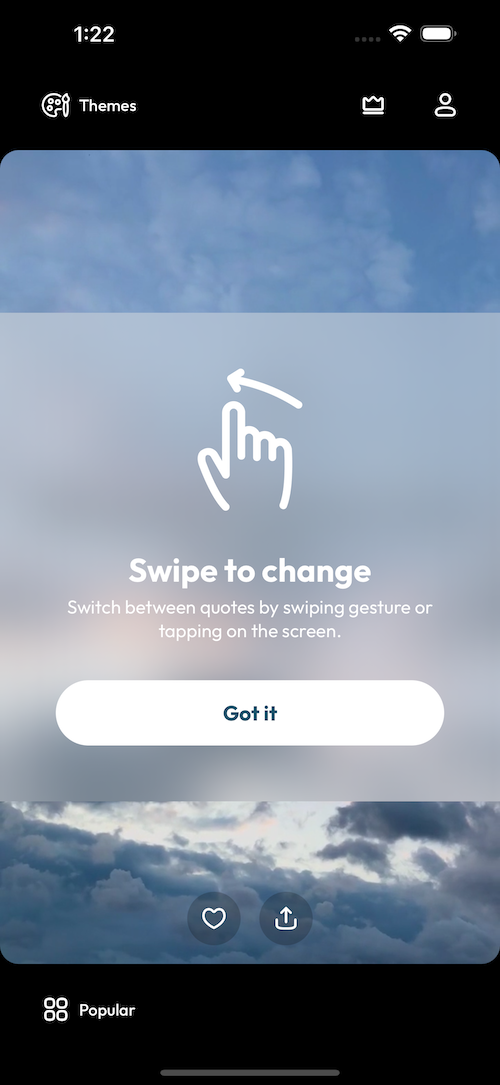
这是我的SwiftUI视图
struct FeatureIntroductionView: View {

let image: String
let title: String
let subtitle: String
let buttonTitle: String

var body: some View {
    VStack(spacing: 33) {
        Image(image)
        VStack(alignment: .center, spacing: 4) {
            Text(title)
                .foregroundColor(.white)
                .font(Font(UIFont.boldFontWith(size: 28)))

            Text(subtitle)
                .foregroundColor(.white)
                .font(Font(UIFont.regularFontWith(size: 16)))
                .multilineTextAlignment(.center)

        }

        SecondaryButton(title: buttonTitle) {
            // Close
        }
    }
    .padding(48)
    .background(.ultraThinMaterial,
                in: Rectangle())
    .frame(maxWidth: .infinity, maxHeight: .infinity)

}
}
,我把它嵌入到UIViewController中,如下所示
func addIntroductoryView() {
    let swipeFeatureIntroductionView = FeatureIntroductionView(image: "Swipe",
                                                               title: "Swipe to change",
                                                               subtitle: "Switch between quotes by swiping gesture or tapping on the screen.",
                                                               buttonTitle: "Got it")

    var swipeFeatureIntroductionHostingController = UIHostingController(rootView: swipeFeatureIntroductionView)
    swipeFeatureIntroductionHostingController.view.invalidateIntrinsicContentSize()
    addChild(swipeFeatureIntroductionHostingController)
    swipeFeatureIntroductionHostingController.view.frame = backgroundImageView.frame
    swipeFeatureIntroductionHostingController.view.layer.cornerRadius = 16
    swipeFeatureIntroductionHostingController.view?.clipsToBounds = true
    swipeFeatureIntroductionHostingController.view.backgroundColor = .clear
    view.addSubview(swipeFeatureIntroductionHostingController.view)
    swipeFeatureIntroductionHostingController.didMove(toParent: self)
}我正在寻找一种方法来扩展FeatureIntroductionView以填充与backgrodun图像相同的空间。
谢谢
回答 1
Stack Overflow用户
回答已采纳
发布于 2022-10-14 12:34:09
在应用.frame之后,您正在应用.background。
这意味着背景视图被应用于视图的内容所决定的区域,并且当视图的框架被展开时,背景保持相同的大小。
尝试切换修饰符的顺序,以便在应用背景之前调整帧大小。
.frame(maxWidth: .infinity, maxHeight: .infinity)
.background(.ultraThinMaterial, in: Rectangle())页面原文内容由Stack Overflow提供。腾讯云小微IT领域专用引擎提供翻译支持
原文链接:
https://stackoverflow.com/questions/74069216
复制相关文章
相似问题
腾讯云开发者

Copyright © 2013 - 2026 Tencent Cloud. All Rights Reserved. 腾讯云 版权所有
深圳市腾讯计算机系统有限公司 ICP备案/许可证号:粤B2-20090059  粤公网安备44030502008569号
腾讯云计算(北京)有限责任公司 京ICP证150476号 | 京ICP备11018762号