
如何在TabLyout中更改Material3文本颜色
如何在TabLyout中更改Material3文本颜色
提问于 2022-10-12 13:52:21
在Material3 TabLayout中,文本的颜色没有改变。TabLayout背景色使用表面颜色改变,但文本颜色不随ColorOnSurface而变化!另外,自定义TabStyle不能在Material3中工作。这是我的定制TabStyle。
<style name="customTabLayout" parent="Widget.Material3.TabLayout">
    <item name="tabIndicatorColor">@color/white</item>
    <item name="tabIndicatorHeight">2.5dp</item>
    <item name="tabPaddingStart">6dp</item>
    <item name="tabPaddingEnd">6dp</item>
    <item name="tabBackground">?attr/selectableItemBackground</item>
    <item name="tabSelectedTextColor">#ffffff</item>
    <item name="colorPrimary">@color/white</item>
    <item name="colorSurface">@color/colorPrimary</item>
    <item name="colorOnSurface">@color/white</item>
</style>回答 1
Stack Overflow用户
发布于 2022-10-15 13:36:41
M3 TabLayout中的默认文本颜色基于(参见所有州):
colorOnSurfaceVariant:未被选中colorPrimary:选择
您可以使用样式中的materialThemeOverlay属性覆盖它们:
<style name="Widget.App.TabLayout" parent="Widget.Material3.TabLayout">
    <item name="materialThemeOverlay">@style/ThemeOverlay.App.TabLayout</item>
</style>

<style name="ThemeOverlay.App.TabLayout" parent="">
    <item name="colorPrimary">@color/red500_dark</item>
    <item name="colorOnSurfaceVariant">@color/blu500_dark</item>
</style>
在你的布局中:
<com.google.android.material.tabs.TabLayout
    style="@style/Widget.App.TabLayout"
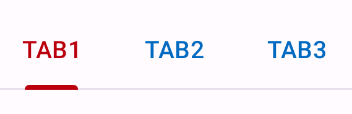
您可以在布局中实现相同的使用:
<com.google.android.material.tabs.TabLayout
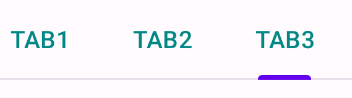
android:theme="@style/ThemeOverlay.App.TabLayout"无论如何,选项卡项文本颜色是由tabTextColor属性定义的,您可以使用以下方法完全覆盖默认选择器:
<style name="Widget.App.TabLayout" parent="Widget.Material3.TabLayout">
    <item name="tabTextColor">@color/selector_teal_700</item>
</style>在布局中使用像这这样的选择器:
<com.google.android.material.tabs.TabLayout
    style="@style/Widget.App.TabLayout"
页面原文内容由Stack Overflow提供。腾讯云小微IT领域专用引擎提供翻译支持
原文链接:
https://stackoverflow.com/questions/74043056
复制相关文章
相似问题
腾讯云开发者

Copyright © 2013 - 2026 Tencent Cloud. All Rights Reserved. 腾讯云 版权所有
深圳市腾讯计算机系统有限公司 ICP备案/许可证号:粤B2-20090059  粤公网安备44030502008569号
腾讯云计算(北京)有限责任公司 京ICP证150476号 | 京ICP备11018762号