
Visio如何使用C#代码在Visio形状上添加数据图形?
Visio如何使用C#代码在Visio形状上添加数据图形?
提问于 2022-10-11 11:40:02
我正在使用2021和VS 2019进行开发。
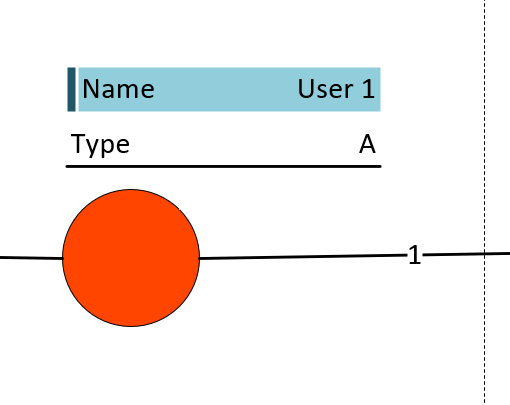
按照下面的屏幕截图,我想在Visio中向添加的形状添加数据图形。你能建议一些C#的可能性吗?
下面是我尝试过的代码
short customProps = (short)VisSectionIndices.visSectionProp;

short rowNumber = shape.AddRow(customProps, (short)VisRowIndices.visRowLast, (short)VisRowTags.visTagDefault);

shape.CellsSRC[customProps, rowNumber, (short)VisCellIndices.visCustPropsLabel].FormulaU = "\"" + PropertyName + "\"";

shape.CellsSRC[customProps, rowNumber, (short)VisCellIndices.visCustPropsValue].FormulaU = "\"" + propertyValue + "\"";
但是我想按照所显示的图像在每个形状上添加数据图形。
回答 1
Stack Overflow用户
发布于 2022-11-11 17:42:03
在Visio用户界面中,它们被称为:数据图形
在对象模型代码中,它们被称为: GraphicItems
https://learn.microsoft.com/en-us/office/vba/api/visio.graphicitems
在这篇文章中,你会发现:
*注意,必须使用Visio用户界面创建visTypeDataGraphic类型的母版--不能以编程方式创建它们。
和
AddCopy方法将现有GraphicItem对象的副本添加到GraphicItems集合中。要添加的GraphicItem对象必须已存在于另一个类型为visTypeDataGraphic的主程序中。
https://learn.microsoft.com/en-us/office/vba/api/visio.graphicitems.addcopy
页面原文内容由Stack Overflow提供。腾讯云小微IT领域专用引擎提供翻译支持
原文链接:
https://stackoverflow.com/questions/74027508
复制相关文章
相似问题
腾讯云开发者

Copyright © 2013 - 2026 Tencent Cloud. All Rights Reserved. 腾讯云 版权所有
深圳市腾讯计算机系统有限公司 ICP备案/许可证号:粤B2-20090059  粤公网安备44030502008569号
腾讯云计算(北京)有限责任公司 京ICP证150476号 | 京ICP备11018762号