
如何获得访问密钥(AK/SK)?
如何获得访问密钥(AK/SK)?
提问于 2022-10-10 17:53:46
在华为云中,如何获得访问密钥(AK/SK)密钥对?
请:如果你有超过1500个声誉,请帮我加上“华为云”标签。
回答 1
Stack Overflow用户
回答已采纳
发布于 2022-10-10 17:53:46
访问密钥包括访问密钥ID (AK)和秘密访问密钥(SK),并用作签署华为云API请求的长期身份证书。
- 登录到华为云,然后单击右上角的控制台。

- 在管理控制台上,悬停在右上角的用户名上,并从下拉列表.
中选择“我的凭据”。
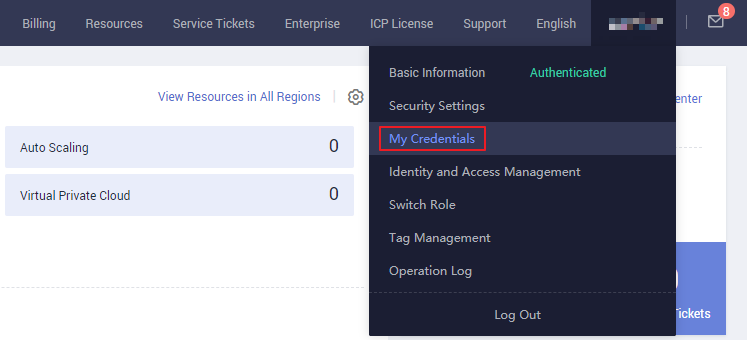
- 从导航窗格中选择访问键。
- 单击Create Access键,然后输入验证代码或密码。

NOTE:
• You can create a maximum of two access keys. The quota cannot be increased. If you already have two access keys, you can only delete an access key and create a new one.
• To change an access key, delete it and create a new one.- 单击OK生成一个访问密钥并下载它。
创建访问密钥后,在访问密钥列表中查看AK,并在下载的CSV文件.中查看SK。
NOTE:

• Download the access key file and keep it properly. If the download page is closed, you will not be able to download the access key. However, you can create a new one.
• Open the CSV file in the lower left corner, or choose Downloads in the upper right corner of the browser and open the CSV file.
• Keep your access keys secure and change them periodically for security purposes. To change an access key, delete it and create a new one.
Source - https://support.huaweicloud.com/intl/en-us/usermanual-ca/ca_01_0003.html
页面原文内容由Stack Overflow提供。腾讯云小微IT领域专用引擎提供翻译支持
原文链接:
https://stackoverflow.com/questions/74018912
复制相关文章
相似问题
腾讯云开发者

Copyright © 2013 - 2026 Tencent Cloud. All Rights Reserved. 腾讯云 版权所有
深圳市腾讯计算机系统有限公司 ICP备案/许可证号:粤B2-20090059  粤公网安备44030502008569号
腾讯云计算(北京)有限责任公司 京ICP证150476号 | 京ICP备11018762号