
如何打印非选定(未选定)芯片,如选择的芯片在颤振?
如何打印非选定(未选定)芯片,如选择的芯片在颤振?
提问于 2022-10-10 12:10:16
我使用Map函数构建了多个选择芯片。当选择一个芯片时,颜色会变黄。当选定的芯片,然后打印选定的芯片。就像这样,我想选择芯片并显示它们中未选择的芯片。能做到吗?如果可以如何实现呢?
我的密码..。
 List<String> hobbyList = [
    'Shopping',
    'Brunch',
    'Music',
    'Road Trips',
    'Tea',
    'Trivia',
    'Comedy',
    'Clubbing',
    'Drinking',
    'Wine',
  ];

List<String>? selectedHobby = [];Column(
children: <Widget>[
const SizedBox(height: 16),
Wrap(
children: hobbyList.map(
(hobby) {
bool isSelected = false;
if (selectedHobby!.contains(hobby)) {
isSelected = true;
}
return GestureDetector(
onTap: () {
if (!selectedHobby!.contains(hobby)) {
if (selectedHobby!.length < 50) {
selectedHobby!.add(hobby);
setState(() {});
print(selectedHobby);
}
} else {
selectedHobby!.removeWhere(
(element) => element == hobby);
setState(() {});
print(selectedHobby);
}
},
child: Container(
margin: const EdgeInsets.symmetric(
horizontal: 5, vertical: 4),
child: Container(
padding: const EdgeInsets.symmetric(
vertical: 5, horizontal: 12),
decoration: BoxDecoration(
color: isSelected
? HexColor('#F5F185')
: HexColor('#D9D9D9'),
borderRadius:
BorderRadius.circular(18),
border: Border.all(
color: isSelected
? HexColor('#F5F185')
: HexColor('#D9D9D9'),
width: 2)),
child: Text(
hobby,
style: TextStyle(
color: isSelected
? Colors.black
: Colors.black,
fontSize: 14,
fontWeight: FontWeight.w600),
),
),
),
);
},
).toList(),
),
],
),我现在把它放出来
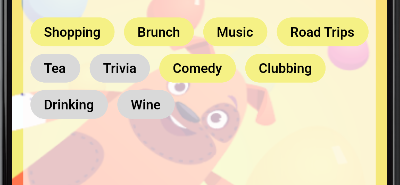

回答 3
Stack Overflow用户
发布于 2022-10-10 14:08:26
您可以通过减去hoppy列表和所选择的列表来实现这一点,这将给出未选择的列表,您可以使用该列表进行逻辑处理。
此函数将通过减去两个列表生成一个列表:
List<String> subtract({required List<String> listOne ,required List<String> listTwo}){
  List<String> list = [];
  for(String e in listOne){
    if(!listTwo.contains(e)){
      list.add(e);
    }
  }
  return list;
}Stack Overflow用户
发布于 2022-10-11 16:13:07
class Example extends State<ExState> {

  List<String> hobbyList = [
    'Shopping',
    'Brunch',
    'Music',
    'Road Trips',
    'Tea',
    'Trivia',
    'Comedy',
    'Clubbing',
    'Drinking',
    'Wine',
  ];

  List<String>? selectedHobby = [];

  void printNotIncluded(List<String> completeList, List<String> selectedItems) {
    List<String> notIncludedItems = [];
    for (String item in completeList) {
      if (!selectedItems.contains(item)) {
        notIncludedItems.add(item);
      }
    }
    print('Items not selected:');
    print(notIncludedItems);
  }

  @override
  Widget build(BuildContext context) {
    return Column(
      children: <Widget>[
        const SizedBox(height: 16),
        Wrap(
          children: hobbyList.map(
            (hobby) {
              bool isSelected = false;
              if (selectedHobby!.contains(hobby)) {
                isSelected = true;
              }
              return GestureDetector(
                onTap: () {
                  if (!selectedHobby!.contains(hobby)) {
                    if (selectedHobby!.length < 50) {
                      selectedHobby!.add(hobby);
                      setState(() {});
                      print(selectedHobby);
                    }
                  } else {
                    selectedHobby!.removeWhere((element) => element == hobby);
                    setState(() {});
                    print(selectedHobby);
                  }
                  printNotIncluded(hobbyList, selectedHobby!);
                },
                child: Container(
                  margin:
                      const EdgeInsets.symmetric(horizontal: 5, vertical: 4),
                  child: Container(
                    padding:
                        const EdgeInsets.symmetric(vertical: 5, horizontal: 12),
                    decoration: BoxDecoration(
                        color: isSelected ? Colors.red : Colors.yellow,
                        borderRadius: BorderRadius.circular(18),
                        border: Border.all(
                            color: isSelected ? Colors.red : Colors.yellow,
                            width: 2)),
                    child: Text(
                      hobby,
                      style: TextStyle(
                          color: isSelected ? Colors.black : Colors.black,
                          fontSize: 14,
                          fontWeight: FontWeight.w600),
                    ),
                  ),
                ),
              );
            },
          ).toList(),
        ),
      ],
    );
  }
}
Stack Overflow用户
发布于 2022-10-11 16:39:01
尝试此操作,它将只显示未选择的业余爱好,并将选定的部分移至另一节,我为此创建了一个演示,只需将您的构建方法替换为下一个构建方法:
    @override
  Widget build(BuildContext context) {

    return Scaffold(
      appBar: AppBar(
        title: const Text("Demo"),
      ),
      body: SingleChildScrollView(
        child: Column(
          mainAxisAlignment: MainAxisAlignment.start,
          crossAxisAlignment: CrossAxisAlignment.center,
          children: <Widget>[
            const SizedBox(height: 25),
            Container(alignment: Alignment.center,child: const Text("Hobbies", style:  TextStyle(fontSize: 20),),),
            const SizedBox(height: 35),
            Wrap(
              children: hobbyList.map(
                    (hobby) {
                  bool isSelected = false;
                  if (selectedHobby.contains(hobby)) {
                    isSelected = true;
                  }
                  return GestureDetector(
                    onTap: () {
                      if (!selectedHobby.contains(hobby)) {
                        if (selectedHobby.length < 50) {
                          selectedHobby.add(hobby);
                          // when you select the item remove it from the hobby list and add it to the selected
                          hobbyList.remove(hobby);
                          setState(() {});
                          debugPrint(selectedHobby.toString());
                        }
                      } else {
                        selectedHobby.removeWhere(
                                (element) => element == hobby);
                        setState(() {});
                        debugPrint(selectedHobby.toString());
                      }
                    },
                    child: Container(
                      margin: const EdgeInsets.symmetric(
                          horizontal: 5, vertical: 4),
                      child: Container(
                        padding: const EdgeInsets.symmetric(
                            vertical: 5, horizontal: 12),
                        decoration: BoxDecoration(
                            color: isSelected
                                ? const Color(0x0ff5f185)
                                : const Color(0x00d9d9d9),
                            borderRadius:
                            BorderRadius.circular(18),
                            border: Border.all(
                                color: isSelected
                                    ? const Color(0xfff5f185)
                                    : const Color(0xffd9d9d9),
                                width: 2)),
                        child: Text(
                          hobby,
                          style: TextStyle(
                              color: isSelected
                                  ? Colors.black
                                  : Colors.black,
                              fontSize: 14,
                              fontWeight: FontWeight.w600),
                        ),
                      ),
                    ),
                  );
                },
              ).toList(),
            ),
            const SizedBox(height: 50),
            Container(alignment: Alignment.center,child: const Text("Selected Hobbies", style:  TextStyle(fontSize: 20),),),
            const SizedBox(height: 35),
            Wrap(
              children: selectedHobby.map(
                    (hobby) {
                  return GestureDetector(
                    onTap: () {
                      // add the hobby to the hobbies list and remove it from the selected hobbies list.
                      hobbyList.add(hobby);
                      selectedHobby.remove(hobby);
                      setState(() {});
                    },
                    child: Container(
                      margin: const EdgeInsets.symmetric(
                          horizontal: 5, vertical: 4),
                      child: Container(
                        padding: const EdgeInsets.symmetric(
                            vertical: 5, horizontal: 12),
                        decoration: BoxDecoration(
                            color: const Color(0xfff5f185),
                            borderRadius: BorderRadius.circular(18),
                            border: Border.all(
                                color: const Color(0xfff5f185),
                                width: 2)),
                        child: Text(
                          hobby,
                          style: const TextStyle(
                              color: Colors.black,
                              fontSize: 14,
                              fontWeight: FontWeight.w600),
                        ),
                      ),
                    ),
                  );
                },
              ).toList(),
            ),
          ],
        ),
      ),
    );
  }
并将列表替换为以下列表
    List<String> hobbyList = [
    'Shopping',
    'Brunch',
    'Music',
    'Road Trips',
    'Tea',
    'Trivia',
    'Comedy',
    'Clubbing',
    'Drinking',
    'Wine',
  ];

List<String> selectedHobby = [];页面原文内容由Stack Overflow提供。腾讯云小微IT领域专用引擎提供翻译支持
原文链接:
https://stackoverflow.com/questions/74014743
复制相关文章
相似问题
腾讯云开发者

Copyright © 2013 - 2026 Tencent Cloud. All Rights Reserved. 腾讯云 版权所有
深圳市腾讯计算机系统有限公司 ICP备案/许可证号:粤B2-20090059  粤公网安备44030502008569号
腾讯云计算(北京)有限责任公司 京ICP证150476号 | 京ICP备11018762号