
使用PHPMailer忽略PHPMailer if语句
使用PHPMailer忽略PHPMailer if语句
提问于 2022-10-05 16:38:21
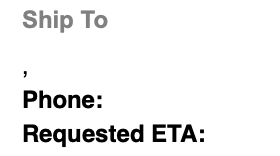
我正在尝试从我的Apache (7.2)后端发送一个订单确认电子邮件HTML模板(order_confirmation.html.php),该后端具有phpmailer库(^6.0.2)发送的条件呈现标记。我在电子邮件正文中发送这个消息,但是php语句并没有像我所期望的那样被解释。例如,即使$data['order_shipping']键不存在,模板文件中的这些行呈现:
<? if ($data['order_shipping']) { ?>
<tr>
  <td>
      <div style="color:#808080;font-size:12px;line-height:20px;font-weight:bold;font-family:Arial,sans-serif;">Ship To</div>
      <div style="padding-bottom:3px;font-size:12px;color:#000;font-family:Helvetica,Arial,sans-serif;"><?= stripslashes($data['order_shipping']['address_line_1']); ?></div>
      <? if ($data['order_shipping']['address_line_2']) { ?>
        <div style="padding-bottom:3px;font-size:12px;color:#000;font-family:Helvetica,Arial,sans-serif;"><?= stripslashes($data['order_shipping']['address_line_2']); ?></div>
      <? } ?>
      <div style="padding-bottom:3px;font-size:12px;color:#000;font-family:Helvetica,Arial,sans-serif;"><?= stripslashes($data['order_shipping']['city']).", ".stripslashes($data['order_shipping']['state'])." ".stripslashes($data['order_shipping']['zip']); ?></div>
      <div style="padding-bottom:3px;font-size:12px;color:#000;font-family:Helvetica,Arial,sans-serif;"><span style="font-weight:bold;">Phone:</span> <?= stripslashes($data['order_shipping']['phone']); ?></div>
      <div style="padding-bottom:3px;font-size:12px;color:#000;font-family:Helvetica,Arial,sans-serif;"><span style="font-weight:bold;">Requested ETA:</span> <?= stripslashes($data['order_shipping']['requested_eta']); ?></div>
  </td>
</tr>
<? } ?>
以下是已发送的电子邮件:
以及使用SystemMailer.php库的PHPMailer文件:
class SystemMailer extends Controller {

    var $container;

    function __construct($container) {
        $this->container = $container;
        parent::__construct($container);
        $this->mailer = new \PHPMailer\PHPMailer\PHPMailer;
    }

    function clearAddresses() {
        $this->mailer->clearAddresses();
    }

    function initEmail($email_config) {
        $this->log->debug("SystemMailer", "initEmail");
        $this->log->debug("SystemMailer", "adding address");
        $this->log->debug("SystemMailer", $email_config['to_email']);
        if (is_array($email_config['to_email'])) {
            foreach ($email_config['to_email'] AS $email) {
                $this->mailer->addAddress($email);
                $this->container->log->debug("addAddress", $email);
            }
        } else {
            $this->mailer->addAddress($email_config['to_email']);
        }

        if (is_array($email_config['bcc_email'])) {
            foreach ($email_config['bcc_email'] AS $email) {
                $this->mailer->addBCC($email);
            }
        } else {
            $this->mailer->addBCC($email_config['bcc_email']);
        }

        if ($email_config['from_name'] && $email_config['from_email']) {
            $this->mailer->setFrom($email_config['from_email'], $email_config['from_name']);
        } elseif ($email_config['from_email']) {
            $this->mailer->setFrom($email_config['from_email']);
        }
        if ($email_config['reply_to_name'] && $email_config['reply_to_email']) {
            $this->mailer->addReplyTo($email_config['reply_to_email'], $email_config['reply_to_name']);
        } elseif ($email_config['reply_to_email']) {
            $this->mailer->addReplyTo($email_config['reply_to_email']);
        }
        $this->mailer->isHTML(true); // Set email format to HTML
        $this->mailer->Subject = $email_config['subject'];
        // the following must be done in this order.
        // 1) add HTML content to email
        // 2) add TEXT content to email
        if ($email_config['html_content']) {
            $this->mailer->Body    = $email_config['html_content'];
        }
        if ($email_config['text_email']) {
            $this->mailer->AltBody = $email_config['text_email'];
        }
    }

    function sendEmail() {
        // smtp auth
        ob_start();
        $this->mailer->SMTPDebug    = 2;
        $this->mailer->isSMTP();                                                    // Set mailer to use SMTP
        $this->mailer->SMTPAuth     = true;                                         // Enable SMTP authentication
        $this->mailer->Host         = $this->config->get_value('smtp_host_1');      // Specify main and backup SMTP servers
        $this->mailer->Username     = $this->config->get_value('smtp_user_1');      // SMTP username
        $this->mailer->Password     = $this->config->get_value('smtp_password_1');  // SMTP password
        $this->mailer->SMTPSecure   = $this->config->get_value('smtp_encryption_1');  // SMTP encryption
        $this->mailer->Port         = $this->config->get_value('smtp_port_1');       // TCP port to connect to
        $success                    = $this->mailer->send();
        $output                     = ob_get_contents();
        ob_end_clean();

        if ( ! $success ) {
            $this->log->debug("SystemMailer", "Error sending mail");
            $this->log->debug("SystemMailer", $this->mailer->ErrorInfo);
            $this->log->debug("SystemMailer : output", $output);
            return false;
        } else {
            $this->log->debug("SystemMailer", "Sent mail");
            return true;
        }
    }

}
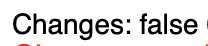
有几行php代码确实会被呈现。例如,为了排除故障,我将这一行添加到电子邮件模板中;它在电子邮件中正确显示:
Changes: <?= count($data['changes']) ? "true" : "false" ?>
回答 1
Stack Overflow用户
回答已采纳
发布于 2022-10-05 17:55:45
我正在使用docker/docker-组合来封装应用程序。因此,您希望将这一行添加到用于构建图像的Dockerfile中:
RUN sed -i "s/short_open_tag = Off/short_open_tag = On/" "$PHP_INI_DIR/php.ini"使用此GitHub链路作为参考
页面原文内容由Stack Overflow提供。腾讯云小微IT领域专用引擎提供翻译支持
原文链接:
https://stackoverflow.com/questions/73963623
复制相关文章
相似问题
腾讯云开发者

Copyright © 2013 - 2026 Tencent Cloud. All Rights Reserved. 腾讯云 版权所有
深圳市腾讯计算机系统有限公司 ICP备案/许可证号:粤B2-20090059  粤公网安备44030502008569号
腾讯云计算(北京)有限责任公司 京ICP证150476号 | 京ICP备11018762号