
如何解决“分支先于‘源/<分支>’10次提交”
如何解决“分支先于‘源/<分支>’10次提交”
提问于 2022-10-04 19:18:40
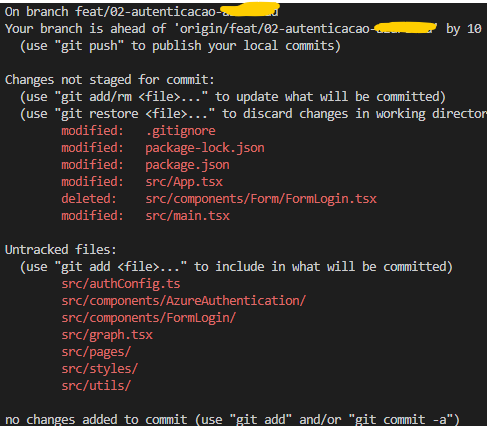
在vscode终端中的git状态命令之后,出现以下消息
On branch feat/02-autenticacao
Your branch is ahead of 'origin/feat/02-autenticacao' by 10 commits.
  (use "git push" to publish your local commits)

Changes not staged for commit:
  (use "git add/rm <file>..." to update what will be committed)
  (use "git restore <file>..." to discard changes in working directory)
        modified:   .gitignore
        modified:   package-lock.json
        modified:   package.json
        modified:   src/App.tsx
        deleted:    src/components/Form/FormLogin.tsx
        modified:   src/main.tsx

Untracked files:
  (use "git add <file>..." to include in what will be committed)
        src/authConfig.ts
        src/components/AzureAuthentication/
        src/components/FormLogin/
        src/graph.tsx
        src/pages/
        src/styles/
        src/utils/

no changes added to commit (use "git add" and/or "git commit -a")
如何解决这个问题?
回答 1
Stack Overflow用户
发布于 2022-10-04 19:38:49
如果绝对确定要放弃10次提交,请:
git stash push -u  # Save the current changes for later (including untracked files).
git reset --hard origin/feat/02-autenticacao  # Reset the branch to the origin version, discarding the commits.
git stash pop  # Restore the changes saved to the stash.
(如果某些当前编辑的文件是由这10次提交编辑的,则可能会发生冲突。)
页面原文内容由Stack Overflow提供。腾讯云小微IT领域专用引擎提供翻译支持
原文链接:
https://stackoverflow.com/questions/73952684
复制相关文章
相似问题
腾讯云开发者

Copyright © 2013 - 2026 Tencent Cloud. All Rights Reserved. 腾讯云 版权所有
深圳市腾讯计算机系统有限公司 ICP备案/许可证号:粤B2-20090059  粤公网安备44030502008569号
腾讯云计算(北京)有限责任公司 京ICP证150476号 | 京ICP备11018762号