
我想使用CSS Hover,但我无法运行它
我想使用CSS Hover,但我无法运行它
提问于 2022-10-01 08:58:05
我准备的那一页是一个反应项目。
我正在使用星战api提供一些信息。
当我把这个信息放在一个不同的容器中时,当我用鼠标悬停在它上面时,相关的字段是一个不同的颜色,我想让它写我给它的信息。
我试了几样东西,但都没成功。
您可以在“片段”中看到从api获得的信息以及如何将其打印到屏幕上。
我的相关CSS代码也在那里。
我提到了我不能在评论行中运行的部分
我希望我解释得对。
谢谢你提前提供帮助。
我把它印在屏幕上如下:
import React, { Component } from "react";
import "../styles/Films.css";
class Films extends Component {
state = {
data: [],
movieDetailsOpen: false,
movieSelected: "",
index: 0,
page: 1,
isLoading: false,
};
posterImages = [
"CR90-Corvette.png",
"stardestroyer.png",
"Sentinel-class-landing-craft.jpg",
"Death-Star.png",
"Millenium_Falcon.jpg",
"Y-wing.png",
"x-wing.png",
"TIE-Advanced-x1.png",
"executor.png",
"rebel-transport.png",
"https://picsum.photos/id/237/200/300",
"https://picsum.photos/id/247/200/300",
"https://picsum.photos/id/257/200/300",
"https://picsum.photos/id/267/200/300",
"https://picsum.photos/id/277/200/300",
"https://picsum.photos/id/287/200/300",
"https://picsum.photos/id/297/200/300",
"https://picsum.photos/id/137/200/300",
"https://picsum.photos/id/247/200/300",
"https://picsum.photos/id/357/200/300",
"https://picsum.photos/id/467/200/300",
"https://picsum.photos/id/577/200/300",
"https://picsum.photos/id/687/200/300",
"https://picsum.photos/id/797/200/300",
];
async getFilms() {
const { page } = this.state;
await fetch(`https://swapi.dev/api/starships/?page=${page}`)
.then(async (res) => {
let response = await res.json();
const films = response.results.map((result,index) => ({name:result.name,image:this.posterImages[ index + 10 * (page - 1)], model:result.model, hyperdrive_rating:result.hyperdrive_rating}))
this.state.data = [...this.state.data,...films]
console.log(this.state.data)
this.setState({})
})
.catch((err) => {
console.log(err);
});
}
closeDetails() {
document.getElementById("movie-details-wrapper").style.animation = "close .5s ease forwards";
document.getElementById("bottom").style.animation = "open .5s ease forwards";
document.getElementById("top").style.animation = "open .5s ease forwards";
this.props.closeDetails();
}
componentWillMount() {
this.getFilms();
}
componentDidMount() {}
componentDidUpdate(prevProps, prevState) {
if (prevState.page !== this.state.page) {
this.getFilms();
}
}
loadMore = () => {
this.setState((prevState) => ({
page: prevState.page + 1,
index: prevState.index + 1,
}));
};
render() {
const { isLoading } = this.state;
return (
<div className="starships-wrapper">
<div className="top" id="top">
<img src="./logo.png" alt="logo" />
</div>
<div className="bottom" id="bottom">
<ul>
{this.state.data.map((res, index) => {
return (
<li
key={index}
className="ship-list"
style={{
backgroundImage: `url(${res.image})`,
}}
>
<div className="name">{res.name}</div>
//--------------after this part it doesn't work------//
<div className="container">
<div className="overlay">
<p className="text">{res.model}</p>
<p className="text">{res.hyperdrive_rating}</p>
{/* <a href={`#state/${res.name}`} onClick={() => this.setState((res.url))} role="button">
More details »
</a> */}
</div>
</div>
//--------------------------------------------------//
</li>
);
})}
</ul>
</div>
<div className="load-more">
<button onClick={this.loadMore} className="btn-grad" variant="dark">
{isLoading ? "Loading..." : "Load More"}
</button>
</div>
</div>
);
}
}
export default Films;.starships-wrapper {
display: grid;
grid-template-columns: 1fr;
}
.top {
height: 400px;
background-size: contain;
background: rgb(0, 0, 0) url("https://starwars.fandom.com/tr/wiki/Star_Wars?file=Star-wars-logo-new-tall.jpg") no-repeat top;
}
.top > img {
width: 400px;
margin: 10px 590px;
text-align: center;
}
.bottom {
background: #fff;
}
.bottom > ul {
list-style: none;
width: fit-content;
margin: 0 auto auto;
padding: 10px;
display: grid;
grid-template-columns: repeat(3, 1fr);
grid-gap: 15px;
text-align: center;
position: relative;
top: 6rem;
color:#ffffff;
bottom: 0;
}
.bottom > ul:hover {
cursor: pointer;
}
.ship-list {
height: 510px;
width: 400px;
border-radius: 15px;
box-shadow: 0 10px 15px -9px black;
background-repeat: no-repeat;
background-size: contain;
background-position: bottom;
}
.name {
background-color: #070707;
color: #ffffff;
width: 100%;
font-size: 48px;
font-weight: 900;
border-radius: 15px 15px 0 0;
}
button {
background-color: white;
color: black;
border: 2px solid #555555;
background-color: #000000;
/* Green */
border: #070707;
color: rgb(255, 251, 0);
padding: 16px 32px;
text-align: left;
text-decoration: none;
display: inline-block;
font-size: 16px;
margin: 4px 2px;
transition-duration: 0.4s;
cursor: pointer;
}
@media only Screen and (max-width: 900px) {
.bottom > ul {
grid-template-columns: 1fr;
width: 95%;
}
.movie-list {
height: 350px;
background-size: cover;
}
}
.ship-list .overlay {
position: absolute;
top: 0;
bottom: 0;
left: 0;
right: 0;
height: 100%;
width: 100%;
opacity: 0;
transition: .5s ease;
background-color: #008CBA;
}
.ship-list .container:hover .overlay {
opacity: 1;
}
.ship-list .text {
color: white;
font-size: 20px;
position: absolute;
top: 50%;
left: 50%;
-webkit-transform: translate(-50%, -50%);
-ms-transform: translate(-50%, -50%);
transform: translate(-50%, -50%);
text-align: center;
}
回答 1
Stack Overflow用户
发布于 2022-10-01 10:04:38
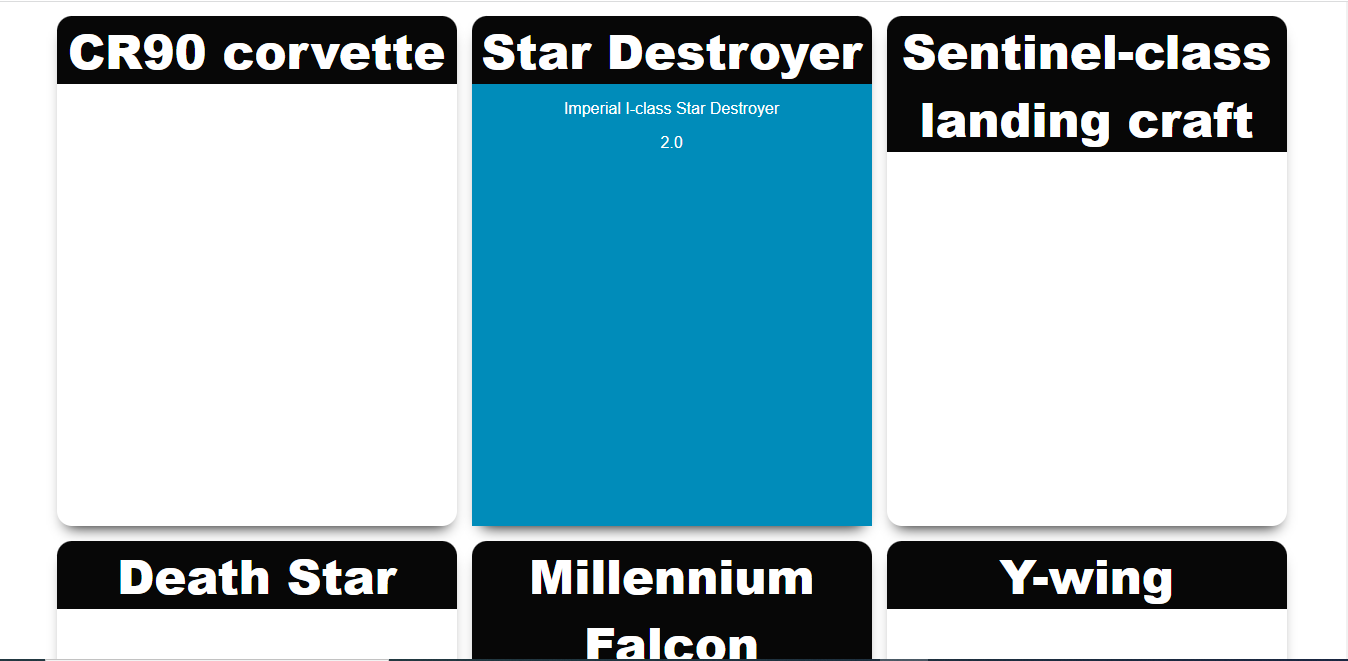
我的主要问题是在多个父类上使用hover。我试图对styles.css文件做一些更改。
这是代码箱演示- https://codesandbox.io/s/currying-sky-os2c3n?file=/src/styles.css
虽然我还没有对媒体查询进行更改,但请尝试浏览900 it以上的媒体屏幕大小。
演示屏幕截图
页面原文内容由Stack Overflow提供。腾讯云小微IT领域专用引擎提供翻译支持
原文链接:
https://stackoverflow.com/questions/73917046
复制相关文章
相似问题
腾讯云开发者

Copyright © 2013 - 2026 Tencent Cloud. All Rights Reserved. 腾讯云 版权所有
深圳市腾讯计算机系统有限公司 ICP备案/许可证号:粤B2-20090059  粤公网安备44030502008569号
腾讯云计算(北京)有限责任公司 京ICP证150476号 | 京ICP备11018762号