
构建多个无法工作的C++文件- Linux
构建多个无法工作的C++文件- Linux
提问于 2022-09-29 20:15:14
我正在学习一个C++教程,这个家伙展示了如何设置tasks.json以同时运行多个C++文件,并链接到时间戳:https://youtu.be/8jLOx1hD3_o?t=4584
现在我安装了所有软件包的最新版本:
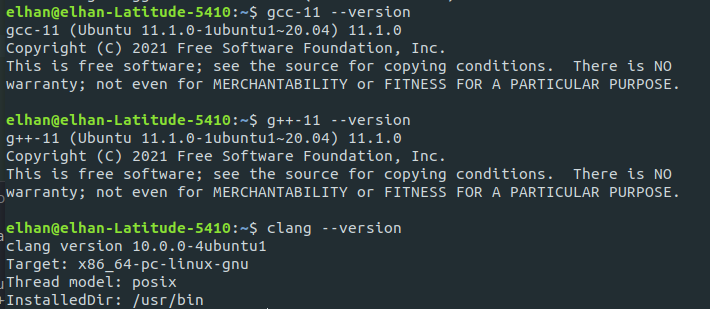
将我的tasks.json更改为与他的相同:
{
  "version": "2.0.0",
  "tasks": [
    {
      "type": "cppbuild",
      "label": "C/C++: g++-11 build active file",
      "command": "/usr/bin/g++-11",
      "args": [
        "-g",
        "-std=c++20",
        "${workspaceFolder}/*.cpp",
        "-o",
        "${fileDirname}/rooster"
      ],
      "options": {
        "cwd": "${fileDirname}"
      },
      "problemMatcher": ["$gcc"],
      "group": "build",
      "detail": "compiler: /usr/bin/g++-11"
    }
  ]
}
尝试编译,但它不工作,错误:
Starting build...
/usr/bin/g++-11 -g -std=c++20 "/home/elhan/ius/intro to programming/cpp/*.cpp" -o "/home/elhan/ius/intro to programming/cpp/rooster"
cc1plus: fatal error: /home/elhan/ius/intro to programming/cpp/*.cpp: No such file or directory
compilation terminated.

Build finished with error(s).
有什么问题吗?
工作主任:

回答 1
Stack Overflow用户
发布于 2022-09-29 23:44:16
构建命令的一个参数是
${workspaceFolder}/*.cpp当变量替换发生时,VS Code会识别您的目录名中有空格,所以整个参数都用引号括起来,以保护它不受shell的影响。在Starting build...之后的行中,您可以看到指定输出目的地的参数(替换后也有空格)发生了同样的事情,而其他参数(其中没有空格)没有引号传递给shell。
"/home/elhan/ius/intro to programming/cpp/*.cpp"引号确实保护参数不被shell处理,这就是为什么它被解释为单个参数的原因。同时,引号保护参数不被shell处理,这就是通配符*未展开的原因。这就是问题所在。
如果您注意细节,则视频使用下划线而不是空格来分隔目录名称中的单词。跟着做,将您的intro to programming目录重命名为intro_to_programming。
页面原文内容由Stack Overflow提供。腾讯云小微IT领域专用引擎提供翻译支持
原文链接:
https://stackoverflow.com/questions/73901156
复制相关文章
相似问题
腾讯云开发者

Copyright © 2013 - 2026 Tencent Cloud. All Rights Reserved. 腾讯云 版权所有
深圳市腾讯计算机系统有限公司 ICP备案/许可证号:粤B2-20090059  粤公网安备44030502008569号
腾讯云计算(北京)有限责任公司 京ICP证150476号 | 京ICP备11018762号