
与startAdornment MUI一起使用时,标签始终位于顶部。
与startAdornment MUI一起使用时,标签始终位于顶部。
提问于 2022-09-29 15:35:28
我试图在startAdornment中使用输入。但在这种情况下,标签总是在顶部。
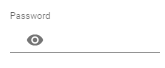
当输入为空时,标签将与图标位于同一条线上,当用户试图写smth时,标签将移动到顶部。我该怎么做呢?
<FormControl sx={{ m: 1, width: '25ch' }} variant="standard">
      <InputLabel htmlFor="standard-adornment-password">Password</InputLabel>
      <Input
        id="standard-adornment-password"
        type={values.showPassword ? 'text' : 'password'}
        value={values.password}
        onChange={handleChange('password')}
        startAdornment={
          <InputAdornment position="start">
            <IconButton
              aria-label="toggle password visibility"
              onClick={handleClickShowPassword}
              onMouseDown={handleMouseDownPassword}
            >
              {values.showPassword ? <VisibilityOff /> : <Visibility />}
            </IconButton>
          </InputAdornment>
        }
      />
</FormControl>回答 1
Stack Overflow用户
发布于 2022-09-29 19:02:19
您可以使用TextField而不是InputLabel和Input组件,并将图标移出TextField之外,并使用一个flex样式的组件包装它们,如下所示:
<Box sx={{ m: 1, width: "25ch", display: "flex", alignItems: "flex-end" }}>
  <IconButton
    aria-label="toggle password visibility"
    onClick={handleClickShowPassword}
  >
    {values.showPassword ? <VisibilityOff /> : <Visibility />}
  </IconButton>
  <TextField
    label="Password"
    id="standard-adornment-password"
    type={values.showPassword ? "text" : "password"}
    value={values.password}
    onChange={(e) => handleChange("password", e.target.value)}
    variant="standard"
  />
</Box>有关此解决方案的实际工作示例,您可以查看这个沙箱。
页面原文内容由Stack Overflow提供。腾讯云小微IT领域专用引擎提供翻译支持
原文链接:
https://stackoverflow.com/questions/73898179
复制相关文章
相似问题
腾讯云开发者

Copyright © 2013 - 2026 Tencent Cloud. All Rights Reserved. 腾讯云 版权所有
深圳市腾讯计算机系统有限公司 ICP备案/许可证号:粤B2-20090059  粤公网安备44030502008569号
腾讯云计算(北京)有限责任公司 京ICP证150476号 | 京ICP备11018762号