
如何使悬停弹出按钮上方?
如何使悬停弹出按钮上方?
提问于 2022-09-28 12:15:38
我正在使用codeigniter-3开发web应用程序。
我有一个页面,其中包含whatsapp按钮右边的页面底部。
当我悬停或单击按钮时,一个弹出窗口应该像这样打开:
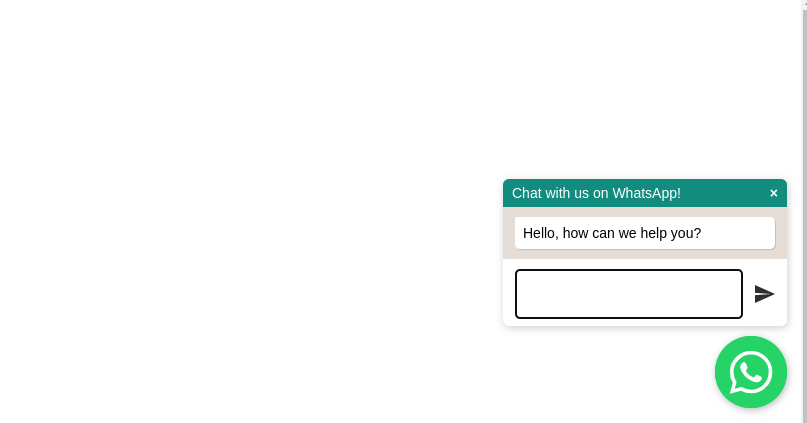
它工作很好,现在我的要求是我想要移动按钮到中心的页面,其中有固定的位置。
这部分也完成了。
我的要求是如何使按钮闪烁,直到它盘旋或可点击..?
$(function() {
  $('#WAButton').floatingWhatsApp({
    phone: '1231231231', //WhatsApp Business phone number International format-
    //Get it with Toky at https://toky.co/en/features/whatsapp.
    headerTitle: 'Chat with us on WhatsApp!', //Popup Title
    popupMessage: 'Hello, how can we help you?', //Popup Message
    showPopup: true, //Enables popup display
    buttonImage: '<img src="https://rawcdn.githack.com/rafaelbotazini/floating-whatsapp/3d18b26d5c7d430a1ab0b664f8ca6b69014aed68/whatsapp.svg" />', //Button Image
    //headerColor: 'crimson', //Custom header color
    //backgroundColor: 'crimson', //Custom background button color
    position: "right"
  });
});<!--Jquery-->
<script src="https://cdnjs.cloudflare.com/ajax/libs/jquery/3.4.1/jquery.min.js" integrity="sha256-CSXorXvZcTkaix6Yvo6HppcZGetbYMGWSFlBw8HfCJo=" crossorigin="anonymous"></script>
<!--Floating WhatsApp css-->
<link rel="stylesheet" href="https://rawcdn.githack.com/rafaelbotazini/floating-whatsapp/3d18b26d5c7d430a1ab0b664f8ca6b69014aed68/floating-wpp.min.css">
<!--Floating WhatsApp javascript-->
<script type="text/javascript" src="https://rawcdn.githack.com/rafaelbotazini/floating-whatsapp/3d18b26d5c7d430a1ab0b664f8ca6b69014aed68/floating-wpp.min.js"></script>
<body>
<!--Div where the WhatsApp will be rendered-->
<div id="WAButton"></div>
</body>
发光应该是这样的:示例片段
回答 2
Stack Overflow用户
发布于 2022-09-28 12:38:27
这就是你要的。
我使用了提供的片段中的动画。
它在单击或悬停时移除发光类。
$(function() {
  $('#WAButton').floatingWhatsApp({
    phone: '1231231231', //WhatsApp Business phone number International format-
    //Get it with Toky at https://toky.co/en/features/whatsapp.
    headerTitle: 'Chat with us on WhatsApp!', //Popup Title
    popupMessage: 'Hello, how can we help you?', //Popup Message
    showPopup: true, //Enables popup display
    buttonImage: '<img src="https://rawcdn.githack.com/rafaelbotazini/floating-whatsapp/3d18b26d5c7d430a1ab0b664f8ca6b69014aed68/whatsapp.svg" />', //Button Image
    //headerColor: 'crimson', //Custom header color
    //backgroundColor: 'crimson', //Custom background button color
    position: "right"
  });
  $('#WAButton').on("click", function (event) {
    $("#WAButton").removeClass("glowing");
  });
  $('#WAButton').on("mouseover", function (event) {
    $("#WAButton").removeClass("glowing");
  });
});.glowing {
-webkit-animation: glowing 1500ms infinite;
-moz-animation: glowing 1500ms infinite;
-o-animation: glowing 1500ms infinite;
animation: glowing 1500ms infinite;
border-radius: 50%;
}
@-webkit-keyframes glowing {
0% { background-color: #25d366; -webkit-box-shadow: 0 0 3px #25d366; }
50% { background-color: #25d366; -webkit-box-shadow: 0 0 40px #FF0000; }
100% { background-color: #25d366; -webkit-box-shadow: 0 0 3px #25d366; }
}
@-moz-keyframes glowing {
0% { background-color: #25d366; -moz-box-shadow: 0 0 3px #25d366; }
50% { background-color: #25d366; -moz-box-shadow: 0 0 40px #25d366; }
100% { background-color: #25d366; -moz-box-shadow: 0 0 3px #25d366; }
}
@-o-keyframes glowing {
0% { background-color: #25d366; box-shadow: 0 0 3px #25d366; }
50% { background-color: #25d366; box-shadow: 0 0 40px #25d366; }
100% { background-color: #25d366; box-shadow: 0 0 3px #25d366; }
}
@keyframes glowing {
0% { background-color: #25d366; box-shadow: 0 0 3px #25d366; }
50% { background-color: #25d366; box-shadow: 0 0 40px #25d366; }
100% { background-color: #25d366; box-shadow: 0 0 3px #25d366; }
}<!--Jquery-->
<script src="https://cdnjs.cloudflare.com/ajax/libs/jquery/3.4.1/jquery.min.js" integrity="sha256-CSXorXvZcTkaix6Yvo6HppcZGetbYMGWSFlBw8HfCJo=" crossorigin="anonymous"></script>
<!--Floating WhatsApp css-->
<link rel="stylesheet" href="https://rawcdn.githack.com/rafaelbotazini/floating-whatsapp/3d18b26d5c7d430a1ab0b664f8ca6b69014aed68/floating-wpp.min.css">
<!--Floating WhatsApp javascript-->
<script type="text/javascript" src="https://rawcdn.githack.com/rafaelbotazini/floating-whatsapp/3d18b26d5c7d430a1ab0b664f8ca6b69014aed68/floating-wpp.min.js"></script>
<body>
<!--Div where the WhatsApp will be rendered-->
<div id="WAButton" class="glowing"></div>
</body>
Stack Overflow用户
发布于 2022-09-28 12:40:48
$(function() {
  $('#WAButton').floatingWhatsApp({
    phone: '1231231231', //WhatsApp Business phone number International format-
    //Get it with Toky at https://toky.co/en/features/whatsapp.
    headerTitle: 'Chat with us on WhatsApp!', //Popup Title
    popupMessage: 'Hello, how can we help you?', //Popup Message
    showPopup: true, //Enables popup display
    buttonImage: '<img src="https://rawcdn.githack.com/rafaelbotazini/floating-whatsapp/3d18b26d5c7d430a1ab0b664f8ca6b69014aed68/whatsapp.svg" />', //Button Image
    //headerColor: 'crimson', //Custom header color
    //backgroundColor: 'crimson', //Custom background button color
    position: "right"
  });

  function fnBlink() {
    $("#WAButton").fadeOut(500);
    $("#WAButton").fadeIn(500);
  }
  let fnBlinkInterval = setInterval(fnBlink, 1000);


  $("#WAButton").hover( function() {
    clearInterval(fnBlinkInterval);
  })
});<!--Jquery-->
<script src="https://cdnjs.cloudflare.com/ajax/libs/jquery/3.4.1/jquery.min.js" integrity="sha256-CSXorXvZcTkaix6Yvo6HppcZGetbYMGWSFlBw8HfCJo=" crossorigin="anonymous"></script>
<!--Floating WhatsApp css-->
<link rel="stylesheet" href="https://rawcdn.githack.com/rafaelbotazini/floating-whatsapp/3d18b26d5c7d430a1ab0b664f8ca6b69014aed68/floating-wpp.min.css">
<!--Floating WhatsApp javascript-->
<script type="text/javascript" src="https://rawcdn.githack.com/rafaelbotazini/floating-whatsapp/3d18b26d5c7d430a1ab0b664f8ca6b69014aed68/floating-wpp.min.js"></script>
<body>
<!--Div where the WhatsApp will be rendered-->
<div id="WAButton"></div>
</body>
页面原文内容由Stack Overflow提供。腾讯云小微IT领域专用引擎提供翻译支持
原文链接:
https://stackoverflow.com/questions/73881248
复制相关文章
相似问题
腾讯云开发者

Copyright © 2013 - 2026 Tencent Cloud. All Rights Reserved. 腾讯云 版权所有
深圳市腾讯计算机系统有限公司 ICP备案/许可证号:粤B2-20090059  粤公网安备44030502008569号
腾讯云计算(北京)有限责任公司 京ICP证150476号 | 京ICP备11018762号