
OpenMDAO: pyOptSparse构建脚本
因此,我将打开这个关于如何构建pyOptSparse并在OpenMDAO框架中使用它的新线程。OpenMDAO团队发布了一份清单,应该通过集成IPOPT来构建pyOptSparse:https://github.com/OpenMDAO/build_pyoptsparse
我在Ubuntu虚拟机上遵循了他们的指示。不幸的是,当涉及到运行纸片时,出现了一些问题,并阻止了pyOptSparse的安装。
我不知道我是不是忘了什么,但我被卡住了。有人知道如何解决这个问题吗?
非常感谢您的帮助。下面是我得到的奇怪错误消息:
文件"/usr/local/lib/python3.9/subprocess.py",第528行,在run raise中(retcode,process.args,subprocess.CalledProcessError:命令‘./subprocess.CalledProcessError’,‘-with-metis’,‘-with-metis-l之母=-L/root/pyoptsparse/lib -lcoinmetis',’-metis-c之旗=-w-i/root/pyopts解译/包含-i/root/pyopts解译/包含/硬币-I/root/pyoptsparse/include /metis‘,’-前缀=/root/prefix‘,‘'CFLAGS=-w -I/root/pyoptsparse/include -I/root/pyoptsparse/include /投币-或-i/root/pyoptsparse/include/投币-或/metis’FCFLAGS=-参数不匹配-I/root/pyoptsparse/include/pyoptsparse/include/硬币-或-i/root/pyopts解译/包含/metis‘返回的非零退出状态1。
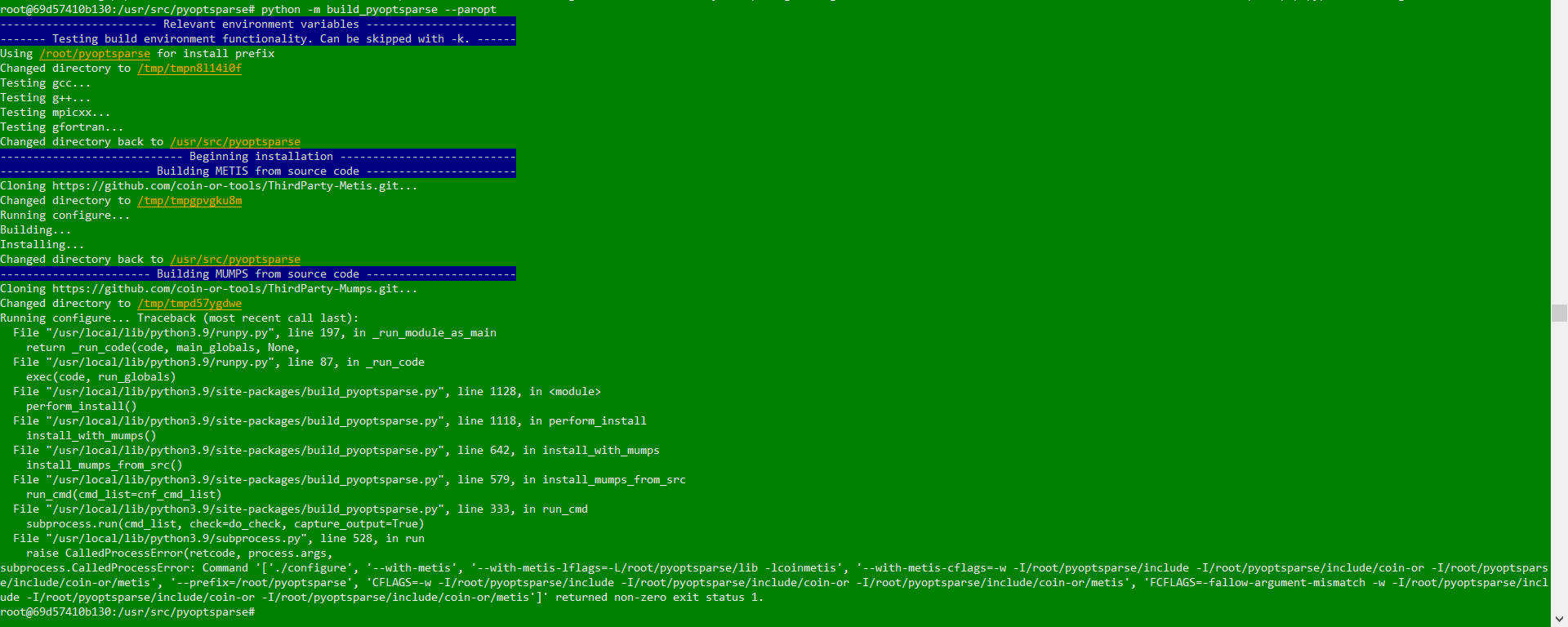
编辑:所以我运行了两次build_pyoptsparse -v :第一次我收到一条错误消息,它告诉我包LAPCK丢失了。因此,我做了一个apt安装libblas-dev liblapack-dev来安装它。然后,我再次运行pyopts解析式命令,得到如下结果:
...
checking for LAPACK... yes: generic module (lapack.pc blas.pc)
checking for function dgemmt_ in -llapack -lblas  ... no
checking for function dgemmt in -llapack -lblas  ... no
checking for function DGEMMT_ in -llapack -lblas  ... no
checking for function DGEMMT in -llapack -lblas  ... no
checking for function dgemmt__ in -llapack -lblas  ... no
checking for function dgemmt_ in -llapack -lblas  ... no
checking for function DGEMMT__ in -llapack -lblas  ... no
checking for function DGEMMT_ in -llapack -lblas  ... no
checking for library containing cos... -lm
checking for library Metis with combined link and compile check... no (link with header)
configure: Compiler flags were "-w -I/root/pyoptsparse/include -I/root/pyoptsparse/include/coin-or -I/root/pyoptsparse/include/coin-or/metis". Use --with-metis-cflags to overwrite. Check config.log for details of failed compile attempt.
configure: Linker flags are "-L/root/pyoptsparse/lib -lcoinmetis". Use --with-metis-lflags to overwrite. Check config.log for details of failed link attempt.
configure: error: user-specified flags for Metis do not work.
Traceback (most recent call last):
File "/usr/local/bin/build_pyoptsparse", line 8, in <module>
sys.exit(perform_install())
File "/usr/local/lib/python3.9/site-packages/build_pyoptsparse.py", line 1118, in perform_install
install_with_mumps()
File "/usr/local/lib/python3.9/site-packages/build_pyoptsparse.py", line 642, in install_with_mumps
install_mumps_from_src()
File "/usr/local/lib/python3.9/site-packages/build_pyoptsparse.py", line 579, in install_mumps_from_src
run_cmd(cmd_list=cnf_cmd_list)
File "/usr/local/lib/python3.9/site-packages/build_pyoptsparse.py", line 335, in run_cmd
subprocess.run(cmd_list, check=do_check)
File "/usr/local/lib/python3.9/subprocess.py", line 528, in run
raise CalledProcessError(retcode, process.args,
subprocess.CalledProcessError: Command '['./configure', '--with-metis', '--with-metis-lflags=-L/root/pyoptsparse/lib -lcoinmetis', '--with-metis-cflags=-w -I/root/pyoptsparse/include -I/root/pyoptsparse/include/coin-or -I/root/pyoptsparse/include/coin-or/metis', '--prefix=/root/pyoptsparse', 'CFLAGS=-w -I/root/pyoptsparse/include -I/root/pyoptsparse/include/coin-or -I/root/pyoptsparse/include/coin-or/metis', 'FCFLAGS=-fallow-argument-mismatch -w -I/root/pyoptsparse/include -I/root/pyoptsparse/include/coin-or -I/root/pyoptsparse/include/coin-or/metis']' returned non-zero exit status 1.回答 2
Stack Overflow用户
发布于 2022-09-28 13:13:05
build_pyoptsparse脚本打算以普通用户而不是root用户的身份运行--它还没有通过这种方式进行测试,并且可能会对您的系统产生意外的影响。
理想情况下,它应该在虚拟Python环境中运行,无论是使用conda (Anaconda / miniconda / miniforge)还是使用venv。在conda环境中,可以从存储库安装几个包,而不必构建它们。如果在虚拟环境之外运行,它将安装在您的主目录下。精确的路径可以用-p修改。
话虽如此,你的截图中并没有太多的信息,只有一个错误发生了。如果您的系统上已经安装了不同版本的METIS,则可能会导致腮腺炎配置出现问题。尝试删除另一个版本的METIS并重新构建。如果仍然收到错误,请运行build_pyoptsparse -v,以便打印完整的错误文本,并在这里发布。
Stack Overflow用户
发布于 2022-10-29 21:29:08
当我试图安装这个软件包时,我遇到了一个类似的问题,将它与openmdao/dymos一起使用。我使用Linux和Conda22.9.0。以下是我为完全设置我的环境所遵循的步骤,对所有提示都是肯定的:
#Create and activate new environment with python 3.10 and pip
conda create -n py310
conda activate py310
conda install python=3.10
conda install pip
关闭外壳并重新打开它
# install dymos
conda activate py310
git clone https://github.com/OpenMDAO/dymos.git ./dymos.git
python -m pip install -e dymos.git
# install build_pyoptsparse
git clone https://github.com/OpenMDAO/build_pyoptsparse.git
python -m pip install ./build_pyoptsparse
# install gfortran and swig as they will be required by build_pyoptsparse
conda install -c conda-forge gfortran
conda install -c anaconda swig
# install MUMPS, METIS, and IPOPT using the conda-forge channel
conda install -c conda-forge MUMPS
conda install -c conda-forge METIS
conda install -c conda-forge IPOPT
# run build_pyoptsparse
build_pyoptsparse -vhttps://stackoverflow.com/questions/73875458
复制相似问题
腾讯云开发者

Copyright © 2013 - 2026 Tencent Cloud. All Rights Reserved. 腾讯云 版权所有
深圳市腾讯计算机系统有限公司 ICP备案/许可证号:粤B2-20090059  粤公网安备44030502008569号
腾讯云计算(北京)有限责任公司 京ICP证150476号 | 京ICP备11018762号