
元素不能使用Selenium和Python单击。
元素不能使用Selenium和Python单击。
提问于 2022-09-27 13:24:10
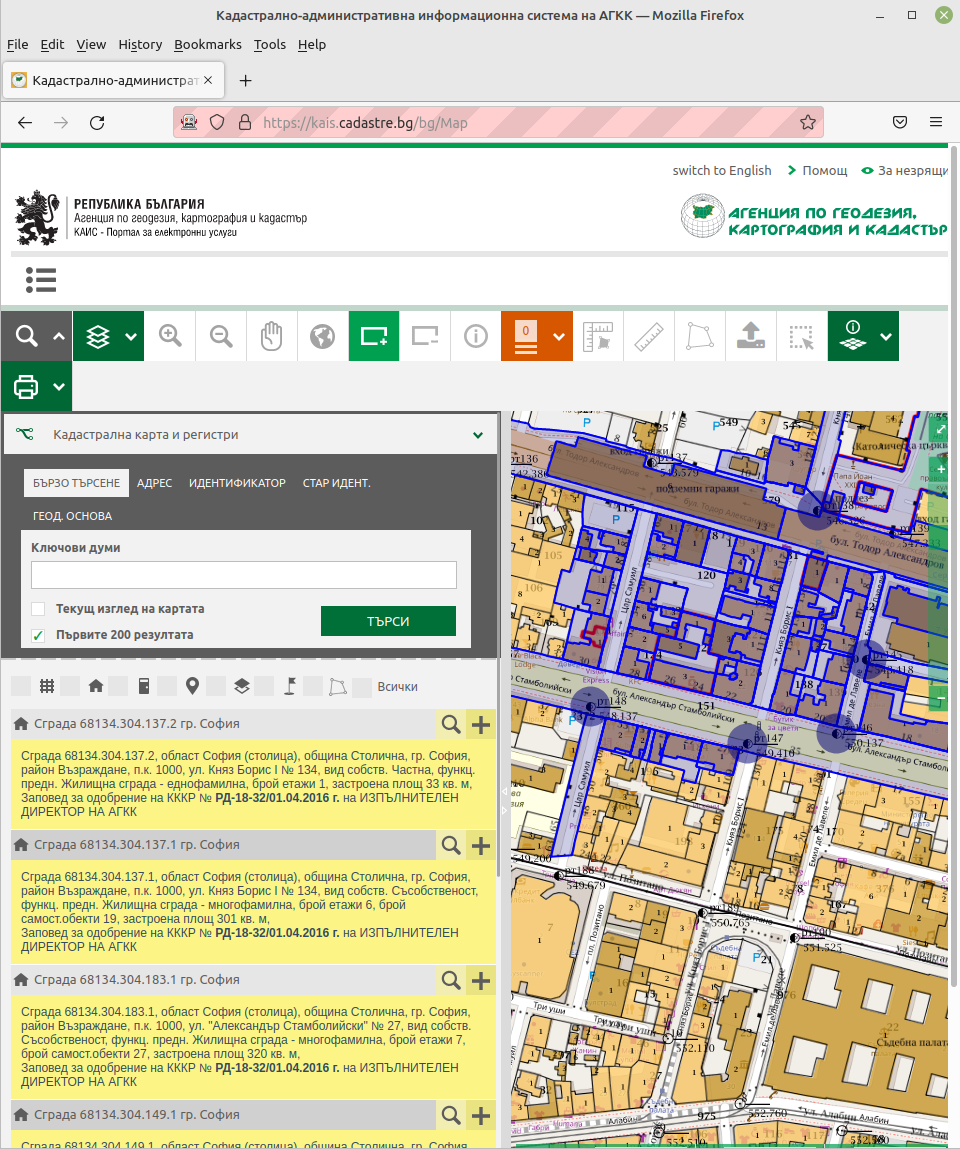
我正在尝试从网站上获取数据。因为它是动态加载的,有时一个元素需要1-2分钟才能加载“time.sleep(1.2.3.10)”,因为它会更早地关闭自己。("Message: element单击截获: Element不能用Selenium和Python单击“)我的代码如下:
import os
import platform

from selenium.webdriver.common.by import By

if platform.system() == "Windows":
    try:
        import undetected_chromedriver
        from parsel import Selector
        from selenium import webdriver
    except ImportError:
        os.system('python -m pip install parsel')
        os.system('python -m pip install selenium')
        os.system('python -m pip install undetected_chromedriver')
else:
    try:
        from parsel import Selector
        from selenium import webdriver
        import undetected_chromedriver
    except ImportError:
        os.system('python3 -m pip install parsel')
        os.system('python3 -m pip install selenium')
        os.system('python3 -m pip install undetected_chromedriver')

import undetected_chromedriver as uc
import csv
import os
from parsel import Selector
import time
from selenium import webdriver

filename = "cadastre"

if __name__ == '__main__':

    driver = uc.Chrome()
    time.sleep(5)
    driver.get("https://kais.cadastre.bg/bg/Map")
    input("Ready (Y/N) : ")

    if filename+'.csv' not in os.listdir(os.getcwd()):
        with open(filename+".csv","a",newline="",encoding="utf-8") as f:
            writer = csv.writer(f)

    while True:
        print("Waiting for 3 sec")
        time.sleep(3)
        response = Selector(text=driver.page_source)
        uids = response.xpath('.//*[@id="resultsList"]//@data-uid').extract()
        print(uids)
        for uid in uids:
            print("Clicking : "+str(uid))
            driver.find_element(by=By.XPATH,value='.//*[@data-uid="'+str(uid)+'"]/a').click()
            time.sleep(1)

        for uid in uids:
            sel = Selector(text=driver.page_source).xpath('.//*[@data-uid="'+str(uid)+'"]')
            textfile = ','.join([i.strip() for i in sel.xpath('.//*[@class="object-properties"]/p//text()').extract() if i.strip()])

            if textfile:
                with open(filename+".csv","a",newline="",encoding="utf-8") as f:
                    writer = csv.writer(f)
                    writer.writerow([textfile])
                    print([textfile])

        current_page = Selector(text=driver.page_source).xpath('.//*[@id="resultsList_pager"]//*[@class="k-link k-pager-nav"]/text()').extract_first()
        if Selector(text=driver.page_source).xpath('.//*[@data-page="'+str(int(current_page)+1)+'"]'):
            driver.execute_script("document.getElementsByClassName('k-link k-pager-nav')[8].click();")
        else:
            break


    driver.close()
我已经搜索了所有可能的方法来做WebDriverWait,但是所有的选项都没有起作用。
回答 4
Stack Overflow用户
发布于 2022-09-28 13:08:12
试试这个:
from time import sleep

counter = 1

aa = ""

while counter < 100:
    try:
        aa = driver.find_element_by_xpath(".//*[@id='resultsList']//@data-uid")
    except:
        print("Element not visible yet...")

    if "selenium" in str(aa):
        print("Element located!")
        break

    sleep(1)
counter = counter + 1Stack Overflow用户
发布于 2022-09-28 13:18:23
你没说是哪个元素造成了问题。
代码只在单击以显示详细信息时才会产生问题。
(但我在Firefox上而不是undetected_chromedriver上进行了测试)
当它单击打开详细信息时,它会移动其他元素,它们在窗口中是不可见的,因此Selenium不能单击它们。
我不得不用javaScript来点击它
item = driver.find_element(by=By.XPATH, value=f'.//*[@data-uid="{uid}"]/a')
driver.execute_script('arguments[0].click()', item)
这样我就可以得到所有选定的元素。
我得到了123件物品(从13页)
Stack Overflow用户
发布于 2022-09-29 12:16:48
我编写了以下脚本,可以抓取所有数据:需要检查数据是否为空;需要检查加载图像在抓取当前页的数据之前消失;需要检查是否是最后一个页面。
from time import sleep
from clicknium import clicknium as cc

if not cc.chrome.extension.is_installed():
    cc.chrome.extension.install_or_update()
tab = cc.chrome.attach_by_title_url(url='https://kais.cadastre.bg/bg/Map')
results = tab.find_element_by_xpath('//*[@id="resultsList"]')

while True:
    elems = results.find_elements_by_xpath('./div')
    for elem in elems:
        elem.find_element_by_xpath('./a[1]').click()
        while True:
            property = elem.find_element_by_xpath('.//*[@class="object-properties"]/p').get_text()
            if property == None:
                sleep(0.1)
            else:
                print(property)
                break
    if tab.is_existing_by_xpath('//*[@id="resultsList_pager"]//a[@class="k-link k-pager-nav"]//span[@class="k-icon k-i-arrow-e"]'):
        tab.find_element_by_xpath('//*[@id="resultsList_pager"]//a[@class="k-link k-pager-nav"]//span[@class="k-icon k-i-arrow-e"]').click()
        tab.wait_disappear_by_xpath('//div[@class="k-loading-image"]')
    else:
break页面原文内容由Stack Overflow提供。腾讯云小微IT领域专用引擎提供翻译支持
原文链接:
https://stackoverflow.com/questions/73868365
复制相关文章
相似问题
腾讯云开发者

Copyright © 2013 - 2026 Tencent Cloud. All Rights Reserved. 腾讯云 版权所有
深圳市腾讯计算机系统有限公司 ICP备案/许可证号:粤B2-20090059  粤公网安备44030502008569号
腾讯云计算(北京)有限责任公司 京ICP证150476号 | 京ICP备11018762号