
D3调整linkText位置
D3调整linkText位置
提问于 2022-09-22 07:24:30
我的强迫图有两个问题。first问题是指链接文本的位置。我添加了50%的offSet,以确保每个linkText都是居中的。如果linkText不是很长的话,这是很好的工作。但它看起来完全
描述越长越好。
我不确定是否可能计算所需的linkText空间的长度,并以某种方式从给定的offSet中减去它。一般来说,所需的空间是在那里,不知道它是否可以用于进一步的计算。
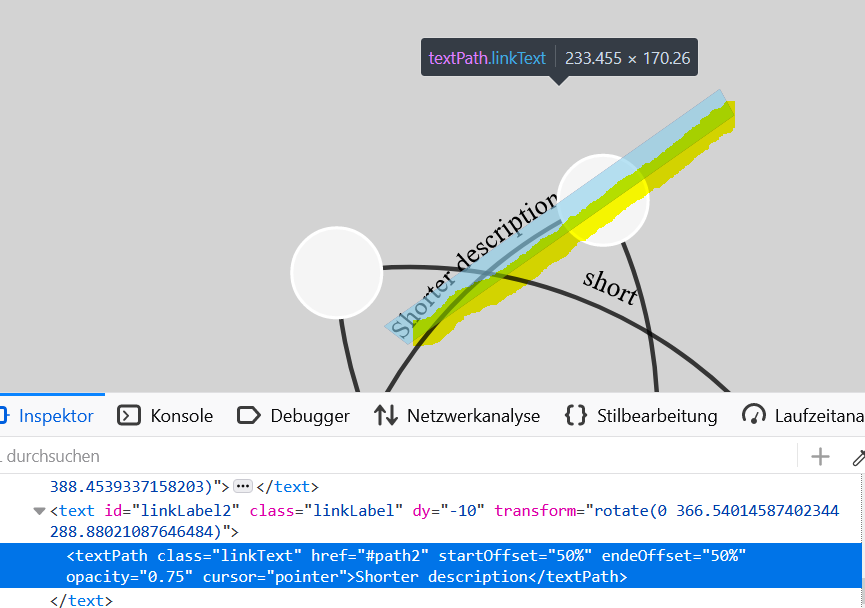
我的第二个问题与链接曲线有关。我增加了那些,以便能够可视化双向链接。否则它们就会相依为命。问题是,只要你玩弄一个目标节点并以某种方式拖拽它们,目标节点X位置就会比源节点的x位置小,linkText就会错误地弯曲。
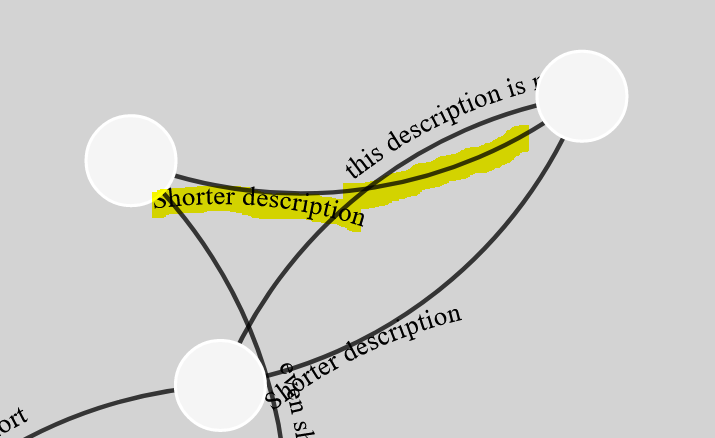
也许你们有个主意或者暗示。
       console.log("D3 Forced Layout ready.")

////////////////////////////////////////////////////////////
//////////////////// D3 Forced Graph ///////////////////////
////////////////////////////////////////////////////////////

    var data = {
        "nodes": [
            { "id": 1 },
            { "id": 2 },
            { "id": 3 },
            { "id": 4 },
            { "id": 5 }
        ],
        "links": [
            { "source": 1, "target": 2, "text": "this description is not centered"},
            { "source": 2, "target": 1, "text": "Shorter description" },
            { "source": 2, "target": 3, "text": "Shorter description" },
            { "source": 3, "target": 4, "text": "even shorter" },
            { "source": 4, "target": 5, "text": "shorter" },
            { "source": 5, "target": 1, "text": "short" }
        ]
    }

    initForceLayout()

function initForceLayout() {
    let vw = 800
    let vh = 800

    const svg = d3.select("#chart").append("svg")
                .attr("width", vw)
                .attr("height", vh)

    const forceLayout = svg.append("g")
                .attr("id", "forceLayout")
                .call(d3.zoom().on("zoom", function (event) {
                    svg.attr("transform", event.transform)
                }))
                .on("dblclick.zoom", null)

    linksContainer = forceLayout.append("g").attr("class", "linkscontainer")
    nodesContainer = forceLayout.append("g").attr("class", "nodesContainer")

    var simulation = d3.forceSimulation()
        .force("link", d3.forceLink().id(function (d) { return d.id; }).distance(300))
        .force('charge', d3.forceManyBody().strength(-400))
        .force('center', d3.forceCenter(vw / 2, vh / 2))

    link = linksContainer.selectAll("g")
        .data(data.links)
        .join("g")
        .attr("cursor", "pointer")

    linkLine = linksContainer.selectAll(".linkPath")
        .data(data.links)
        .join("path")
        .attr("id", function(_,i) {
            return "path" + i
        })
        .attr("stroke", "black")
        .attr("opacity", 0.75)
        .attr("stroke-width", 3)
        .attr("fill", "transparent")

    linkText = linksContainer.selectAll(".linkLabel")
        .data(data.links)
        .join("text")
        .attr("dy", -10)
        .attr("class", "linkLabel")
        .attr("id", function (d, i) {return "linkLabel" + i })
        .text("")

    linkText.append("textPath")
        .attr("xlink:href", function (_, i) {
            return "#path" + i
        })
        .attr("startOffset", "50%")
        .attr("opacity", 0.75)
        .attr("cursor", "pointer")
        .attr("class", "linkText")
        .text(function (d) {
            return d.text
        })

    node = nodesContainer.selectAll(".node")
        .data(data.nodes, d => d.id)
        .join("g")
        .attr("class", "node")
        .call(d3.drag()
            .on("start", function(event, d) {
                if (!event.active) simulation.alphaTarget(0.3).restart();
                d.fx = d.x;
                d.fy = d.y;
            })
            .on("drag", function(event, d) {
                d.fx = event.x;
                d.fy = event.y;
            })
            .on("end", function(event, d) {
                if (!event.active) simulation.alphaTarget(0);
                d.fx = undefined;
                d.fy = undefined;
            })
        )

    node.selectAll("circle")
        .data(d => [d])
        .join("circle")
        .attr("r", 30)
        .attr("fill", "whitesmoke")
        .attr("stroke", "white")
        .attr("stroke-width", 2)

    simulation
        .nodes(data.nodes)
        .on("tick", function () {
            // update link positions
            linkLine.attr("d", function (d) {
                if (d.target.x > d.source.x) {
                    var dx = (d.target.x - d.source.x),
                        dy = (d.target.y - d.source.y),
                        dr = Math.sqrt(dx * dx + dy * dy)
                    return "M" + d.source.x + "," + d.source.y + "A" + dr + "," + dr + " 0 0,1 " + d.target.x + "," + d.target.y;
                } else if (d.target.x < d.source.x) {
                    var dx = (d.target.x - d.source.x),
                        dy = (d.target.y - d.source.y),
                        dr = Math.sqrt(dx * dx + dy * dy)
                    return "M" + d.source.x + "," + d.source.y + "A" + dr + "," + dr + " 0 0,1 " + d.target.x + "," + d.target.y;
                }
            });

            // update node positions
            node
                .attr("transform", function (d) {
                    return "translate(" + d.x + ", " + d.y + ")";
                });

            linkText.attr("transform", function (d) {
                if (d.target.x < d.source.x) {
                    var bbox = this.getBBox();

                    rx = bbox.x + bbox.width / 2;
                    ry = bbox.y + bbox.height / 2;
                    return 'rotate(180 ' + rx + ' ' + ry + ')';
                } else if (d.target.x > d.source.x) {
                    var bbox = this.getBBox();

                    rx = bbox.x + bbox.width / 2;
                    ry = bbox.y + bbox.height / 2;
                    return 'rotate(0 ' + rx + ' ' + ry + ')';
                }
            })
        })

    simulation
        .force("link")
        .links(data.links)

} :root {
--bs-gradient-dark-right: #141727;
--bs-gradient-dark-left: #3a416f;
}
html, body {
height: 100%;
width: 100%;
margin: 0;
padding: 0;
}
body {
background-color: lightgray;
overflow: hidden;
}
.border-radius-lg {
border-radius: 0.75rem;
}
.svg-container {
display: inline-block;
position: relative;
width: 100%;
padding-bottom: 100%; /* aspect ratio */
vertical-align: top;
overflow: hidden;
}
#svg-content-responsive {
display: inline-block;
position: absolute;
top: 10px;
left: 0;
}
svg .rect {
fill: gold;
stroke: steelblue;
stroke-width: 5px;
}<!DOCTYPE html>
<html>
<head>
<meta http-equiv="Content-Type" content="text/html;charset=utf-8" />
<title>linkText</title>
<meta name="viewport" content="width=device-width, initial-scale=1">
<!-- D3.js -->
<script src="https://cdnjs.cloudflare.com/ajax/libs/d3/7.6.1/d3.min.js" charset="utf-8"></script>
</head>
<body>
<div id="chart"></div>
</body>
</html>
回答 1
Stack Overflow用户
回答已采纳
发布于 2022-10-04 11:33:20
解决方案
- 将文本对齐为:向
<text />添加text-anchor:middle属性就足以使文本对中。
虽然没有必要,但我还将文本长度计算作为数据属性添加到textPath元素中。这样,手动对齐文本也是可能的。
textLink./* ... */.each(function(d,i) {
  // ANSWER EDIT: precalculate text width
  var thisWidth = this.getComputedTextLength()
  d3.select(this).attr('data-text-width', () => thisWidth)
})- 用textPath固定180度旋转:为了正确地交换
<textPath />文本的Y轴,最好画出从相反方向开始的路径,而不是使用transform:rotate(180deg)。
复杂转换似乎不能在<textPath />中正常工作。
在这个答案中,我交换了路径的源和目标来表示180度的文本旋转。
编辑:为了避免两行相互碰撞,对扫旗路径弧进行了修改。标志指示弧形的方向。
console.log("D3 Forced Layout ready.")

////////////////////////////////////////////////////////////
//////////////////// D3 Forced Graph ///////////////////////
////////////////////////////////////////////////////////////

var data = {
  "nodes": [{
      "id": 1
    },
    {
      "id": 2
    },
    {
      "id": 3
    },
    {
      "id": 4
    },
    {
      "id": 5
    }
  ],
  "links": [{
      "source": 1,
      "target": 2,
      "text": "this description is not centered"
    },
    {
      "source": 2,
      "target": 1,
      "text": "Shorter description"
    },
    {
      "source": 2,
      "target": 3,
      "text": "Shorter description"
    },
    {
      "source": 3,
      "target": 4,
      "text": "even shorter"
    },
    {
      "source": 4,
      "target": 5,
      "text": "shorter"
    },
    {
      "source": 5,
      "target": 1,
      "text": "short"
    }
  ]
}

initForceLayout()

function initForceLayout() {
  let vw = 800
  let vh = 800

  const svg = d3.select("#chart").append("svg")
    .attr("width", vw)
    .attr("height", vh)

  const forceLayout = svg.append("g")
    .attr("id", "forceLayout")
    .call(d3.zoom().on("zoom", function(event) {
      svg.attr("transform", event.transform)
    }))
    .on("dblclick.zoom", null)

  linksContainer = forceLayout.append("g").attr("class", "linkscontainer")
  nodesContainer = forceLayout.append("g").attr("class", "nodesContainer")

  var simulation = d3.forceSimulation()
    .force("link", d3.forceLink().id(function(d) {
      return d.id;
    }).distance(300))
    .force('charge', d3.forceManyBody().strength(-400))
    .force('center', d3.forceCenter(vw / 2, vh / 2))

  link = linksContainer.selectAll("g")
    .data(data.links)
    .join("g")
    .attr("cursor", "pointer")

  linkLine = linksContainer.selectAll(".linkPath")
    .data(data.links)
    .join("path")
    .attr("id", function(_, i) {
      return "path" + i
    })
    .attr("stroke", "black")
    .attr("opacity", 0.75)
    .attr("stroke-width", 3)
    .attr("fill", "transparent")

  linkText = linksContainer.selectAll(".linkLabel")
    .data(data.links)
    .join("text")
    .attr("dy", -10)
    .attr("class", "linkLabel")
    .attr("id", function(d, i) {
      return "linkLabel" + i
    })
    // ANSWER EDIT: added text-anchor middle property
    // so that the text is centered properly
    .attr('text-anchor', 'middle')
    .text("")

  linkText.append("textPath")
    .attr("xlink:href", function(_, i) {
      return "#path" + i
    })
    .attr("opacity", 0.75)
    .attr("cursor", "pointer")
    .attr("class", "linkText")
    .attr('startOffset', '50%')
    .text(function(d) {
      return d.text
    }).each(function(d,i) {
        // ANSWER EDIT: precalculate text width
        var thisWidth = this.getComputedTextLength()
        d3.select(this).attr('data-text-width', () => thisWidth)
    })

  node = nodesContainer.selectAll(".node")
    .data(data.nodes, d => d.id)
    .join("g")
    .attr("class", "node")
    .call(d3.drag()
      .on("start", function(event, d) {
        if (!event.active) simulation.alphaTarget(0.3).restart();
        d.fx = d.x;
        d.fy = d.y;
      })
      .on("drag", function(event, d) {
        d.fx = event.x;
        d.fy = event.y;
      })
      .on("end", function(event, d) {
        if (!event.active) simulation.alphaTarget(0);
        d.fx = undefined;
        d.fy = undefined;
      })
    )

  node.selectAll("circle")
    .data(d => [d])
    .join("circle")
    .attr("r", 30)
    .attr("fill", "whitesmoke")
    .attr("stroke", "white")
    .attr("stroke-width", 2)

  simulation
    .nodes(data.nodes)
    .on("tick", function() {
      // update link positions
      linkLine.attr("d", function(d) {
        const shouldInvert = d.target.x < d.source.x
        if (!shouldInvert) {
          var dx = (d.target.x - d.source.x),
            dy = (d.target.y - d.source.y),
            dr = Math.sqrt(dx * dx + dy * dy)

          return "M" + d.source.x + "," + d.source.y + "A" + dr + "," + dr + " 0 0,1 " + d.target.x + "," + d.target.y;
        } else {
          var dx = (d.target.x - d.source.x),
            dy = (d.target.y - d.source.y),
            dr = Math.sqrt(dx * dx + dy * dy)
          // ANSWER EDIT: swapped source and target
          // ANSWER EDIT2: changed sweep flag 1 to 0
          return "M" + d.target.x + "," + d.target.y + "A" + dr + "," + dr + " 0 0,0 " + d.source.x + "," + d.source.y;
        }
      });

      // update node positions
      node
        .attr("transform", function(d) {
          return "translate(" + d.x + ", " + d.y + ")";
        });
      // ANSWER EDIT: removed 180 degree transform
      // this was redundant
    })

  simulation
    .force("link")
    .links(data.links)

}:root {
--bs-gradient-dark-right: #141727;
--bs-gradient-dark-left: #3a416f;
}
html,
body {
height: 100%;
width: 100%;
margin: 0;
padding: 0;
}
body {
background-color: lightgray;
overflow: hidden;
}
.border-radius-lg {
border-radius: 0.75rem;
}
.svg-container {
display: inline-block;
position: relative;
width: 100%;
padding-bottom: 100%;
/* aspect ratio */
vertical-align: top;
overflow: hidden;
}
#svg-content-responsive {
display: inline-block;
position: absolute;
top: 10px;
left: 0;
}
svg .rect {
fill: gold;
stroke: steelblue;
stroke-width: 5px;
}<!DOCTYPE html>
<html>
<head>
<meta http-equiv="Content-Type" content="text/html;charset=utf-8" />
<title>linkText</title>
<meta name="viewport" content="width=device-width, initial-scale=1">
<!-- D3.js -->
<script src="https://cdnjs.cloudflare.com/ajax/libs/d3/7.6.1/d3.min.js" charset="utf-8"></script>
</head>
<body>
<div id="chart"></div>
</body>
</html>
页面原文内容由Stack Overflow提供。腾讯云小微IT领域专用引擎提供翻译支持
原文链接:
https://stackoverflow.com/questions/73810782
复制相关文章
相似问题
腾讯云开发者

Copyright © 2013 - 2026 Tencent Cloud. All Rights Reserved. 腾讯云 版权所有
深圳市腾讯计算机系统有限公司 ICP备案/许可证号:粤B2-20090059  粤公网安备44030502008569号
腾讯云计算(北京)有限责任公司 京ICP证150476号 | 京ICP备11018762号