
使用新的UINavigationBarAppearance() API在单个ViewController上设置navigationBar颜色?
我需要setUp一个单一ViewController的NavigationBar颜色。我目前正在做的是在viewDidLoad()上设置导航颜色,并将其重置为.clear (因此它在viewWillDissappear上使用新推出的VC上设置的任何颜色)。虽然这类方法可以工作,但速度还不够快,因为直到推送动画结束时,.clear颜色才会被应用,导致在最终将navigationBar颜色重新设置为.clear之前,大约有半秒钟的navigationBar颜色可见。
当前代码如下所示:
override func viewWillAppear(_ animated: Bool) {
        super.viewWillAppear(animated)
        navigationController?.navigationBar.setNavBarColor(color: .red)
}

override func viewWillDisappear(_ animated: Bool) {
        super.viewWillDisappear(animated)
        navigationController?.navigationBar.setNavBarColor(color: .clear)
}


func setNavBarColor(color: UIColor) {
    let appearance: UINavigationBarAppearance = UINavigationBarAppearance()
    appearance.configureWithTransparentBackground()
    appearance.backgroundColor = color
    self.standardAppearance = appearance
    self.scrollEdgeAppearance = appearance
}
这是有效的,但还不够快,因为变化只有在推送动画结束后才会生效。有小费吗?
回答 1
Stack Overflow用户
发布于 2022-09-22 06:20:23
使用我的分机设置导航栏:
extension UIViewController {
func configureNavigationBar(largeTitleColor: UIColor, backgoundColor: UIColor, tintColor: UIColor, title: String, preferredLargeTitle: Bool) {
if #available(iOS 13.0, *) {
let navBarAppearance = UINavigationBarAppearance()
navBarAppearance.configureWithOpaqueBackground()
navBarAppearance.largeTitleTextAttributes = [.foregroundColor: largeTitleColor]
navBarAppearance.titleTextAttributes = [.foregroundColor: largeTitleColor]
navBarAppearance.backgroundColor = backgoundColor
navigationController?.navigationBar.standardAppearance = navBarAppearance
navigationController?.navigationBar.compactAppearance = navBarAppearance
navigationController?.navigationBar.scrollEdgeAppearance = navBarAppearance

navigationController?.navigationBar.prefersLargeTitles = preferredLargeTitle
navigationController?.navigationBar.isTranslucent = false
navigationController?.navigationBar.tintColor = tintColor
navigationItem.title = title

} else {
// Fallback on earlier versions
navigationController?.navigationBar.barTintColor = backgoundColor
navigationController?.navigationBar.tintColor = tintColor
navigationController?.navigationBar.isTranslucent = false
navigationItem.title = title
  }
 }
}
调用它在viewWillAppear或viewDidLoad,并改变您的背景色,在您的情况下设置背景为清除.使用方法:
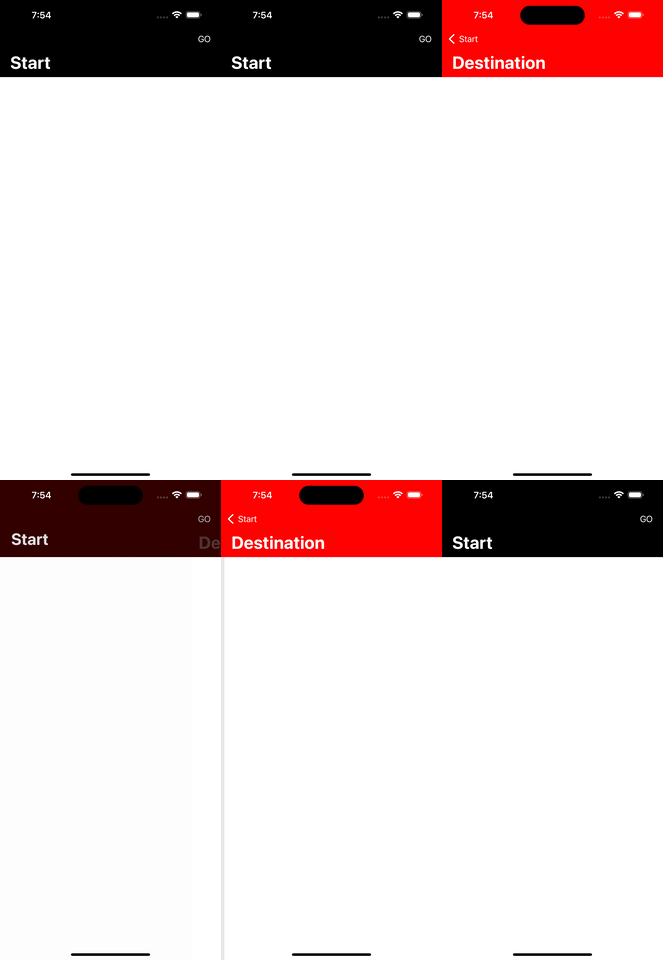
configureNavigationBar(largeTitleColor: .black, backgoundColor: .white, tintColor: .black, title: "yourTitle", preferredLargeTitle: true)在您的示例中,在开始控制器的configureNavigationBar viewWillAppear中调用configureNavigationBar func,在目标控制器的viewDidLoad中调用configureNavigationBar.ES:在SceneDelegate中,将启动控制器设置为场景功能:
func scene(_ scene: UIScene, willConnectTo session: UISceneSession, options connectionOptions: UIScene.ConnectionOptions) {
    guard let windowScene = (scene as? UIWindowScene) else { return }
    window = UIWindow(windowScene: windowScene)
    window?.makeKeyAndVisible()
    let controller = UINavigationController(rootViewController: StartController())
    window?.rootViewController = controller
    if #available(iOS 13, *) {
        window?.overrideUserInterfaceStyle = .dark
    }
}
这是StartController:
import UIKit

class StartController: UIViewController {

override func viewDidLoad() {
    super.viewDidLoad()

    view.backgroundColor = .white
    navigationItem.rightBarButtonItem = UIBarButtonItem(title: "GO", style: .plain, target: self, action: #selector(handleGo))
}

override func viewWillAppear(_ animated: Bool) {
    super.viewWillAppear(animated)
    configureNavigationBar(largeTitleColor: .white, backgoundColor: .black, tintColor: .white, title: "Start", preferredLargeTitle: true)
}

@objc fileprivate func handleGo() {
    let controller = DestinationController()
    navigationController?.pushViewController(controller, animated: true)
 }
}
这是DestinationController:
import UIKit

class DestinationController: UIViewController {

override func viewDidLoad() {
    super.viewDidLoad()

    view.backgroundColor = .white
    configureNavigationBar(largeTitleColor: .white, backgoundColor: .red, tintColor: .white, title: "Destination", preferredLargeTitle: true)
 }
}
结果:
https://stackoverflow.com/questions/73807082
复制相似问题
腾讯云开发者

Copyright © 2013 - 2026 Tencent Cloud. All Rights Reserved. 腾讯云 版权所有
深圳市腾讯计算机系统有限公司 ICP备案/许可证号:粤B2-20090059  粤公网安备44030502008569号
腾讯云计算(北京)有限责任公司 京ICP证150476号 | 京ICP备11018762号