
当使用ShellRoute和GoRouter 5.0在选项卡之间切换时,如何返回嵌套路由?
我正在尝试在ShellRoute 5.0中使用嵌套导航。
如下面的示例所示,当单击产品时,我可以正确地导航到(嵌套)产品页面。
但是,如果切换到cart选项卡并返回到products,就会回到(root) products页面,而不是(嵌套的)产品页面:
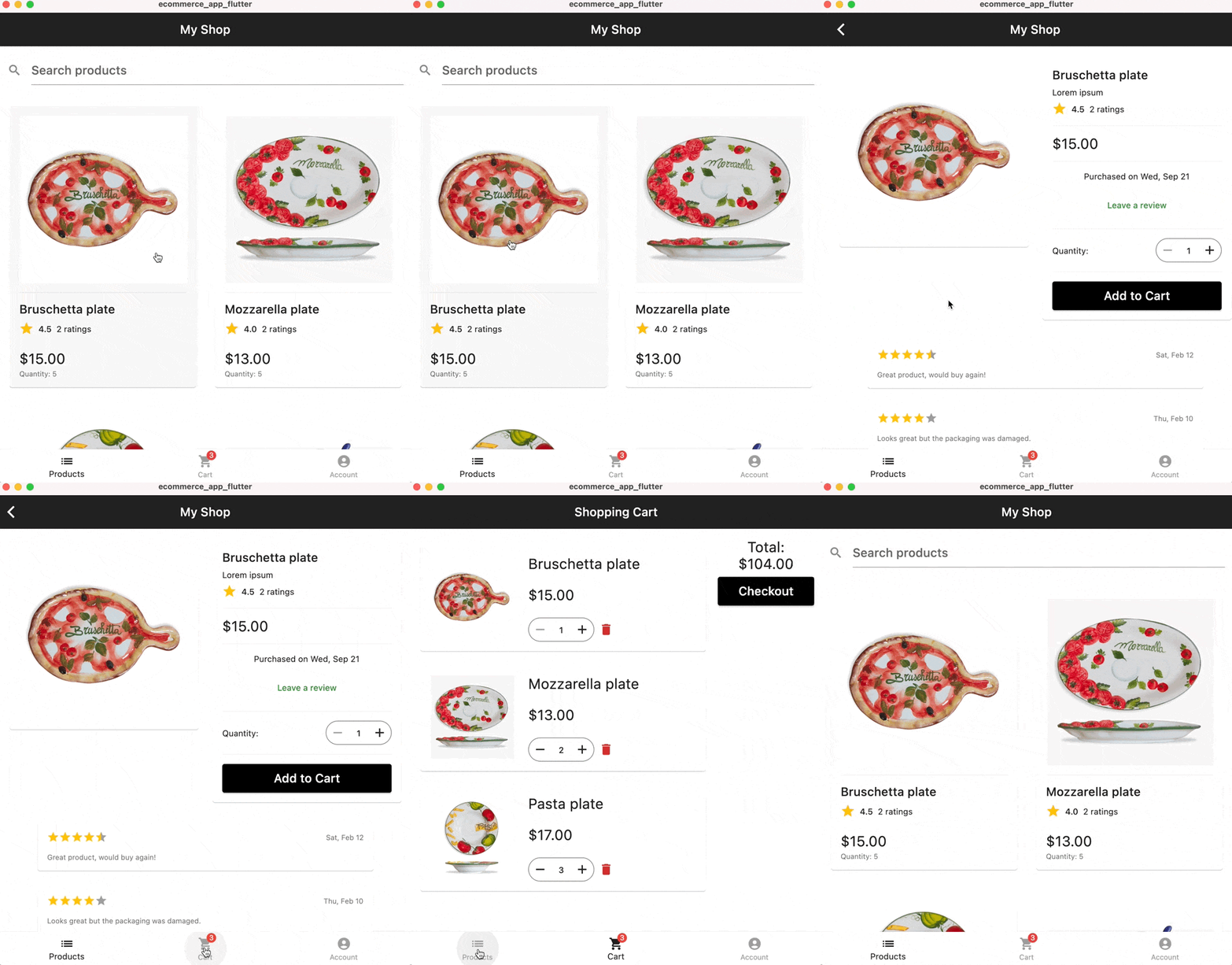
我就是这样设置路由器的:
enum AppRoute {
  products,
  product,
  cart,
  account,
}

final goRouter = GoRouter(
    initialLocation: '/products',
    navigatorKey: _rootNavigatorKey,
    debugLogDiagnostics: true,
    routes: [
      ShellRoute(
        navigatorKey: _shellNavigatorKey,
        builder: (context, state, child) {
          return ScaffoldWithBottomNavBar(child: child);
        },
        routes: [
          // Products
          GoRoute(
            path: '/products',
            name: AppRoute.products.name,
            redirect: (context, state) {
              print(state.toString());
              return null;
            },
            pageBuilder: (context, state) => NoTransitionPage(
              key: state.pageKey,
              restorationId: state.pageKey.value,
              child: const ProductsListScreen(),
            ),
            routes: [
              GoRoute(
                path: ':id',
                name: AppRoute.product.name,
                pageBuilder: (context, state) {
                  final productId = state.params['id']!;
                  // TODO: Cupertino slide transition
                  return MaterialPage(
                    key: state.pageKey,
                    restorationId: state.pageKey.value,
                    child: ProductScreen(productId: productId),
                  );
                },
              ),
            ],
          ),
          // Shopping Cart
          GoRoute(
            path: '/cart',
            name: AppRoute.cart.name,
            pageBuilder: (context, state) => NoTransitionPage(
              key: state.pageKey,
              child: const ShoppingCartScreen(),
            ),
          ),
          // Account page
          GoRoute(
            path: '/account',
            name: AppRoute.account.name,
            pageBuilder: (context, state) => NoTransitionPage(
              key: state.pageKey,
              child: const AccountScreen(),
            ),
          ),
        ],
      ),
    ],
);这是build小部件的ScaffoldWithBottomNavBar方法:
@override
  Widget build(BuildContext context) {
    return Scaffold(
      body: widget.child,
      bottomNavigationBar: BottomNavigationBar(
        type: BottomNavigationBarType.fixed,
        unselectedItemColor: Colors.grey,
        selectedItemColor: Colors.black87,
        currentIndex: _selectedIndex,
        items: [
          BottomNavigationBarItem(
            icon: const Icon(
              Icons.list,
            ),
            label: 'Products'.hardcoded,
          ),
          BottomNavigationBarItem(
            icon: const ShoppingCartIcon(),
            label: 'Cart'.hardcoded,
          ),
          BottomNavigationBarItem(
            icon: const Icon(
              Icons.account_circle,
            ),
            label: 'Account'.hardcoded,
          ),
        ],
        onTap: (index) => _tap(context, index),
      ),
    );
  }
在选项卡按钮回调中,我执行以下操作:
  void _tap(BuildContext context, int index) {
    setState(() => _selectedIndex = index); // used for the highlighted state
    // navigate to the target route based on the tab index
    if (index == 0) {
      context.goNamed(AppRoute.products.name);
    } else if (index == 1) {
      context.goNamed(AppRoute.cart.name);
    } else if (index == 2) {
      context.goNamed(AppRoute.account.name);
    }
}我理解为什么不工作,因为我告诉GoRouter到、go到ShellRoute中的每个(根)路由。
理想情况下,我希望通过索引切换到特定的选项卡,并让GoRouter“记住”它是否位于嵌套或顶级路由上。
注意,与TabBar__不同,BottomNavigationBar to not有一个控制器,我可以使用它来切换索引。
GoRouter 5.0是新的,没有太多的文档或示例显示这些常见的用例。
有人知道怎么处理这个吗?
注意:我的想法之一是将选定的产品ID存储在某个应用程序状态中,并在/products路由内的一个/products函数中使用它,但是,知道在哪里将该状态重置为null__变得非常复杂,而且我对NavigationObserver的实验没有产生预期的结果。
编辑
根据本期
当你在它们之间航行时,没有自动的方法让你的路线记住它们的内部状态。
所以看起来这看起来还不受支持。
更多信息在这里:
回答 1
Stack Overflow用户
发布于 2022-09-21 18:15:49
可悲的是,这是一个缺失的部分,使它成为完美的路由器。正如您注意到的,这是要跟踪的问题,并且团队已经在上面了:https://github.com/flutter/flutter/issues/99124。
https://stackoverflow.com/questions/73798174
复制相似问题
腾讯云开发者

Copyright © 2013 - 2026 Tencent Cloud. All Rights Reserved. 腾讯云 版权所有
深圳市腾讯计算机系统有限公司 ICP备案/许可证号:粤B2-20090059  粤公网安备44030502008569号
腾讯云计算(北京)有限责任公司 京ICP证150476号 | 京ICP备11018762号