
如何删除这些空行
如何删除这些空行
提问于 2022-09-19 19:51:41
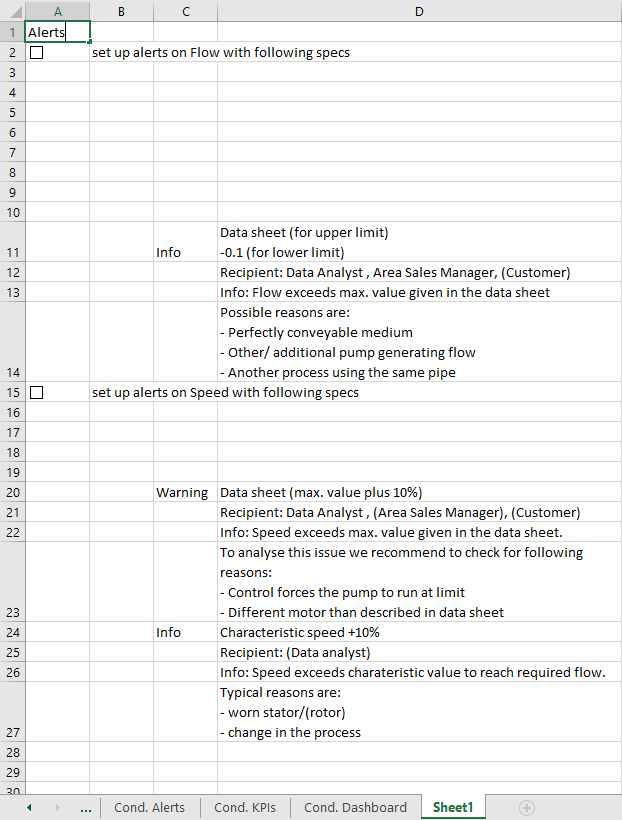
我想删除空行,比如3-10和16-19.我尝试了以下代码,但它也删除了行1、2和15。
Dim s1 as worksheet
Dim LastRow As Long

Set s1 = ThisWorkbook.Worksheets(9)

LastRow = s1.Range("D" & s1.Rows.Count).End(xlUp).Row
With s1.Range("D2:D" & LastRow)
    If WorksheetFunction.CountBlank(.Cells) > 0 Then
        .SpecialCells(xlCellTypeBlanks).EntireRow.Delete
    End If
End With回答 3
Stack Overflow用户
回答已采纳
发布于 2022-09-19 21:03:41
看一看@cybernetic.nomads的评论,以及我刚刚做了一个快速的事实,将会有一个更好的方法来做到这一点。
如果要删除所有空行,则(可能)需要一个循环。
删除一行时,代码需要考虑行号的更改(删除第1行,现在第2行实际上是第1行)。您可以通过向后循环,或者重新尝试当前行,直到所有空行都消失,然后增加行号(如我的示例)。
Sub main()
Dim Sheet As Worksheet: Set Sheet = ThisWorkbook.Worksheets("Sheet1")
Dim Row As Integer: Row = 2 ' start row
Do
    If Row > Sheet.Range("D" & Sheet.Rows.Count).End(xlUp).Row Then ' break out once you've gotten to the end
        Exit Do
    End If

    If Application.WorksheetFunction.CountA(Sheet.Rows(Row)) = 0 Then ' check if the row is empty
        Sheet.Rows(Row).Delete xlShiftUp ' delete the row and shift up
    Else
        Row = Row + 1 ' row was not empty, move on to the next row
    End If
Loop
End SubStack Overflow用户
发布于 2022-09-19 21:05:27
您的代码只检查D列,并在那里删除空白。第1、2和15行的案文载于A和B栏。
也许你可以在你的代码中使用这个扭曲?
删除
- 时,使用
i检查单行
代码
Dim s1 As Worksheet
Dim LastRow As Long
Dim i As Long

Set s1 = ThisWorkbook.Worksheets(9)

LastRow = s1.Range("D" & s1.Rows.Count).End(xlUp).Row
If WorksheetFunction.CountBlank(s1.Range("A2:D" & LastRow).Cells) > 0 Then
    For i = 1 To LastRow - 2: '-2 means: row 2 will be checked last. Use '-1' to check row 1 as well
        If WorksheetFunction.CountBlank(Range(Cells(LastRow - i, 1), Cells(LastRow - i, 4))) = 4 Then
            Rows(LastRow - i).Delete
        End If
    Next i
End If
注意:如果您没有处理许多行,则可以考虑使用整数而不是长。
Stack Overflow用户
发布于 2022-09-19 21:55:40
一个简单的解决方案是检查最后一列以维护整个空行。
lastline = s1.Cells(Rows.Count, 4).End(xlUp).Row
i = lastline
While (i > 0)
    If (s1.Cells(i, Columns.Count).End(xlToLeft).Column = 1 And s1.Cells(i, 1).Value = "") Then
        s1.Rows(i).EntireRow.Delete
    End If
    i = i - 1
Wend注意,循环是向后的,因为(i)删除一行重新索引所有其他的下一步和(ii)经典的条件(for i = 1 to lastline)只检查一次)。
页面原文内容由Stack Overflow提供。腾讯云小微IT领域专用引擎提供翻译支持
原文链接:
https://stackoverflow.com/questions/73778597
复制相关文章
相似问题
腾讯云开发者

Copyright © 2013 - 2026 Tencent Cloud. All Rights Reserved. 腾讯云 版权所有
深圳市腾讯计算机系统有限公司 ICP备案/许可证号:粤B2-20090059  粤公网安备44030502008569号
腾讯云计算(北京)有限责任公司 京ICP证150476号 | 京ICP备11018762号