
Woocommerce只显示具有一定元值产品的类别。
我正在我的Woocommerce商店开发b2b部分。我成功地筛选了woocommerce_product_query_meta_query,使其只显示已为b2b部分为b2b用户启用的产品。
但是,我无法找到一种方法来隐藏Woocommerce类别小部件中显示0结果的产品类别(因为没有为b2b部分启用的产品在该类别中)。
我正在考虑重写默认Woocommerce小部件代码,并为每个类别(和子类别)运行wp查询,该查询返回此类别中为b2b启用的产品数量。但是,由于产品和种类很多,这似乎是非常低效的。
是否有一种方法可以对“空”的Woocommerce类别小部件隐藏类别(在此类别中没有为b2b启用任何产品)?
谢谢你的建议。
编辑
为了澄清我的问题:下面是用于筛选产品查询的函数,仅显示将_eda_display_in_b2b元设置为yes的产品。
function show_only_b2b_products( $meta_query, $query ) {
    if ( is_admin() || ! is_user_logged_in() || ! is_b2b_user() ) {
        return $meta_query;
    }

    $meta_query[] = array(
        'key'     => '_eda_display_in_b2b',
        'value'   => 'yes',
        'compare' => '='
    );

    return $meta_query;
}

add_filter( 'woocommerce_product_query_meta_query', 'show_only_b2b_products', 10, 2 );例:https://klon.vozikyprozivot.cz/kategorie-produktu/pridavne-pohony/
对于常规客户,此类别不是空的,也不是登录用户的。但对于b2b客户来说,没有产品可供展示。因此,我需要对b2b客户的小部件隐藏这个类别。
回答 2
Stack Overflow用户
发布于 2022-09-20 15:18:45
在Harshit Vaid的大力帮助下,我设法解决了这个问题:
add_filter( 'woocommerce_product_categories_widget_dropdown_args', 'eda_exclude_wc_widget_categories' );
add_filter( 'woocommerce_product_categories_widget_args', 'eda_exclude_wc_widget_categories' );

function eda_exclude_wc_widget_categories( $cat_args ) {

    $args = array(
        'taxonomy'   => 'product_cat',
        'hide_empty' => 0
    );

    $all_categories        = get_categories( $args );
    $category_exclude_list = array();

    foreach ( $all_categories as $cat ) {
        if ( $cat->category_parent == 0 ) {
            $category_id = $cat->term_id;

            $product_args = array(
                'posts_per_page' => - 1,
                'post_type'      => 'product',
                'tax_query'      => array(
                    array(
                        'taxonomy' => 'product_cat',
                        'terms'    => $category_id,
                        'field'    => 'term_id',
                        'operator' => 'IN'
                    )
                ),
                'meta_query'     => array(
                    array(
                        'key'   => '_eda_display_in_b2b',
                        'value' => 'yes'
                    )
                )
            );

            $query = new WP_Query( $product_args );
            $count = $query->post_count;

            if ( $count == 0 ) {
                array_push( $category_exclude_list, $category_id );
            }
        }
    }

    $cat_args['exclude'] = $category_exclude_list;

    return $cat_args;
}Stack Overflow用户
发布于 2022-09-16 04:56:17
如果您指的是产品类别小部件,则有一个隐藏空类别的设置:
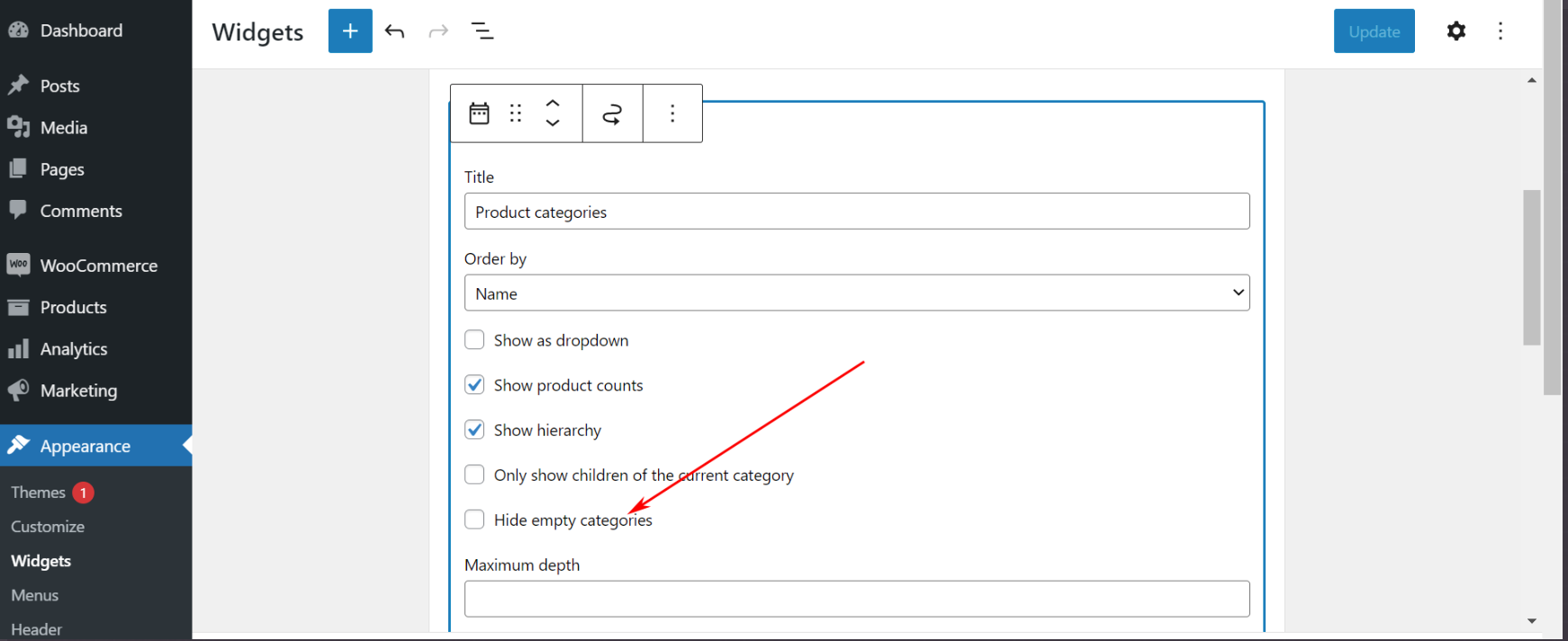
如果您指的是不同的内容,请您共享一个示例页面URL以及您的站点的系统状态?您可以通过WooCommerce > Status找到它。选择“获取系统报告”,然后选择“复制用于支持”。一旦你这样做了,粘贴在这里在你的回应。
希望这能帮到你。
======Edit======
我认为对于上述问题,您可以使用wc类别挂钩并删除该类别。请检查下面的代码
        //* Used when the widget is displayed as a dropdown
    add_filter( 'woocommerce_product_categories_widget_dropdown_args', 'rv_exclude_wc_widget_categories' );
    //* Used when the widget is displayed as a list
    add_filter( 'woocommerce_product_categories_widget_args', 'rv_exclude_wc_widget_categories' );
    function rv_exclude_wc_widget_categories( $cat_args ) {
    //add the logic to check the category have product or not and make the array of ID and replace the below array with that.
        $cat_args['exclude'] = array('55','68'); // Insert the product category IDs you wish to exclude
        return $cat_args;
    }
在上面的代码中,我认为您可以创建逻辑,检查类别是否有产品,并为非产品类别创建id数组。
通过这种方式,可以将类别从列表和下拉列表中排除在外。
这对你有多大帮助。
https://stackoverflow.com/questions/73730782
复制相似问题
腾讯云开发者

Copyright © 2013 - 2026 Tencent Cloud. All Rights Reserved. 腾讯云 版权所有
深圳市腾讯计算机系统有限公司 ICP备案/许可证号:粤B2-20090059  粤公网安备44030502008569号
腾讯云计算(北京)有限责任公司 京ICP证150476号 | 京ICP备11018762号